


Known Participant
February 10, 2016
解決済み

Trying to download ebook to Digital Editions but its going to Acrobat Reader DC.

  • February 10, 2016
  • 返信数 2.
  • 1193 ビュー

I've been using Kobo for years now and every single time there is an update by Adobe I waste a hell of a lot time trying to make Digital Editions work again.

This time around - I download the ebook and instead of going to Digital Editions , Acrobat Reader DC opens and I get the following message
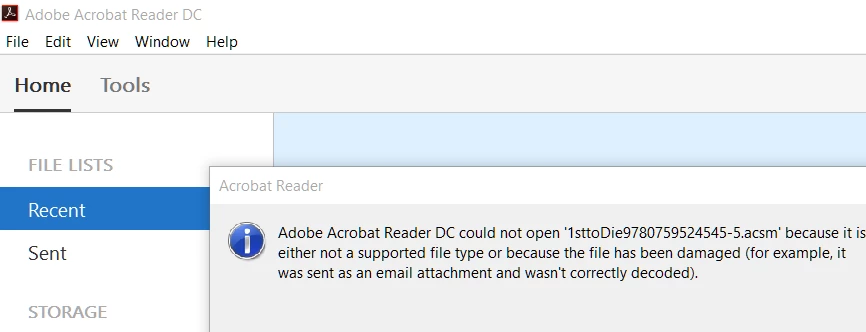
Of course it won't open - damn it!!!   I can't see how I can get it to open and load into Digital Editions.

Any ideas - anyone?!

I thinking very bad thoughts about Adobe right now!

    このトピックへの返信は締め切られました。
    解決に役立った回答 RogerOsborn

    It sounds like your "association" of .acsm files with ADE has been lost.  In windows 7 Click Start then Default Programs then Associate a file type or protocol with a program.  select acsm and change the default program to ADE.

    返信数 2

    Participant
    October 15, 2018

    I can't figure out how to do those instructions for Window 10.  Is there a secret?

    Nanaky
    Participating Frequently
    February 10, 2016

    Open Digital Edition.
    Go to File > Add to Library and choose the eBook.

    puchala作成者
    Known Participant
    February 10, 2016

    Tried Nanaky - but I can't download into Digital Edition directly from the website. 

    I would have to download from the internet and it won't let me it because it is a .acsm file

    So this is no help

    RogerOsborn解決!
    Inspiring
    February 10, 2016

    It sounds like your "association" of .acsm files with ADE has been lost.  In windows 7 Click Start then Default Programs then Associate a file type or protocol with a program.  select acsm and change the default program to ADE.