


Participant
July 26, 2019
Question

Unable to download

  • July 26, 2019
  • 1 reply
  • 271 views

Jag får följande meddelande när jag försöker låna en e-bok på biblan i Båstad:
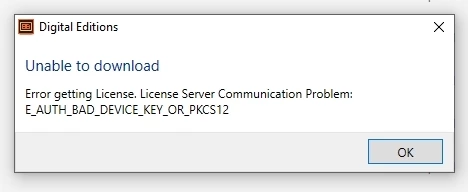
Jag får också veta att jag saknar behörighet att ladda ner boken till min dator.

Jag fattar ingenting! Har tidigare lånat massor av e-böcker utan trassel.

På inrådan från biblioteket har jag avinstallerat Adobe Digital Edition,

och därefter åter laddat ner det, men det hjälpte inte.

This topic has been closed for replies.

1 reply

Nanaky
Participating Frequently
July 26, 2019

Windows:

    Close all applications.
    Press WINDOWS + R.
    In the Open text box, type regedit and then press Enter. The Registry Editor opens.
    In the left pane of the Registry Editor, locate the following registry key: HKEY_CURRENT_USER\Software\Adobe\Adept
    Remove the Adept Folder.
    In the Confirm Key Delete dialog, click OK.
    Close the Registry Editor.
    Open Adobe Digital Editions and reauthorize..

Macintosh:

    quit Adobe Digital Editions.
    Navigate to /Users/Library/Application Support/Adobe/Digital Editions and drag the activation.dat file to the trash.
    If you are using 10.7, see https://helpx.adobe.com/x-productkb/global/access-hidden-user-library-files.html
    Open Adobe Digital Editions and reauthorize.

Participant
July 29, 2019

Thank you! Now everything is OK.