


Participant
March 21, 2016
Question

While authorizing new ADE installation: Activation Server Error E_ADEPT_REQUEST_EXPIRED

  • March 21, 2016
  • 1 reply
  • 318 views

New Windows 10 installation, new ADE 4.5.1 installation.

Bought book from my local bookseller's website, downloaded URLLink.acsm

Opened ADE, dragged URLLink.acsm on ADE window.

Dialog Box "Computer Authorization" pops up.

Enter credentials that work for the Adobe ID web portal and press "Authorize"

The following error message appears:
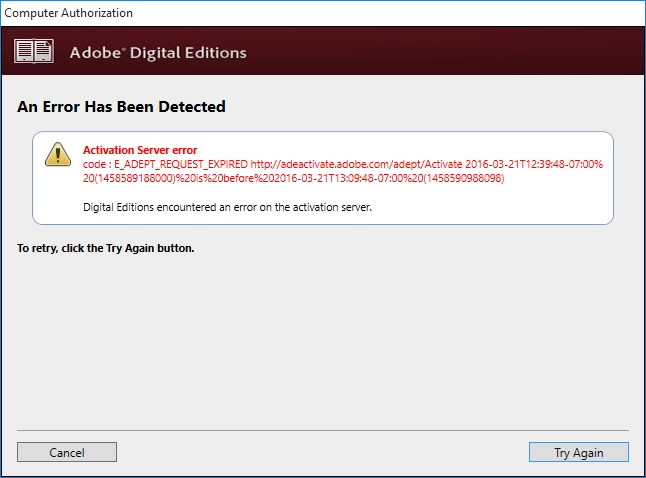
Please advise how I can use ADE to open the book I have purchased.

    1 reply

    JerryP64Author
    Participant
    March 21, 2016

    Ok, I found the cause of the problem: a wrong system time in my windows installation caused the problem. Windows has been using the wrong time (1 hour off) despite having "set time automatically" enabled and having the correct time zone set. Manually setting the correct time fixed the problem. Kudos to the Adobe knowlegebase for the correct answer ( Lösung für den Fehler: REQUEST_EXPIRED in Digital Editions ), maybe it would be helpful to add this information to the database for the support chat.

    Participant
    August 26, 2020

    This was it (or rather the opposite) after trying off and on for well over a year!

    The time and date was correct on my computer but they were not set automatically (the automatic time and date settings were causing problems with something else way back)

    I can finally retire my ancient laptop that I have to drag out whenever I needed to use adobe digital editions (I must learn to stop buying ebooks from google play store).

    I should probably mention I'd been getting the error message for adobe digital editions 3.0 and 4.5 which is the latest downloadable version at time of typing.