
Participant
August 1, 2014
Question

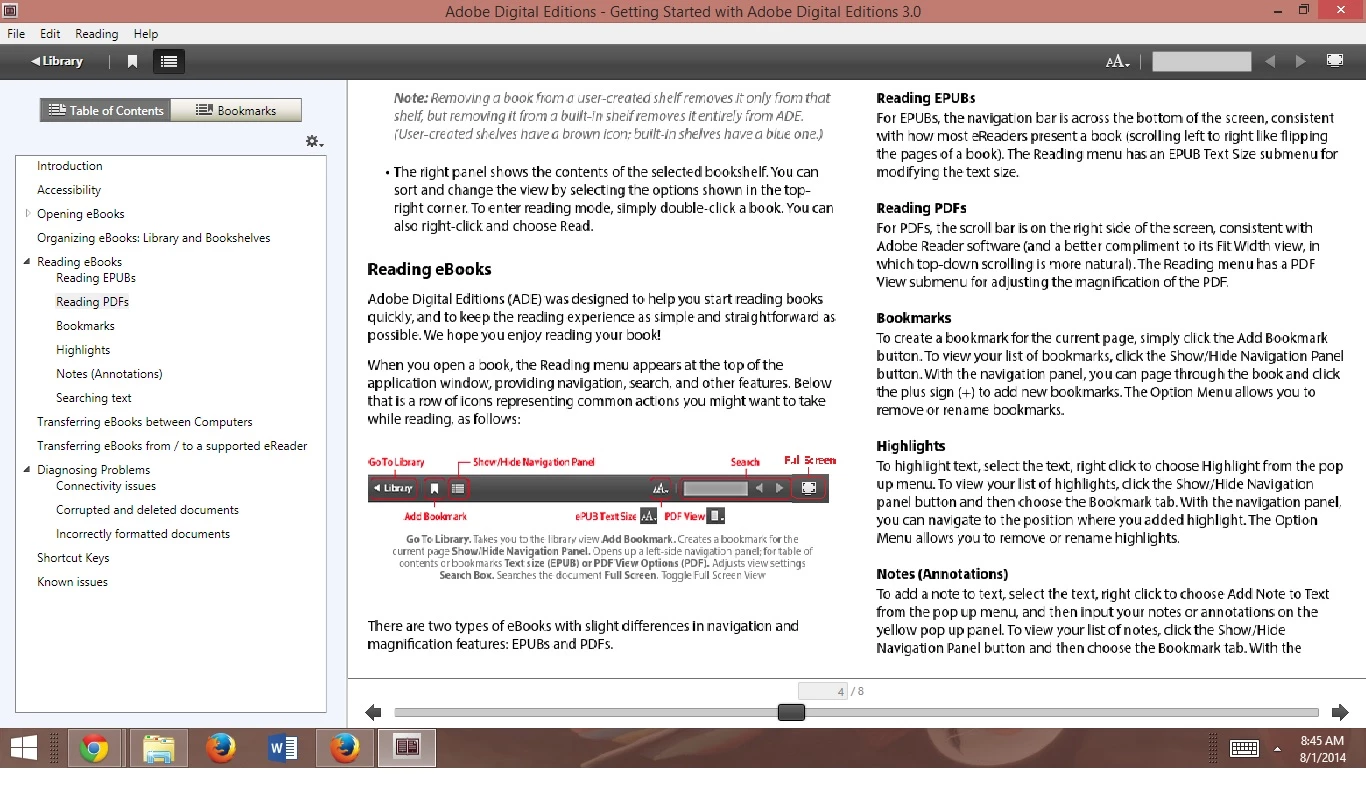
Why is text & image distorted, pixelated, illegible?

  • August 1, 2014
  • 2 replies
  • 1415 views

I'm providing a screen shot to demonstrate precisely what I look at when I use Adobe Digital Editions, the window here maximized, and the text impossible to read.

If I re-size the ADE window to an arbitrarily correct dimension--for example 1151x716--the text is clear.

It is like this for every file.  (As though it were reading images rather than text.)

Any other experiences of this nature?  Any Solutions?  Or should I switch to another reader?
This topic has been closed for replies.

2 replies

Participant
August 2, 2023

Hi. I am refering to text, not image. 

I have discovered that I need to set Display -> Scale to 100. 

Though the texts are small to my eyes but ADE displays the text nicely.

Thank you.

Participant
October 14, 2021

Hello IpsisSilemus,

I am now encountering precisely the same issue in Adobe Digital Editions version 4.5.11.187303. (I note your post was seven years ago.)

In my case, I noticed the issue occurred when I opened a new chapter of an e-book. I had been reading books in the current edition for several weeks without any problem. Then, suddenly, the reader began to produce only distorted font views on texts which were working well before.

I plan to uninstall and reinstall the software, but I am concerned that my highlighting and notes will be erased. Can someone confirm the best process to use for handling this issue?

Thanks, 


Participant
October 14, 2021

Update: As I kept playing with the reader, I noticed that the font "reset" to a standard, legible form when I changed the dimensions of the bookmarks panel. If you ever encounter this issue, just trying to resize the bookmark panel should do the trick!