


adair_ing_design
Participating Frequently
October 15, 2018
Answered

Dimension is freezing on the splash screen

  • October 15, 2018
  • 30 replies
  • 12895 views

Adobe Dimensions will not load past the splash screen (attached screenshot). It used to load and run just fine, but hasn't for the last two updates including todays major update. Any ideas on what i can do to solve the issue? I can provide what ever information needed to diagnose the issue. Thanks in advance!
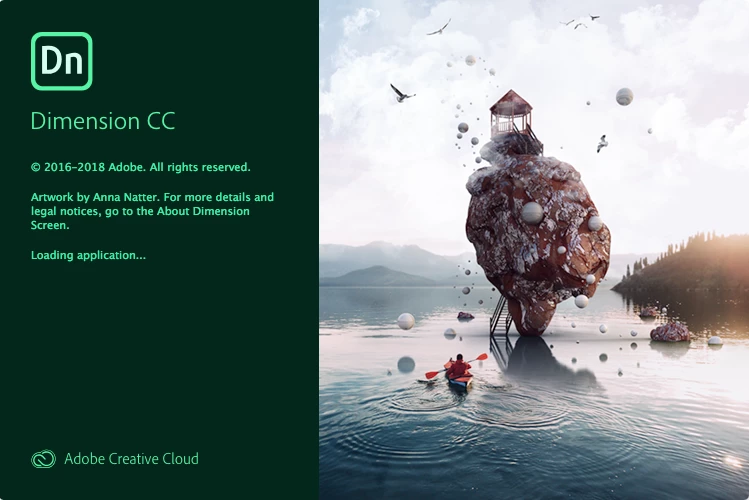

This topic has been closed for replies.
Correct answer JeanetteMathews

Hey guys!  Just wanted to let you know we're investigating this.  Can you let me know if you're on older Macs?  Seems like it might be all 2010 Mac machines.  If any of you are on newer Macs (can find in the Apple > About this mac... menu) that'd be a great data point for us.

30 replies

richil
Inspiring
November 24, 2018

I have the same issue as others with Dimension...

nothing after the start-up screen.

Mac Pro

3.2 GHz 6-Core Intel Xeon

32GB RAM

Radeon RX580

Mojave 10.14.1

First Muse, now Dimension?

Come on Adobe, all us Mac Pro folk need apps to work

on these machines...

Dimension, so near, yet so far. 

peace.

Participant
November 15, 2018

Same problem here:

Mac Pro 2010 3,33 GHz 6-Core Intel Xeon

MacOS 10.13.6

AMD Radeon RX580

32GB ram

Force quitting the Adobe Dimension CC Helper will get you to the welcome screen but that is frozen as well

decoderltd
Participating Frequently
November 9, 2018

Same problem here:

  • Mac Pro (Mid 2010/5,1) running High Sierra 10.13.6
  • Processor: 2 x 2.4 GHz Quad-Core Intel Xeon
  • Memory: 32 GB 1066 MHz DDR3
  • Graphics: ATI Radeon HD 5770 1024 MB

Would love to get it working.

Participant
November 5, 2018

I am so disappointed in Adobe's decision to make the new Dimensions software only work if you have a CPU with AVX coding on it. This decision will keep all us Mac Pro user from being able to upgrade to the new dimensions.  I can't find a replacement CPU with coding that will work on Mac Pros and I really like the ease of working with Dimensions for product sampling for my clients. 

The new Dimensions does work on my MacBook Pro but what takes my Mac Pro 5 mins to render takes an hour on the MacBook Pro.

SO DISAPPOINTED!!!

Mac Pro user if you know of CPU that has AVX coding, please let me know I've got Hackintosh Pro 2010.

Maybe I'm wrong on why it is not working, and someone has solved this, but that is what adobe's support told me.

JeanetteMathews
Adobe Employee
JeanetteMathewsCorrect answer
Adobe Employee
November 3, 2018

Hey guys!  Just wanted to let you know we're investigating this.  Can you let me know if you're on older Macs?  Seems like it might be all 2010 Mac machines.  If any of you are on newer Macs (can find in the Apple > About this mac... menu) that'd be a great data point for us.

Participating Frequently
November 3, 2018

Hi Jeanette

I am on a 2012

Mac 5.1 - 2012

2 times Xeon 3.46

64 MB RAM

GTX 980 Nvidia

The V 1.1.1. works fine in HIHG SIERRA

Thomas Bachor
Known Participant
November 2, 2018

The same problem with the latest Dimension CC 2.0 release couple of days ago
After launch the icon it freezes on start up screen.

Mac Pro 5.1 2010Intel Xeon 6 Core 3.33 GHZ
48 GB RAM 133MHZ
ATI RADEON RX 580X 8GB

OS: macOS Sierra

Participating Frequently
October 28, 2018

Same issue! Have downgraded to version before and works fine.

High Sierra 10.13.6

Mac Pro 5.1

2 x 3.46Ghz 6 core

64gb ram

Nvidia gtx 980 4gb

Raphoto1
Participant
October 27, 2018

Same issue here, it shows the screen and nothing more happens, checking the monitor it shows as its working but not interface is showed

Mac os high sierra

macpro 4,1

2x 2,26 quad core

36gb ram

nvidia gforce gtx 1060 6gb

Thanks in advance!!!!

JeanetteMathews
Adobe Employee
Adobe Employee
October 18, 2018

It may be something with the new rendering engine, as that was the only major change in the application.  Thank you for letting me know about the issue!  If you can please give me your full hardware information that would be most helpful in us trying to reproduce the issue:

System Info

- Application Version (Can be located in the About screen)

- OS/Version

- Processor

- Memory/RAM

- Graphics Card/VRAM

adair_ing_design
Participating Frequently
October 18, 2018

The application version is the latest version. Everything is updated via the cloud. I can't get to the about screen because the app won't open...

I'm running a pretty old system so that might have something to do with it.
OS - macOS High Sierra

Processor - 2 x 3.33 GHz 6-Core Intel Xeon

Memory - 24 GB 1066 MHz DDR3

Graphics Card - ATI Radeon HD 5870 1024 MB

JeanetteMathews
Adobe Employee
Adobe Employee
October 18, 2018

Thank you for the information!  Forwarding this to the engineers!

Participant
October 17, 2018

I have a mid 2010 Mac pro running Mojave. Version 1.1.1 runs, but not the newest version. I assume the processor doesn't meet the 2011 cutoff for Xeons, but it didn't before either, and the program ran fine for me, maybe because I exceeded all other system requirements. I checked the Activity monitor while Dimension was frozen on the startup screen, and it looks like two "helper" applications, plus multiple versions of the app were trying to load, each using memory.