Participant
July 24, 2014
Answered

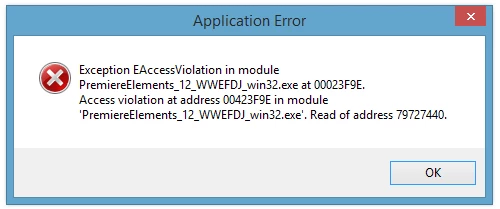
1. Paid, 2. Downloaded (Premier Elements 12), 3. Click to install but its says I don't have write priviligies?

  • July 24, 2014
  • 1 reply
  • 262 views

Download all the files that were given to me and have clicked to run/install them but am faced with the screens:
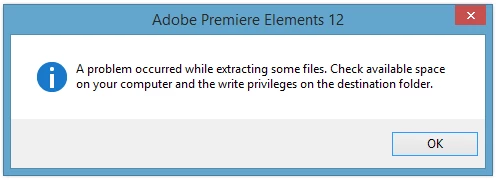
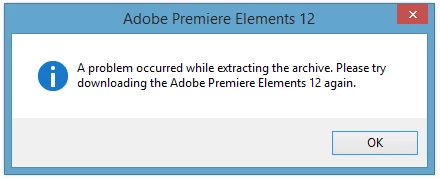
Can anyone help:

This is the first time I have encountered such a difficulty in attempting to install such a software application.

This topic has been closed for replies.
Correct answer Ratandeep Arora

Hi Mjamesno,

Please follow the link: Adobe Photoshop Elements 12 Direct Download Links, Premiere too | ProDesignTools and re download the software. Also please try any use any other extractor to extract the 7z file.

Note: Please follow a very important instruction given on the website.

Let me know if it works or not work.

Thanks,

Ratandeep Arora

1 reply

mjamesnoAuthor
Participant
July 24, 2014

Before asked:

My OS is Windows 8.1

x64 bit processor, with 2TB of memory...

thks - in advance

Ratandeep Arora
Ratandeep AroraCorrect answer
Participating Frequently
July 24, 2014

Hi Mjamesno,

Please follow the link: Adobe Photoshop Elements 12 Direct Download Links, Premiere too | ProDesignTools and re download the software. Also please try any use any other extractor to extract the 7z file.

Note: Please follow a very important instruction given on the website.

Let me know if it works or not work.

Thanks,

Ratandeep Arora

mjamesnoAuthor
Participant
July 24, 2014

Hi Ratandeep

Yes, thanks -

these links worked, I downloaded, installed and opened the software to test. So everything okay so far...

Still, why did I get that message in the first place? Why would I have to download files from another source other than the official adobe site to get my purchased software working?

Thanks

Mark