


November 20, 2017
Answered

22.0.1: Crash Report Service Stopped Working

  • November 20, 2017
  • 20 replies
  • 31293 views

Hi,

I can be very short about this one.

I updated last week to the, let's call it, bug-fixing version of 22.0.1.

Now every time I start Illustrator, I get the below error.

I tried:

- Clearing all preferences

I'm working on:
- Windows 10, Precision 5520, Quadro M1200
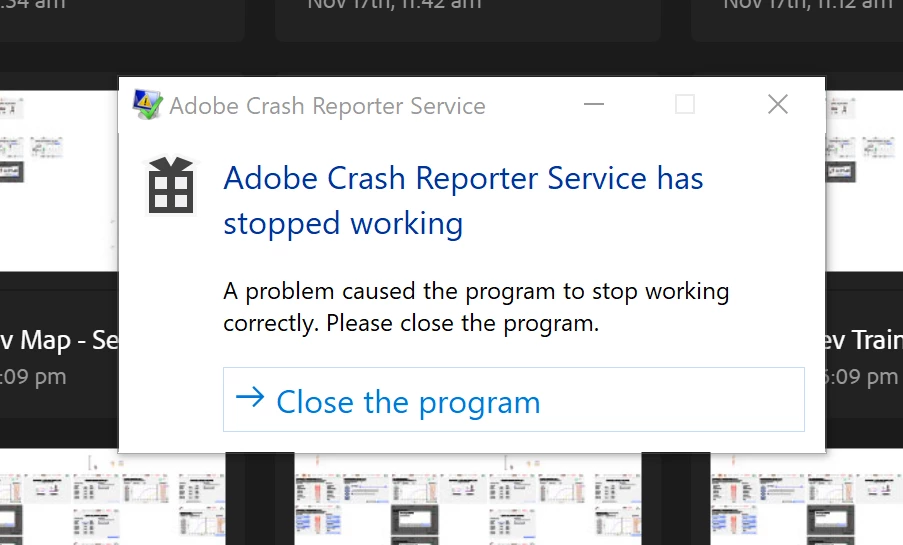
Message was edited by: Moderator (Discussion successfully moved from Illustrator to Adobe Creative Cloud) Because it affects all Adobe software.

Message was edited by: Moderator. Once Again this is being move back to a more appropriate forum. (Discussion successfully moved from Illustrator to Adobe Creative Cloud)

This topic has been closed for replies.
Correct answer Todd Shaner

A bug report has been entered for this issue on the Photoshop Family forum. Please add your 'Me To' vote and 'Follow' at the below link. This is the best way to get Adobe's attention–Thank you.

Adobe Crash Reporter Service has stopped working | Photoshop Family Customer Community

20 replies

Participant
September 28, 2021

제가 해결한 방법은 충돌이 일어나는 모든 어도비 프로그램에서 CRWindowsClientService를 제거한 후,상위 문서에 한개의 CRWindowsClientService파일만 이동시켰습니다. 이후 특별한 이벤트없이 정상 작동하고 있습니다.

Kanikas
Community Manager
Community Manager
December 13, 2017

Moving to Illustrator

Y.J.Malmsteen
Participant
December 11, 2017

Issue is just solved by itself for me. I didn't change anything for CRWindowsClientServices.exe by the way.

albertj358
Participating Frequently
December 11, 2017

I can confirm that it's now working as well for me. Both Lightroom and Photoshop start without the crash in CRWindowsClientServices.exe after putting it back in place.

Just Shoot Me
Legend
December 11, 2017

Thanks for the updates.

Personally I'm leaving those files where they are, IE out of the program folder. I don't see a reason to put them back. All software is running OK with them where they are.

The less things that Phones Home from my computer the better I feel.

Participant
December 11, 2017

I hat the same Problem with a German Version of Photoshop and Ligthroom

I had the folder : Absturzprotokolle

C:\Users\xxxuser\AppData\Roaming\Adobe\Adobe Photoshop CC 2018\Adobe Photoshop CC 2018 Settings\Absturzprotokolle

I made a new folder: Crashlog

C:\Users\xxxuser\AppData\Roaming\Adobe\Adobe Photoshop CC 2018\Adobe Photoshop CC 2018 Settings\Crashlog

after that, it works with Photoshop amd with Lightroom

regards
Toni

Sorry

My operating system
Windows 7 Basic 64-Bit

LHClub
Participating Frequently
December 10, 2017

You can do the following:

Open the folder with the application file cr_win_client_config.cfg

with help ";" comment the line

; crcnUrl = crlog-crcn.adobe.com

and save.

Most likely, the error occurs because there is no connection with the address crlog-crcn.adobe.com

Just Shoot Me
Legend
December 10, 2017

I just pinged that address and got no response.

Also tried this web address https://apip.adobe.com/headlights/FileDataCaptureServlet

And it resolves to the same IP and got not response. So that server, IP is down or rejects pings.

polv94433952
Participant
December 10, 2017

I have removed the CRWindowsClientService.exe file and now everything works back as it should. But does anyone know what this CRWindowsClientService.exe serves for, can you just delete it? Will nobody from Adobe respond to this? We still pay for a good answer. Fortunately, the community works and there are workable solutions here.

Just Shoot Me
Legend
December 10, 2017

polv94433952  wrote

I have removed the CRWindowsClientService.exe file and now everything works back as it should. But does anyone know what this CRWindowsClientService.exe serves for, can you just delete it? Will nobody from Adobe respond to this? We still pay for a good answer. Fortunately, the community works and there are workable solutions here.

If you move it out of the Adobe program folder so that program can't access it you have effectively Deleted that file.

I'll leave them in the other folders I moved them to just in case.

Qbarrie
Participating Frequently
December 10, 2017

Renaming the exe stopped the error pop-up, and Photoshop seems to operate fine.

Y.J.Malmsteen
Participant
December 9, 2017

Admin privileges solution didn't work for me

Just Shoot Me
Legend
December 10, 2017

Then search out the files and either rename them or move them to other folders that have nothing to do with Adobe.

In my post above I list the files in a screen shot I posted and trshaner has also supplied a list of them. Mine are on my D drive because that is where I have all my Adobe software installed.  

Todd Shaner
Legend
December 9, 2017

I have the same issue on Windows 7 with ALL Adobe apps. My Windows updates is set to NEVER so no updates were installed prior to this problem appearing. I went into the Properties> Compatibility tab of each occurrence as shown below and checked 'Run this program as administrator.' No more Crash Reporter popup from any app!

Has anyone filed a bug report at the Photoshop Family forum?

Participating Frequently
December 9, 2017

I have the same problem whenever I launch Photoshop CC 2018, Lightroom Classic CC, or Bridge  CC Version 8.  My operating System is Windows 7 Pro x64.  The error is always caused by an APPCRASH of the program "CRWindowsClientService.exe".  This program is associated with the Adobe Crash Reporter Service.   It is installed three times on my system.   In the root directory of  Photoshop CC 2018, Lightroom CC Classic, and Bridge CC 8.0 install directories.   Every single occurrence is causing an APPCRASH.

I renamed the three separate  occurrences from " CRWindowsClientService.exe" to "CRWindowsClientServiceexe.old".

It also worked to give the program "CRWindowsClientService.exe" administrator privileges.  All my Adobe programs are installed on the D: drive and not the boot drive.