


leandrocamposbr
Known Participant
June 5, 2015
Answered

A solution to the error 201 in the Creative Cloud Desktop installation

  • June 5, 2015
  • 9 replies
  • 24189 views

Let me try to help you, with my poor english (I´m improving it), if you are facing the long jorney to fix de error 201 while installing Creative Cloud Desktop.

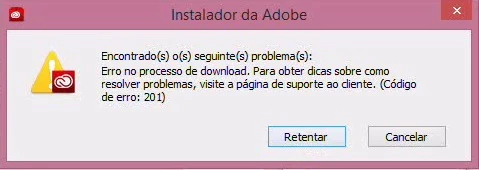
I´m talking about this error (screens in Portuguese), you will recognize it:
I tried ALL proposed solutions, including that found in Adobe foruns, among such:

- Disable the windows firewall, anti-virus, and both (looks the danger!)

- Create special rules on firewall to several solutions proposed.

- Turn off wi-fi and conecting by cable.

- Unistalling ALL Adobe softwares (including Adobe Reader), removing respective remaining folders.

- Create another windows user.

- Running the 'AdobeCreativeCloudCleanerTool' (despite having not worked, it looks interesting. It is here: https://helpx.adobe.com/br/creative-suite/kb/cs5-cleaner-tool-installation-problems.html)

But, NOTHING WORKS: error 201 at 50% of installation.

To get worse, I tried in my wife´s pc (whose configuration is minor of my VAIO i5) and... IT WORKS in de 1st attempt (windows 8.1, firewall and antivirus running, the same netword. Ouch!).

I was on stage are you now, thinking about: a) cancel the subscription; b) format all; c) change de computer; d) changing careers and so on.

I found the solution after many (and many) hours of reserch and attempts, here: http:// https://forums.adobe.com/thread/1847647.

What I did, following the instructions, was simply:

1) open the download page for Photoshop Elements, here:

http://https://helpx.adobe.com/photoshop-elements/kb/photoshop-elements-downloads.html

Do not download anything, just keep the page opened. (yes, That's right you read!)

2) Download the full Creative Cloud Desktop, compressed in a zip file, here:

http://http://trials2.adobe.com/AdobeProducts/KCCC/1/win32/ACCCx3_0_0_74.zip

3) Unzip the file and run the "Set-up.exe".

Done! It works! Already download all apps I need from full subscribe.

I hope it works for you.

Enjoy.

Leandro Campos.

from Brazil

(sorry by my english)

This topic has been closed for replies.
Correct answer Sheena Kaul

Hi Leandro,

Please refer to the help document below which explains the Error Code 201:

Error downloading, installing, or updating Creative Cloud applications

You may also refer to the thread below where this issue has been addressed:

Error 201

Error 201; CC desktop app constantly logged out, won't redownload

Regards,

Sheena

9 replies

Participant
July 30, 2023

Это работает, спасибо ))

Participant
October 31, 2016

Thanks Leandro - constantly getting 201 error when trying to update the Adobe Creative Cloud app on Windows 7 32 bit.  Simply opened up the download page for Photoshop Elements as instructed and whilst it was still open, the install file I downloaded that wouldn't get past 5% before the 201 error has worked perfectly!! Many thanks!!!

stereoworld
Participant
September 6, 2016

Thanks Leandro. It's over a year since the last reply to this and your solution still works perfectly.

I cannot believe something so crazy would work!

July 17, 2015

Olá Leandro!

Meu caso é um pouco diferente.

O erro é igual porém eu fiz o plano mensal aquele para Fotógrafos, portanto não será trial o link que eu baixarei.

Muito ruim esta ADOBE.

leandrocamposbr
Known Participant
July 18, 2015

Olá gerson deo70318633.

Meu plano também não é trial, é o plano completo.

Entendo que o Instalador do Creative Cloud é único para todos os casos, seja trial, fotógrafos, software individual ou completo.

Se o problema é o erro 201, acredito que você conseguirá, seguindo as instruções deste post.

Boa sorte!

Leandro.

Participant
July 13, 2015

Leandro,
I am in Germany, and Im not sure, if this link that you shared, works here. I have the same problem described by you.

Do you know if this link has any location restrictions? It works just for Brazil?

Danke schon!

leandrocamposbr
Known Participant
July 13, 2015

murilos78188555‌, I think that link works fine in any country. Please try it and tell us your experience.

(Are you Brazilian? Your name Murilo is common in Brazil).

Regards.

Abraço.

Leandro Campos.

Participant
July 12, 2015

OBRIGADAAAA!!!!!!!!!!!!!!!!!!!!!!!!!!!!!!!!!!!!!!!!!1

EWMGomes
Participant
June 28, 2015

Really awesome leandrocamposbr, all Staff don't know nothing about this problem. Every time saying the problem is with the connection, when the problem coming from the Installation program.

When this kind of problem happens, Is when we can see what all money what we spend in Adobe don't are help us!!!! Poor support, poor solutions. We can see the people complain more than month and no one improve.

Your solution download the trial and keep the Photoshop Element site's open work for me.

Thanks

Podia ter escrito em português, mas precisava colocar em um idioma em que a Adobe entender claramente. É Impressionante a falta de solução por parte deles.

Participant
June 18, 2015

Obrigado cara! Ajudou muito!

Sheena Kaul
Community Manager
Community Manager
June 18, 2015

You are welcome!

Sheena Kaul
Community Manager
Sheena KaulCommunity ManagerCorrect answer
Community Manager
June 8, 2015

Hi Leandro,

Please refer to the help document below which explains the Error Code 201:

Error downloading, installing, or updating Creative Cloud applications

You may also refer to the thread below where this issue has been addressed:

Error 201

Error 201; CC desktop app constantly logged out, won't redownload

Regards,

Sheena