


Participant
February 11, 2018
Answered

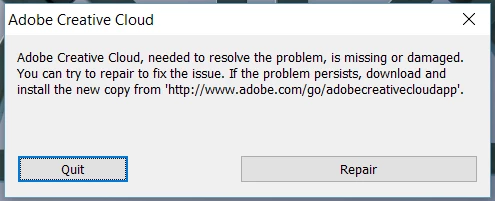
ACC does not launch: "Adobe Creative Cloud , needed to resolve the problem, is missing or damaged."

  • February 11, 2018
  • 2 replies
  • 1544 views

Hi everyone!

I haven't found a working solution to my issue, so I'm asking here (tech support somehow unavailable).

Issue: after installing ACC, during first startup, it loads for a few minutes and then shows an error:

"Adobe Creative Cloud , needed to resolve the problem, is missing or damaged. You can try to repair to fix the issue. If the problem persists, download and install the new copy from <link>."

I have:

1) Hit "Repair" in the window, but the problem persists.

2) Launched the software form the directory "C:\Program Files (x86)\Adobe\Adobe Creative Cloud\ACC". No results.

3) Reinstalled the app using the administrator account. No changes.

4) ACC Cleaner Tool not needed - a fresh install of Windows 10.

How to fix this issue? Thanks a lot in advance!

This issue blocked my work at the most inconvenient moment. In addition,  I would use this opportunity to complain about support workflow for ACC. On the support workflow website there is no option for ACC (apart from other exotic software I haven't even heard of). No chat support.
This topic has been closed for replies.
Correct answer kirillv76020639

uninstall everything cc including preferences, https://helpx.adobe.com/creative-cloud/help/uninstall-remove-app.html

then uninstall the cc desktop app, https://helpx.adobe.com/creative-cloud/help/uninstall-creative-cloud-desktop-app.html

clean your computer of cc files per http://www.adobe.com/support/contact/cscleanertool.html

restart your computer (don't skip this)

reinstall the cc desktop app, https://creative.adobe.com/products/creative-cloud.

if you're unable to install the cc desktop app at this stage, use an administrator account (solution 3 here, https://helpx.adobe.com/creative-cloud/kb/creative-cloud-missing-damaged.html)

use the desktop app to install your cc programs/trials


kglad, thank you for the information and sorry for the late reply. The steps you offered are already mentioned in the links you have sent before, but let them stay here for the unattentive user.

Unfortunately, these steps didn't help me, but I was able to solve the issue myself. The problem was that ACC would not work when installed to the drive other than the drive with OS. I have a dual drive laptop, and I have changed default install location in the registry, because some software would not let me pick installation directory and would always install to the default path. It was an issue for me, because such software fills up the system drive. Changing registry values to default fixed the issue.

But the design of ACC installation is poor. Even if the default installation path is changed to another drive, ACC would install itself to both drives and ruin its structure. Thanks God it allows user to choose installation directory for the Adobe apps. It would be awesome to make this information a feature request.

Anyway, thanks for the help. It might be a good idea to mark this post as a soultion, so others with this issue would see it.

Have a nice day!

2 replies

Kanikas
Community Manager
Community Manager
February 12, 2018
kglad
Community Expert
Community Expert
February 11, 2018
Participant
February 11, 2018

kglad, thank you for your advice.

Done all of that to no success (same error). What are other options?

kglad
Community Expert
Community Expert
February 12, 2018

uninstall everything cc including preferences, https://helpx.adobe.com/creative-cloud/help/uninstall-remove-app.html

then uninstall the cc desktop app, https://helpx.adobe.com/creative-cloud/help/uninstall-creative-cloud-desktop-app.html

clean your computer of cc files per http://www.adobe.com/support/contact/cscleanertool.html

restart your computer (don't skip this)

reinstall the cc desktop app, https://creative.adobe.com/products/creative-cloud.

if you're unable to install the cc desktop app at this stage, use an administrator account (solution 3 here, https://helpx.adobe.com/creative-cloud/kb/creative-cloud-missing-damaged.html)

use the desktop app to install your cc programs/trials