
Ladbroke
Participant
September 11, 2017
Answered

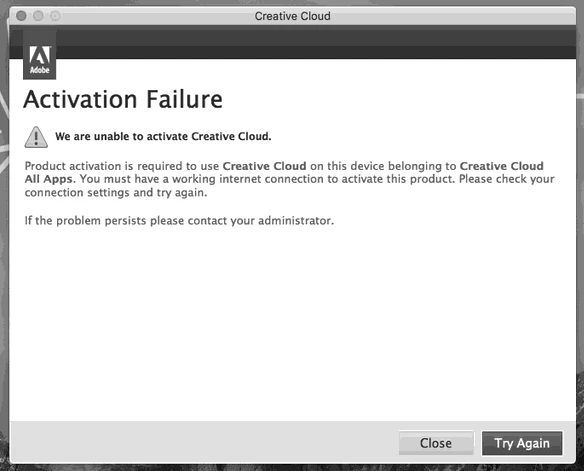
Activation Failure with Creative Cloud Dialog Box appears even when connected to the Internet

  • September 11, 2017
  • 2 replies
  • 499 views

Users are now presented with an Activation Failure dialogue box on first launch of a Creative Cloud app; this started appearing during the week commencing 4 September 2017. Before this client computers were activating on launch of Photoshop etc. seamlessly.

I have already followed the suggestions at: Resolve connection errors with Adobe Creative Cloud and Creative Suite applications

There isn't a problem with the internet or firewall blocking here, and the message appears whether or not the client computer is behind a firewall. Other web services can be accessed successfully.

Clicking Try Again activates Creative Cloud license, but I receive many support calls from users querying this message. The client iMacs are the same model, and imaged using the same method.

How can I suppress this spurious message?
This topic has been closed for replies.
Correct answer Sheena Kaul

Hi Neil,

Please see Contact Support FAQ: Unable to reach support through the "Contact US" link and let me know in case you are still unable to reach the support.

Regards,

Sheena

2 replies

Ladbroke
LadbrokeAuthor
Participant
September 12, 2017

I should add that I have tried contacting support whilst signed in, in different browsers, after deleting cookies, clearing caches, and a support telephone number is not listed and the chat function is permanently 'not available'.

Posting my query in this forum is a result of trying to contact support and not getting any support.

Sheena Kaul
Sheena KaulCorrect answer
Legend
September 13, 2017

Hi Neil,

Please see Contact Support FAQ: Unable to reach support through the "Contact US" link and let me know in case you are still unable to reach the support.

Regards,

Sheena

Ladbroke
LadbrokeAuthor
Participant
September 14, 2017

Chat is still unavailable, and there are no other options displayed.

Ned Murphy
Legend
September 11, 2017

Contact support - For the link below click the Still Need Help? option in the blue area at the bottom and choose the chat or phone option...

Make sure you are logged in to the Adobe site, have cookies enabled, clear your cookie cache.  If it fails to connect try using a different browser.

Creative Cloud support (all Creative Cloud customer service issues)

https://helpx.adobe.com/contact.html?step=CCSN_membership-account-payment_change-or-upgrade-your-membership