

Participant
December 2, 2021
Question

Activation problem

  • December 2, 2021
  • 3 replies
  • 435 views

I have installed Adobe Acrobat PDF Standard DC 2015 on 2 computers.

One day both of them show this activation error:
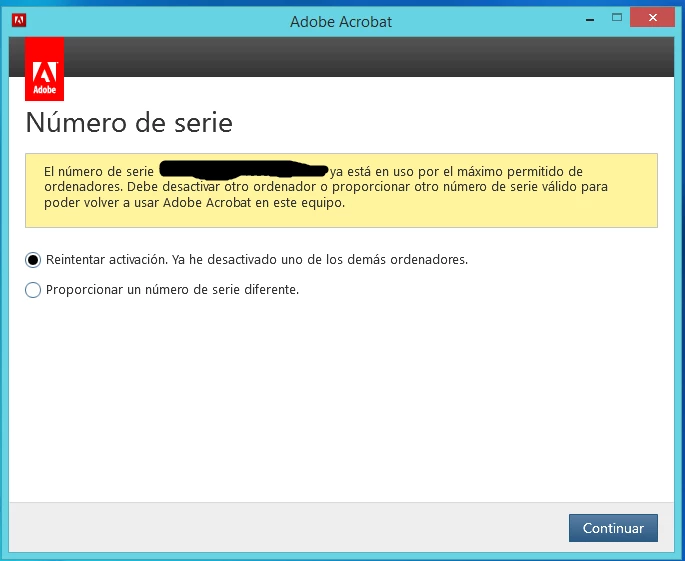
I can´t deactivate, only sign out. but the problem still.

Could someone help me?


Thanks in advance!

This topic has been closed for replies.

3 replies

Nancy OShea
Community Expert
Community Expert
December 5, 2021

[Moderator moved from Account, Payment & Plan to Download & Install.]

@Einfantes,

Which operating system do you have?

Are TLS 1.2 connections enabled on your system & browsers?  Without TLS 1.2 connections, you cannot connect to Adobe's servers for security reasons.  See link below for details.

https://helpx.adobe.com/x-productkb/multi/eol-tls-support.html


Nancy O'Shea— Product User & Community Expert
Participant
December 14, 2021

Hi @Nancy OShea 

I Have Windows server 2012 R2 and yes I have TLS 1.2 enabled.

I don´t know what is happening, :S

Nancy OShea
Community Expert
Community Expert
December 14, 2021

You probably need to update your web browser too.  Also enable TLS 1.2 connections in the browser.


Failing that, use the Adobe's AcroCleaner Tool to wipe old Acrobat settings from your system.

https://www.adobe.com/devnet-docs/acrobatetk/tools/Labs/cleaner.html


Reinstall from your original disks or downloads that you received at purchase.


Nancy O'Shea— Product User & Community Expert
try67
Community Expert
Community Expert
December 3, 2021

Are you sure you installed the right version? You either need to log-in to your account or you need to enter the serial number, but not both. Acrobat DC is subscription-based, but Acrobat 2015 is not. The former requires you to log-in. The latter requires you to enter a serial number and then activate it.

EinfantesAuthor
Participant
December 3, 2021

@try67  I dont know why it doesn´t appeared an activation in my account.


Eric Dumas
Community Expert
Community Expert
December 2, 2021

Did you login to your Adobe account?

There should be a list of devices used for registering the software.

EinfantesAuthor
Participant
December 3, 2021

Hi Eric,

Yes, I did it but i have the same problem... 

I don´t have that list, it would be very interesting and I could detect the problem.

It´s strange because I don´t have "deactivate" option..

EinfantesAuthor
Participant
December 3, 2021

@Eric Dumas 

In my Account, I have this message: