Participating Frequently
September 15, 2015
Answered

Actualización de Creative Cloud con problemas (Photoshop y Lightroom).

  • September 15, 2015
  • 1 reply
  • 434 views

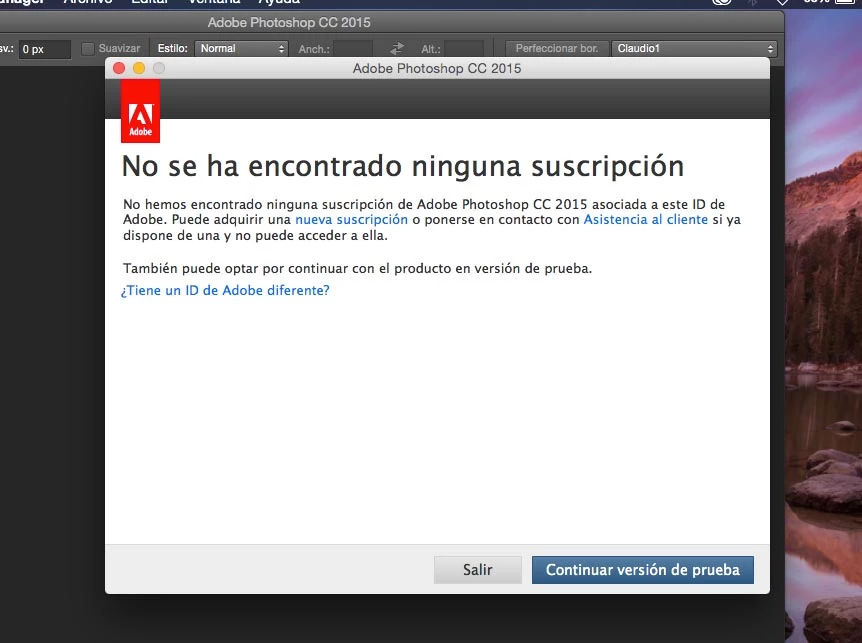
Hace una semana se actualizó mi Creative Cloud, tengo el plan Fotográfico (Photoshop y Lightroom) con los pagos al día, pero desde la actualización mis app son de prueba, me dice que no tengo suscripción. He probado todo, escrito a los foros, y en Adobe no he encontrado asistencia técnica o teléfono. Llevo dos meses pagando y la membresía es por un año. Gracias.

This topic has been closed for replies.
Correct answer Govardhan.V
  • Remove all entries which has adobe name . Then close the Textedit , it will Autosave.
  • Make sure there are no Adobe entries inside .
  • Then copy and paste the Hosts file back to Etc folder . 
  • We are replacing edited hosts file which we had copied to Desktop with the original Hosts file inside Etc folder.
  • When prompted , Authenticate with Mac password ,
  • Make sure to select Replace option ..
  • Once you has replaced Hosts file , double click on it again and check whether Hosts file is free from Adobe entries.
  • If yes. launch Creative Cloud application and load Apps list and check.

1 reply

Govardhan.V
Participating Frequently
September 15, 2015

Sign out and Sign in once :

Sign in and sign out to activate Creative Cloud apps

If Signing out and Signing in didn't help, check the Hosts file and see if you can see Adobe entrties along with loop back adrress like 127.0.0.1 activate.adobe.com

Steps :

Mac :

1) Right click on the Finder icon on dock and select "Go-To Folder" option.
2) You will get a text box, type-in below mentioned command and then hit 'Return' key.

/etc

3) It will open the etc folder, please look for file named "hosts" and copy the same to Desktop screen.

4)Double click on Hosts file , it will open it with TextEdit,

Check whether you can see any Adobe related entries inside Hosts file like 127.0.0.1 activate.adobe.com.......etc??

Participating Frequently
September 15, 2015

Hola Brucgovn, gracias por tu respuesta, pero lamentablemente ya había realizado ese paso, ayer borré los hosts, pero hoy, al abrir Photoshop volvió a hacer el problema, me envía a al versión de prueba.

Gracias, y a seguir probando.

Govardhan.V
Govardhan.VCorrect answer
Participating Frequently
September 15, 2015
  • Remove all entries which has adobe name . Then close the Textedit , it will Autosave.
  • Make sure there are no Adobe entries inside .
  • Then copy and paste the Hosts file back to Etc folder . 
  • We are replacing edited hosts file which we had copied to Desktop with the original Hosts file inside Etc folder.
  • When prompted , Authenticate with Mac password ,
  • Make sure to select Replace option ..
  • Once you has replaced Hosts file , double click on it again and check whether Hosts file is free from Adobe entries.
  • If yes. launch Creative Cloud application and load Apps list and check.