Participant
May 18, 2012
Question

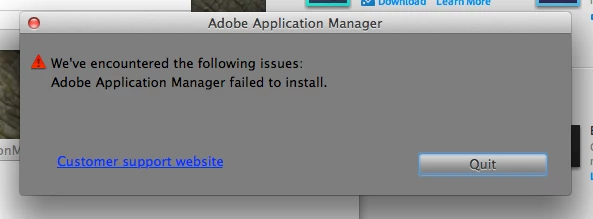
Adobe Application Manager fails to install

  • May 18, 2012
  • 7 replies
  • 10882 views

I'm trying to install Adobe Application Manager for the Creative Cloud on my Mac running OS X 10.7.4.

Fails every time I try.

What's the problem?
This topic has been closed for replies.

7 replies

Participating Frequently
January 2, 2013

It works!!!! ... just downloaded and updated Photoshop and Muse....

I deleted the "Adobe Applications Manager" in Applications>Utilities folder then downloaded the latest Adobe Applicaton Manger install app. It now installed OK and works fine updating my Creative Cloud downloaded applications... PHEW!!!

I hope this helps other folks with same/similar problems not being able to instal AAM.

Participating Frequently
January 2, 2013

Forgot to say after over 2 hours talking to Adobe Support (a few days ago) without any solution to AAM refusing to install including a promise from Adobe they would call me back even gave me a ticket number: 183921690 .... I never received any call or email. Great support eh?

Jeffrey_A_Wright
Legend
January 2, 2013

Trow thank you for the update.  It does appear that your case is currently escalated.  Our support team has been closed for the holidays which maybe why you have not been contacted.  You can find the status of the case by going to http://www.adobe.com/ and selecting My Adobe.  You can then access your support case from there.

Participating Frequently
January 2, 2013

Thanks but I think I've found a fix see post just added...

Participating Frequently
January 2, 2013

Maybe a solution!!!!

I found a similar thread in another Adobe Forum. I did the following (see below) and was able to install Adobe Application Manager OK. I'm now downloading Photoshop from Creative Cloud to see if it works... So far so good.

14.Benjamin Warde,

Nov 16, 2012 6:35 PM in reply to fmagrosoto

Report

I just had this same problem myself.  I was eventually able to solve it by going to the Applications>Utilities folder and deleting the Adobe Application Manager folder.  Then I went here:

http://www.adobe.com/support/downloads/thankyou.jsp?ftpID=4774&fileID= 4438

And downloaded the latest version of the Adobe Application Manager, and installed it.  Then I tried downloading an application from Creative Cloud again, and it worked.

-Ben

Participating Frequently
January 1, 2013

I have exactly the same problem. Spent 2 hours 15 minutes on phone with Adobe Support yesterday and they couldn't fix this problem!!! I'm waiting for tier 2 Adobe support to call me back. This really is bad as I can't update or download any Adobe Cloud Applications in effect I'm paying for a service I'm not receiving? Also now get error messages when launching Photoshop but it still runs...

Adobe please give this priority and post an updated AAM Installer that will work.

Participating Frequently
January 1, 2013

I, too, had this problem. After spending all of Christmas Eve morning on the phone and allowing the Adobe tech in India to operate my computer remotely via Adobe Connect, I was told that this was really an Apple problem. The tech was very uncommunicative and never explained the proceedures he was atempting. I went to the Apple Genius bar, where a very helpful technician recreated the errors. He believes there is something in the code that may have changed, possibly through an update, which doesn't allow me to log in to AAM. I've managed to create a sort of work around by logging in to my computer as a "root" user, then launching Muse, so that I can manage my website. I don't consider this a fix and I don't think that Adobe is addressing this problem properly. I haven't received any follow-up via email asking me to rate their service, which also seems a bit odd. At this point I don't have the option of opting out of Creative Cloud, since they are hosting my website through Business Catalyst.  ADOBE, HOW ABOUT SOME ACTION!!

Jeffrey_A_Wright
Legend
January 1, 2013

Jgiannini48 if logging in as a root user resolves the issue then it would appear the permissions are likely compromised for the user account you regularly utilize.  Have you tried creating a new local administrator account and seeing if you experienced the same difficulties?

September 20, 2012

I have the same issue, same error message.  I've spent yesterday afternoon and this morning going through the forums and tried some of the ~/Library/~ fixes to no avail...  I simply can't get the AAM to install which means I have zero access to the applciations in Adobe's Creative Cloud...  This is really stupid and frustrating and I'm thinking I should just ask for a refund instead wasting any more of my time on this.

Participant
September 21, 2012

I'm having exactly the same problem as you are jim and fotodo, and I'm thinking of asking for a refund too. This is just infuriating and frustrating nonsense, not helped by the labyrinth you have to navigate to try and get some assistance.

Participant
September 21, 2012

I don't know if I replied properly, but I just now signed onto Adobe as a new "member". I'm about half a hair away from not being a member also. Chainsaw and fotodo and all you other guys: I am right there with you in that I can't even get past the AAM sign in problem. I'm on a windows 7 64-bit platform not overloaded by a bunch of junk software programs or anything and I constantly monitor my computer's activity for virus activity as I use it for my work and church activity.

HELLLLOOOO ADOBE!!!!!!!! Time to get a clue and address this problem instead of pushing us off to the next technical assistant and the next one and the next one and then. I've spent the last three days off and on trying to figure this out with their technical assistants who have ended the chat on me without notice (a virtual hangup for crying out loud), one refused to help me and suggested I phone call their tech support and the other just offered minimal support I already found in these forums. I think a refund is in my future.

Adobe, please help us ACTUALLY FIX our problems.

Adobe Employee
May 21, 2012

Please share the files from following locations: ~/Library/Logs/AdobeDownload/* and ~/Library/Logs/PDApp.log

You can send via email to tagarg@adobe.com

Inspiring
May 19, 2012
Participant
May 19, 2012

I'm not sure what you mean or how it's even applicable. I'm the only user on this machine.