

Participant
November 25, 2019
Question

Adobe Application Manager installation fails

  • November 25, 2019
  • 2 replies
  • 1884 views

When I try to install Adobe Application Manager  I get this window.
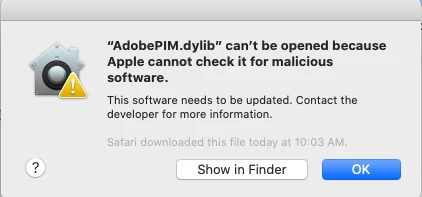
I am running macOS Catalina version 10.15.1

This topic has been closed for replies.

2 replies

Jeffrey_A_Wright
Community Manager
Community Manager
November 25, 2019

GunMan223, to add to Test Screen Names statement, where did you download the AdobePIM.dylib from?  If you are using macOS 10.15 then you will need to use Creative Cloud for Desktop 5.0 or later.  Older versions are not compatible.  You can find more information at https://helpx.adobe.com/x-productkb/global/fix-macos-64-bit-compatibility-errors.html.

Legend
November 25, 2019

Do not try to install Adobe Application Manager in Catalina. Use ONLY the very latest Creative Cloud apps. Nothing else can work.