Participating Frequently
May 5, 2013
Answered

Adobe Application Manager Only Allows Me To Download Selected Programs

  • May 5, 2013
  • 1 reply
  • 2415 views

Hi all,

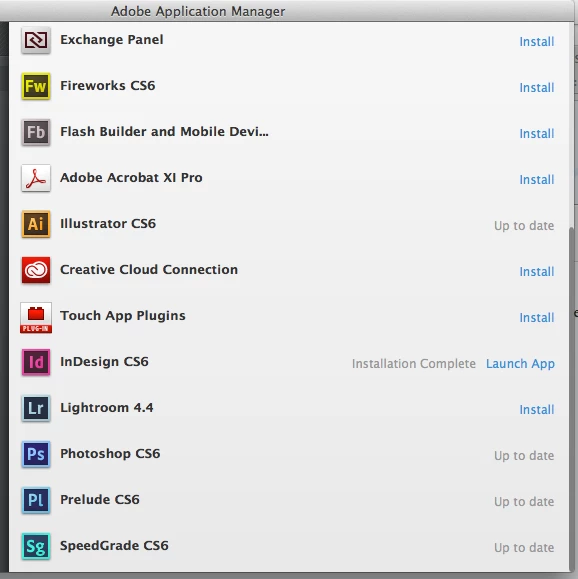
I've just downloaded the application manager and it's running great. However, over half of the programs/apps read "Up to date" in a greyed out text and are uninstallable. The programs which do read "Install" in a blue, clickable text do download and run properly after download. See picture for refrence. Thanks in advance for any help!

Best,

Brandon
This topic has been closed for replies.
Correct answer Jeffrey_A_Wright

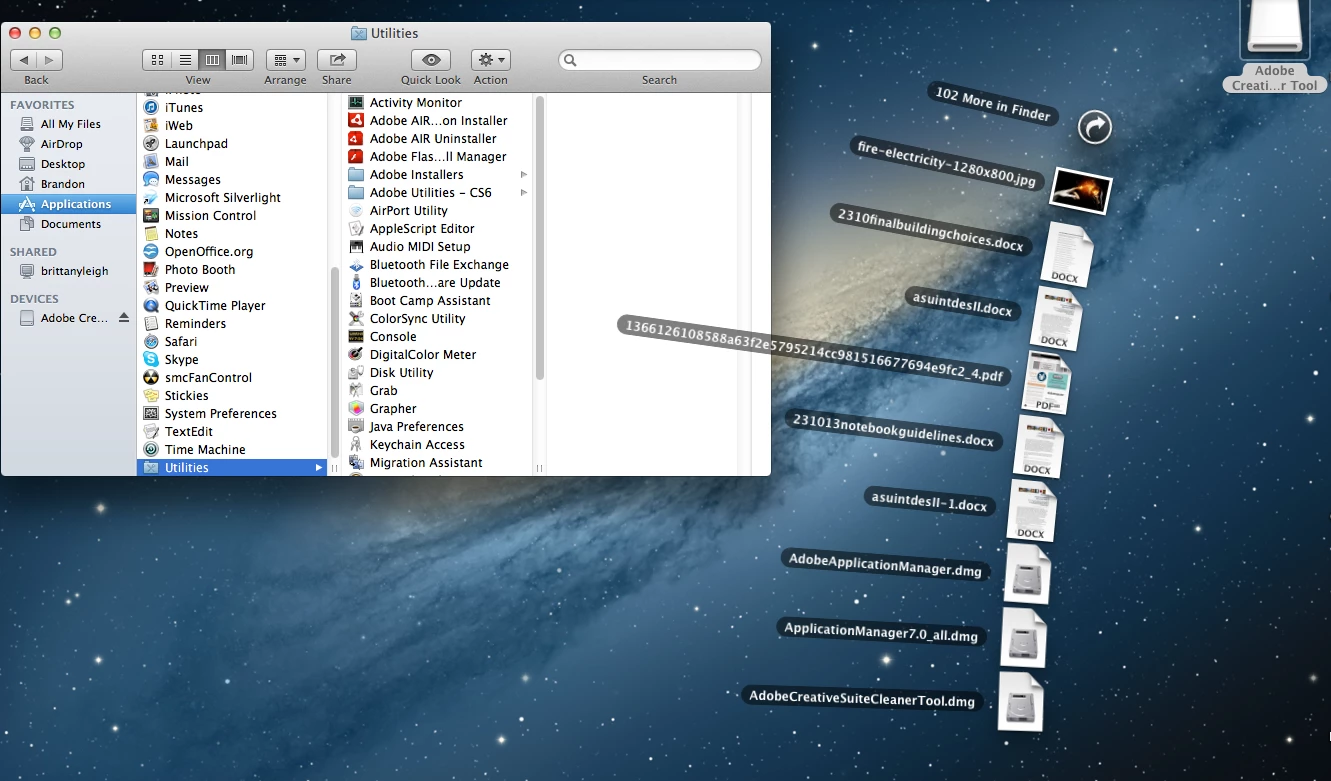
Here is an image of what Adobe related facets are still on my computer. Utilities in the finder window, creative suite cleaner on the desktop, and adobe related drivers?/programs in my downloads...

Thanks in advance Jeff,

Brandon


Sorry for the delay HaynesBM.  Our forums are very busy today with the recent Creative Cloud announcement.

Can you please verify that you don't have any available installers still listed in the Application/Utilities/Adobe Installers folder?

Also for reinstalling the Adobe Application Manager it will be downloaded and request to be installed when you click on the download button for the applications listed at https://creative.adobe.com/.  Alterantely you can download the Mac OS version of the Adobe Application Manager from the link offered in message #3.

1 reply

Jeffrey_A_Wright
Community Manager
Community Manager
May 5, 2013

Brandon the programs listed as Up to date are likely already installed on your computer.  I believe you are using Mac OS, if not please respond back with which operating system you are using, if so please go to your Applications folder to open the programs.  If you wish to uninstall your Adobe Creative software you will be able to access the uninstallers in Applications/Utilities/Adobe Installers/.

HaynesBMAuthor
Participating Frequently
May 7, 2013

Thank you for responding Jeff.

I don't have those programs on my computer. I once tried to install the entire Creative Suite with my OS not being current enough and thus decided to delete any and all traces/installers etc of them. As you know, InDesign was part of said Creative Suite, and InDesign is one of the programs the Application Manager currently allows me to download. It seems my problem may be a complicated one. Ugh.

Also, my Adobe Uninstaller Utility shows only the option to unistall the InDesign which I was able to install via the cloud.

Jeffrey_A_Wright
Community Manager
Community Manager
May 7, 2013

Then you can try reinstalling the Adobe Application Manager from https://www.adobe.com/support/downloads/detail.jsp?ftpID=4774.

If you continue to see the applications listed as Up to date then please do the following:

  1. Run all available uninstallers from the Applications/Utilities/Adobe Installers folder
  2. Run the CS Cleaner tool - CS Cleaner Tool for installation problems | CCM, CS6, CS5.5, CS5, CS4, CS3 - http://helpx.adobe.com/creative-suite/kb/cs5-cleaner-tool-installation-problems.html
  3. Reinstall the Adobe Application Manager from https://creative.adobe.com/

This should allow you to reinstall the affected applications.