


Participant
October 27, 2021
Answered

Adobe Apps say i'm offline, but i'm not?

  • October 27, 2021
  • 1 reply
  • 2280 views

Hello! I recently got a new Macbook Air and am currently dealing with a connection problem? 

Although i'm able to use the applications, the cloud at the top indicates that im working offline when I am well connected to the internet... (see attached picture below↓)
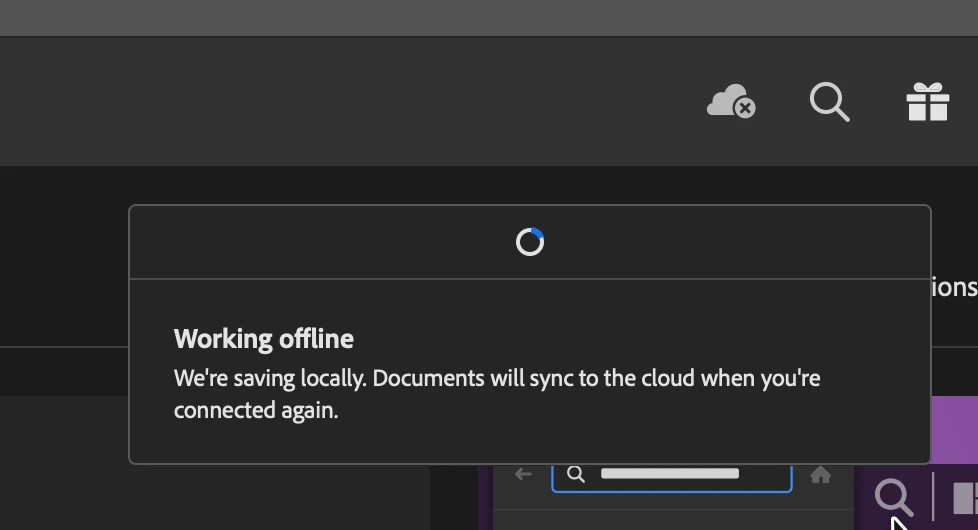
I can open my Adobe Cloud without any problems so its only the applications... However I also cannot get ahold of my recently activated fonts, and the font page wont open on my Cloud application. 


After doing some research, I think the only possiblity is that some server/network that adobe needs is blocked, and i tried to tinker with the proxies but im not very knowledgable in that area so i dont want to touch anything without proper instructions...


My Macbook before had no problems connecting to the cloud, so maybe something went wrong during the migration process?? 


If someone can give me suggestions/instructions on what to do, it would greatly be appreciated..! 

Correct answer Jeffrey_A_Wright

Thanks, Chalissa. The migration is the likely cause of the current errors. Adobe applications are not designed to be copied/migrated from one computer to another. Doing so leads to unexpected behavior, such as what you are encountering on the MacBook Air.


To try to recover, please download and run the CC Cleaner Tool from https://helpx.adobe.com/creative-cloud/kb/cc-cleaner-tool-installation-problems.html and use it to remove any currently installed Adobe software. Once the software is removed, you can then use the steps listed in https://helpx.adobe.com/creative-cloud/help/download-install-app.html to begin the installation process.

1 reply

Jeffrey_A_Wright
Community Manager
Community Manager
October 27, 2021

Challisa, sorry, the MacBook Air is unable to reach our servers. What process did you use when moving over to the new MacBook Air?  Did you copy/transfer any applications from the old computer to the new computer?


You can find steps to resolve most connection errors at https://helpx.adobe.com/download-install/kb/common-network-connectivity-issues.html.

Participant
October 28, 2021

I simply used the migration application apple services offers, which automatically transfers all my data from the old macbook to the new...