
PEnguin
Participant
November 14, 2018
Answered

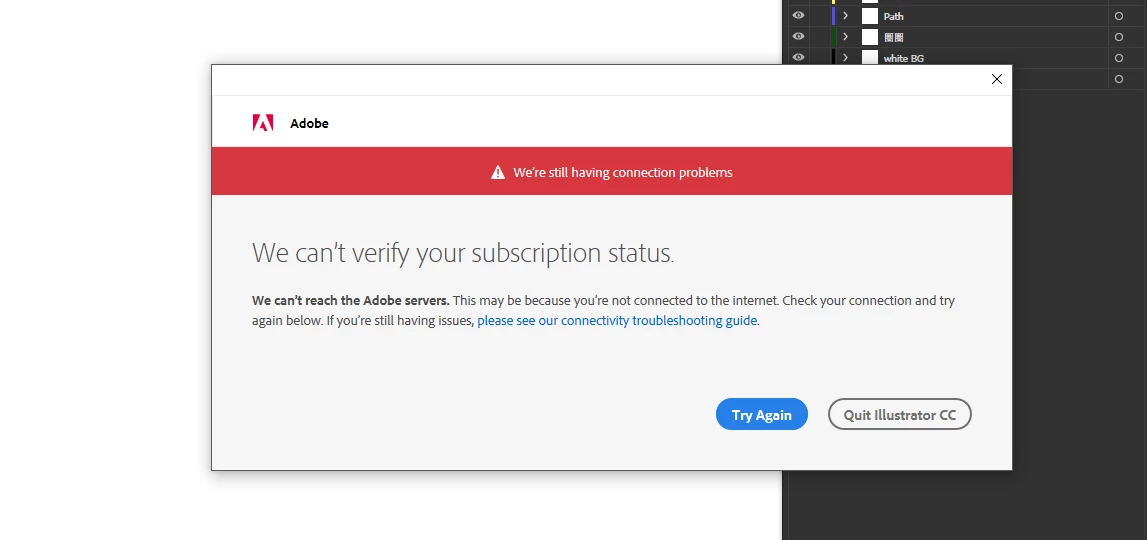
Adobe CC 2019 application wont starts up while working offline.

  • November 14, 2018
  • 6 replies
  • 13211 views

I can not use any of Adobe CC 2019 applications (eg. PS, AI, ID, PR) while working offline. the verification mechanic system always asked me to signed in, everytime when I start to use any of those application, even the computer is connected to internet. How can I let the adobe CC verification mechanic system saved my login and subscription info? I need all these app running while Im working in remote areas. somewhere has no internet.
This topic has been closed for replies.
Correct answer Ned Murphy

Contact support - For the link below click the Still Need Help? option in the blue area at the bottom and choose the chat or phone option...

Make sure you are logged in to the Adobe site, have cookies enabled, clear your cookie cache.  If it fails to connect try using a different browser.

Creative Cloud support (all Creative Cloud customer service issues)

https://helpx.adobe.com/contact.html?step=CCSN_membership-account-payment_change-or-upgrade-your-membership

6 replies

Participant
July 24, 2020

Running in to this problem is making me reconsider ever giving money to Adobe again, and I am now looking for alternatives for Lightroom. 

Even with an always-on internet connection, Adobe screws us on this anyhow.

JBL
Known Participant
December 14, 2019

Really?  "Make sure you are logged into the Adobe site?"  He's offline, as I am I with the PC that has Adobe CC. Can't get any work done with sketchy internet.

Flexigav
Known Participant
January 1, 2019

It appears many are taking this advice. I tried and got a message stating "Our support center currently has long wait times..." This need to login behaviour only seems to have started with CC2019 updates. Before that I only needed to connect online once every 90 days. Now I have to enter my password every time I open an Adobe Application in a new online browser session. For some reason my browser is not retaining my Adobe login details, even though I tick the "remember it" box. There are many times when I have access to my computer and time to do some creative work out and about—without an online connection. If this is not a bug in the CC2019 updates, then it must be part of Adobe's new design rollout. Enlightenment welcome...

Known Participant
December 7, 2018

Just happened to me also, I've been connected to the internet all the time, but today when I didn't have a internet connection when I go to launch Adobe Bridge CC 2019 I get the spinning disk in a popup above the Bridge screen and can't access Bridge?????? Very frustrating! How do I make sure this doesn't happen again?

Abambo
Community Expert
Community Expert
January 1, 2019

Bridge especially does not need internet access except for loading services from the internet (like libraries). ‘m rarely working offline, but I will try and report back.

UPDATE:

My laptop works great without internet connection. The only app that is not working is the Creative Cloud app, as I would expect as their only aim is to keep your computer up to date with the internet based services of the CC.

ABAMBO | Hard- and Software Engineer | Photographer
Participant
July 24, 2020

Thanks for this comment, I tried to run Lightroom and Photoshop direclty without the CC App and both work fine.

The CC App is basically useless anyhow, so I can just run things the way I want.


Can Adobe do anything right?

Inspiring
November 14, 2018

The same happened to me last night. Fortunately it was "just" during a six hour plane flight, but if I lived and worked in a remote area (which I sometimes do) I would be seriously pissed off.

Ned Murphy
Ned MurphyCorrect answer
Legend
November 14, 2018

Contact support - For the link below click the Still Need Help? option in the blue area at the bottom and choose the chat or phone option...

Make sure you are logged in to the Adobe site, have cookies enabled, clear your cookie cache.  If it fails to connect try using a different browser.

Creative Cloud support (all Creative Cloud customer service issues)

https://helpx.adobe.com/contact.html?step=CCSN_membership-account-payment_change-or-upgrade-your-membership

Inspiring
November 14, 2018

I just wanted to chime in and say I had this same issue last night on the plane (PS and Bridge 2019, MacBook pro running High Sierra) – I NEEDED to work during my 6 hour flight home from a job and both Photoshop and Bridge would not start without an internet connection (plane was out of range for its wifi service) – this was hugely inconvenient given that we buy and download the apps to our computer in order to have them accessible whenever we need them. We do not want, and never want, a cloud based service where internet access is required. Ned, I will also follow the links you gave to customer support, but obviously I have a connection now and everything is working again. But I really needed to get a jump on processing my images and Adobe failed me.

Participant
April 25, 2019

Exactly!  I experienced an internet service outage the last couple of days and was totally at a standstill.  I lost two days of work!  I finally figured out that I could open Adobe 2018 and work in it, but didn't help me with the files that were "in progress" that I really needed to complete because they were created in 2019.  I need to be able to work using all programs without access to the cloud.  I do not store anything on the cloud just for this reason.  You never know when you will be without access.