



Swandive stream
Inspiring
January 3, 2022
Question

Adobe CC taking up 1.2GB data on C Drive

  • January 3, 2022
  • 6 replies
  • 1627 views

The problem is my C Drive is small and full which blocks updates. Using Treesize, the Adobe folder is a big chunk of it. How do I change this? I have more space on other drives. For some reason Animate alone is using a large chunk of space despite me barely using it after installation.
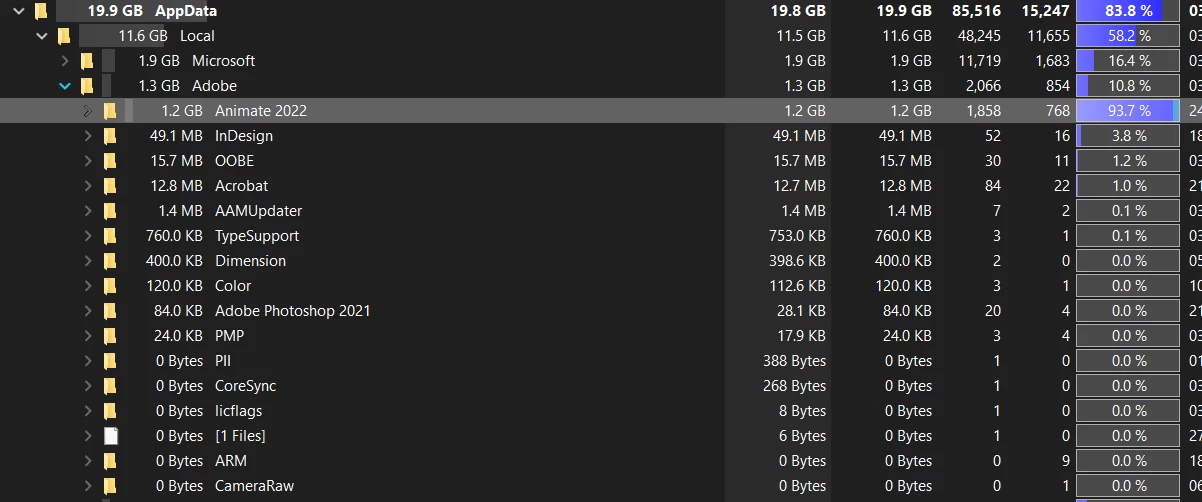
 

Blue=space used

This topic has been closed for replies.

6 replies

Swandive stream
Inspiring
January 10, 2022

The C Drive is very small (just 118GB) whereas other drives have more space. I cannot afford to save anything onto there if possible. With the system files and defaults it's already using 51.1GB of the capacity and I know CC will fill it up with files in seconds. How do I redirect all files to be saved to another drive? It's a pain and a half this, I had to reset the computer just to get it cleared which caused a lot of problems. For such expensive professional software it seems very short-sighted that Adobe doesn't allow for this scenario since there are multiple computer brands that have the small C large D arrangement.

Participant
January 7, 2022

On the off chance that you don't physically change the area of impermanent records when you utilize a program (each program) they will involve the settings and put all transitory documents in the default area

I don't utilize Animate however I really do alter video... what's more I set my impermanent documents to a drive and organizer of MY decision when I open the program and start another undertaking, not the default setting in the program I am utilizing

kglad
Community Expert
Community Expert
January 7, 2022

those are not "impermanent" records.

Participant
January 10, 2022

118GB. It's small as SSD and intended to only be used for system files with user files of php being on other (1TB) drive.

Nancy OShea
Community Expert
Community Expert
January 3, 2022

How much available Hard Disk space do you have?


Nancy O'Shea— Product User & Community Expert
Swandive stream
Inspiring
January 4, 2022

118GB. It's small as SSD and intended to only be used for system files with user files being on other (1TB) drive.

Legend
January 5, 2022

This doesn't sound a viable way to work. But still, what is the actual folder here for these files? It looks as if it is %appdata% and these are USER FILES. So if so, it isn't set up according to your wishes.

John T Smith
Community Expert
Community Expert
January 3, 2022

If you do not manually change the location of temporary files when you use a program (every program) they will use the default settings and put all temporary files in the default location


I don't use Animate but I do edit video... and I set my temporary files to a drive and folder of MY choice when I open the program and start a new project, not the default setting in the program I am using

John T Smith
Community Expert
Community Expert
January 3, 2022
kglad
Community Expert
Community Expert
January 3, 2022

@John T Smith that won't change the location of the files the op is showing.

Legend
January 3, 2022

Microsoft set up the %appdata% folder there, Adobe just use it. 1GB is next to nothing, it can easily be hundreds of GB eg for video cache. 

kglad
Community Expert
Community Expert
January 3, 2022

no, you can't change the location of those files (and expect the corresponding programs to work).