Participant
January 24, 2019
Answered

Adobe Creative Cloud [Have 1TB SSD but unable to install apps due to no space]

  • January 24, 2019
  • 1 reply
  • 289 views

I  cannot for the life of me install adobe programs through the creative cloud  I have purchased the service which should have been cut n dry but it keeps telling me i have no space available for the programs on a fresh 1tb ssd i have ran the adobe removal tool and all that did was make it not have any errors when installing but it did-int fix my issue of being able to use the apps i paid for!

This topic has been closed for replies.
Correct answer Bani Verma

Hi Konners51820953,

You have mentioned you would like to install your Adobe Creative Cloud apps on your computer however it says that the primary drive is full. This could be because the default location to install the apps is set as the primary drive of your machine.

You can configure the installation destination from within the Creative Cloud app preferences however, we would suggest that you install your application on the primary drive or C drive only.

Please be aware that there will still be shared resources stored to your primary drive, In addition during the install process temporary files will also be created on your primary drive.

Please see screenshot below for more information:
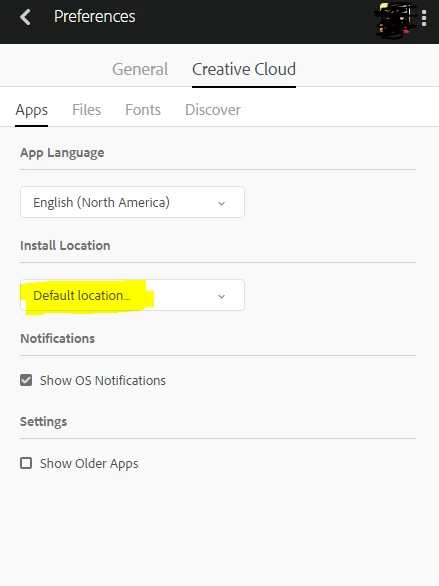
Note: If you have already installed apps then you'll have to uninstall them and make the location changes in Creative Cloud Desktop app, after that reboot the machine and now install your apps again and it should install on the new selected location.

Let us know if this helps.

1 reply

Bani Verma
Bani VermaCorrect answer
Legend
January 24, 2019

Hi Konners51820953,

You have mentioned you would like to install your Adobe Creative Cloud apps on your computer however it says that the primary drive is full. This could be because the default location to install the apps is set as the primary drive of your machine.

You can configure the installation destination from within the Creative Cloud app preferences however, we would suggest that you install your application on the primary drive or C drive only.

Please be aware that there will still be shared resources stored to your primary drive, In addition during the install process temporary files will also be created on your primary drive.

Please see screenshot below for more information:

Note: If you have already installed apps then you'll have to uninstall them and make the location changes in Creative Cloud Desktop app, after that reboot the machine and now install your apps again and it should install on the new selected location.

Let us know if this helps.