
February 10, 2019
Question

"Adobe Creative Cloud is needed to resolve the issue. Please click 'repair'..."

  • February 10, 2019
  • 8 replies
  • 8913 views

Hello all,

Since Friday, I have been receiving this annoying message on my computer.
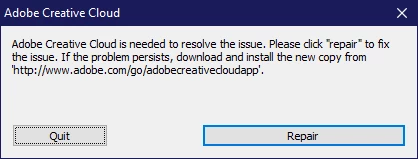
I have put lots of effort in to fixing it but to no avail. Clicking "Repair" seems to solve the problem until the next time I reboot my PC at which point this comes back again. Additionally, doing a full uninstall and reinstall does not seem to fix it either, as rebooting causes this to pop up once again. The uninstall methods that I used include using the traditional method via the "Programs & Features" page on Windows as well as using Adobe's Creative Cloud uninstaller tool and neither have resolved this. Has anyone else been seeing this? And has anyone figured out a solution?

This topic has been closed for replies.

8 replies

Participant
July 2, 2020

Is there an issue?? I get the '...needed to resolve the issue...' message, and here it looks like it happens when Creative Cloud is checking for updates. But what is the issue that Creative Cloud is needed to resolve? Everything seems to be working as it should in the apps, including update notifications. My suspicion is that this warning is over-sensitive and gets some spurious triggering. I just click 'quit' and it goes away until the next time.

Participant
June 21, 2019

We had a similar issue and have been working with the Adobe Development Team for the past 3 months on a solution. We have pinpointed the underlying issue due to UAC (User Access Control) settings deployed via our enterprise Group Policy as part of device hardening and security best practices. Their development team has been able to reproduce the issue in their lab and are actively working on a solution. I have been receiving private builds of the offending DLL from them and are testing it.

In the mean time, we have temporarily resolved this by reverting those users UAC settings to the default Windows settings which has resolved the issue for us.

shahul
Participant
June 19, 2019

I tried adding adobe creative cloud app to list of exclusions and it looks to be okay now.

I added the following file to the exclusion - ofcourse as the warning says, creative cloud may contain threats but that's the risk that you decide if you want to take.

jeffseaver
Participating Frequently
March 13, 2019

Anyone at Adobe who claims they have resolved this issue hasn't done their research.

I have been through multiple instances of installing, reinstalling, sorting out, sifting and deleting multiple files, working directly with Adobe Support controlling my screen on more than one occasion.

I have followed the steps Adobe Support then provided for me here, multiple times - and then, after a restart or two, the issue comes up again. I was pleased to see that the issue appeared to be resolved after over an hour connected to Adobe Support on a recent support ticket - only to see the very next day, after a restart, Adobe Creative Cloud once agains needs to "REPAIR" its installation, which takes over an hour of downloads and reinstalls.

The answer, as far as I am concerned, is clear: ADOBE, YOU HAVE A BUG - this has been going on since 2017 and yet your support staff keep posting the same tired steps which DO NOT RESOLVE THE ISSUE:

https://forums.adobe.com/thread/2382298

February 18, 2019

Does anyone have any other suggestions?    

thatsmauri
Community Expert
Community Expert
February 18, 2019

There's this Help page covering the error that you get:

» Adobe Creative Cloud, needed to resolve this problem, is missing or damaged

I would suggest doing a clean removal by using the 'Adobe CC Cleaner Tool​', followed by a reinstall of the 'Creative Cloud desktop app' - as written under "Solution 3". Be sure to use an Administrator account / use the "Run as Administrator" context menu entry when executing the Cleaner Tool and the 'Creative Cloud desktop app' installer.

Personally said, I doubt that any of your Antivirus software is the culprit here. Despite using Windows Defender, everything works fine for me. Never did this window popped up on my end.

February 23, 2019

I am sorry I did not see this when you posted it, as I was writing my last message at the time when yours was posted. Thank you for sharing the link, but unfortunately, I was not able to get it to work properly despite trying multiple times.    

qianluo
Participant
February 10, 2019

I have tried this but the issue still persists.

kglad
Community Expert
Community Expert
February 11, 2019

using a browser that allows popups and cookies,  contact adobe support during pst business hours by clicking here and, when available, click 'chat', http://helpx.adobe.com/x-productkb/global/service-ccm.html

February 11, 2019

As I expected, Adobe Customer Support is useless. All they do is say to do everything that I have already document as having tried. Keep in mind that they say this after I have already told them that I tried something multiple times unsuccessfully.

February 10, 2019

Hello,

I have tried this but the issue still persists.

Thank you

kglad
Community Expert
Community Expert
February 10, 2019

uninstall everything cc including preferences, https://helpx.adobe.com/creative-cloud/help/uninstall-remove-app.html

then uninstall the cc desktop app, https://helpx.adobe.com/creative-cloud/help/uninstall-creative-cloud-desktop-app.html

clean your computer of cc files per http://www.adobe.com/support/contact/cscleanertool.html

restart your computer (don't skip this)

reinstall the cc desktop app, https://creative.adobe.com/products/creative-cloud.

if you're unable to install the cc desktop app at this stage, use an administrator account (solution 4 here, https://helpx.adobe.com/creative-cloud/kb/creative-cloud-missing-damaged.html)

use the desktop app to install your cc programs/trials

Participant
February 10, 2019

I have the same issue with the Mac version. EVERY time I reboot my Mac that error pops up and I have to reinstall Creative Cloud.

February 10, 2019

When did this start happening to you? I only started seeing it on Friday. At this point I am convinced that it is a bug and not a corrupted installation. I have done everything I can to fix it. I even used a Clonezilla image to roll my entire computer back to the state that it was in on Christmas Eve (the last time I took a backup image). After booting up, Creative Cloud took an update and the issue came back immediately.