Try below steps once :
Uninstall Adobe Creative Cloud .
Creative Cloud Help | Uninstall the Creative Cloud desktop app
Disable Firewall Temporarily.
Step 1 :
Open C:drive and navigate to C:\Program Files (x86)\ " Common Files" \Adobe.
Open Adobe folder and delete folders named Adobe Application Manager and OOBE.
Step 2:
Navigate to C:\Program Files (x86)\Adobe.
Open Adobe folder and if present delete Adobe Creative Cloud folder. [**important]
Unable to delete??? rename it to Adobe Creative Cloud-old.
Step 3 :
Press Windows button (located between Ctrl and Alt buttons) along with R button together at a time , you will get a run command window.
Type in below command and hit 'Enter' key.
appdata
Then navigate to Local>Adobe.
Open Adobe folder and delete folders named AAMUpdater and OOBE.
Step 4 :
Make sure Adobe Creative Cloud is not listed under Control Panel > Program and Features. list.
Then download and install Adobe Creative Cloud application and check.
https://ccmdls.adobe.com/AdobeProducts/KCCC/1/win32/CreativeCloudSet-Up.exe
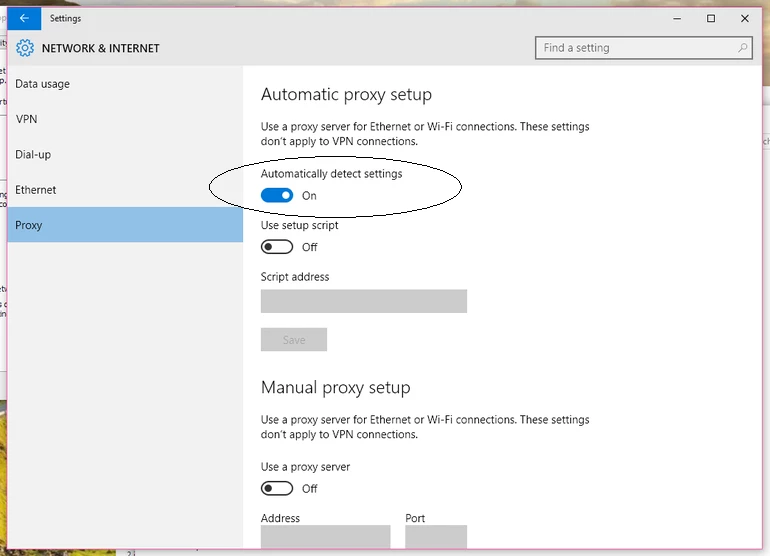
Also make sure , Automatic Proxy settings detect is ON. before installing Adobe Creative Cloud app.
I appear to have fixed it for now. I uninstalled every Adobe application, ran the cleaner and then went through and deleted every "Adobe" directory. Then reinstalled. So far, no error message, but I haven't run the applications yet to make sure all is well. There will probably be other issues down the line, somewhere.


 AdChoices