marjolijno78510420
Participant
December 25, 2018
Answered

Adobe Creative Cloud isn't working.

  • December 25, 2018
  • 3 replies
  • 891 views

Hello,

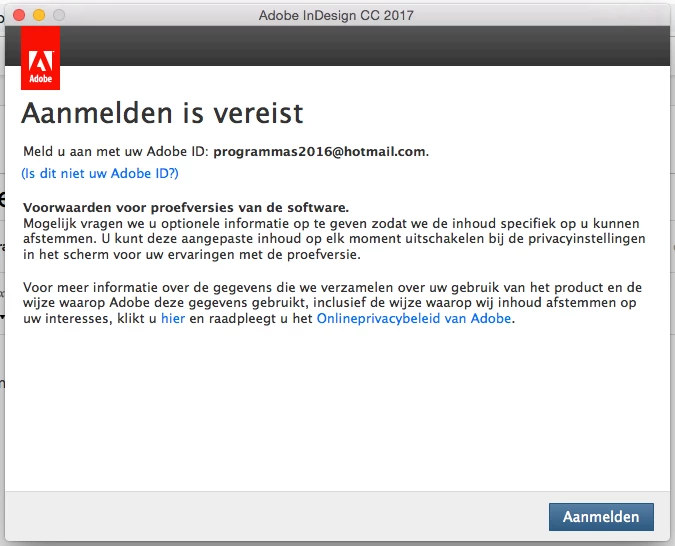
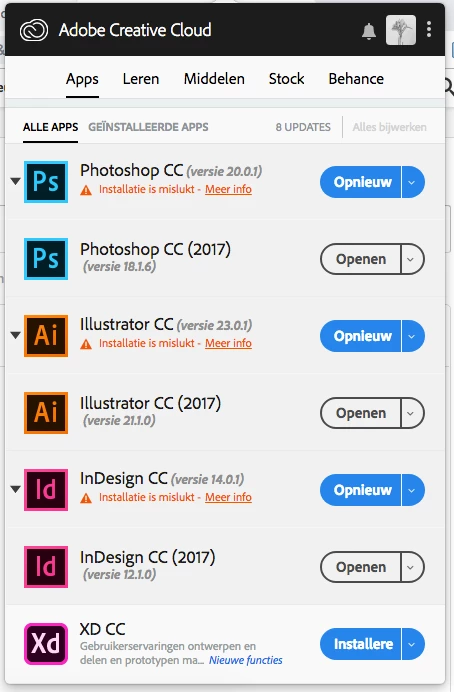
My Adobe Creative Cloud isn't working.

I can't get in and it won't update anymore.

He says I must sign up but I am already signed up.

Maybe you can help me.

(Merry Christmas!! )

This topic has been closed for replies.
Correct answer kglad

uninstall everything cc including preferences, https://helpx.adobe.com/creative-cloud/help/uninstall-remove-app.html

then uninstall the cc desktop app, https://helpx.adobe.com/creative-cloud/help/uninstall-creative-cloud-desktop-app.html

clean your computer of cc files per http://www.adobe.com/support/contact/cscleanertool.html

restart your computer (don't skip this)

reinstall the cc desktop app, https://creative.adobe.com/products/creative-cloud.

if you're unable to install the cc desktop app at this stage, use an administrator account (solution 4 here, https://helpx.adobe.com/creative-cloud/kb/creative-cloud-missing-damaged.html)

use the desktop app to install your cc programs/trials

3 replies

Bani Verma
Community Manager
Community Manager
December 27, 2018

Moving this query to Creative Cloud Download & Install​ community.

shawn_starc
Inspiring
December 25, 2018

You are getting trial error. I am sharing some steps to troubleshoot this.

) Close all adobe related processes in activity monitor (Creative cloud, Core sync, CC library, services for adobe desktop app, adobe desktop service, Adobe IPC broker, AAM updater)

2) Navigate to following locations and assign the current user full permissions to adobe folders. To navigate click "GO" from menu bar at then click 'Go to the folder'.. type /Library/application support/  and click go.

3) Look for folder name Adobe inside Application support > To assign the permission right click on adobe folder and click Get info.. A property window will open. Then click on lock symbol to enable editing. Then click + sign to add your username. Then change read only to read and write. Then click gear symbol at the bottom and click apply to enclosed items and click ok.. Proceed to next step then.

4) Navigate to following location /Library/application support/adobe and Delete Slstore and slcache .

5) Navigate to ~/Library/application support /adobe/ and delete OOBE

6)Navigate to /etc and open hosts file. Check if it has adobe entries . If no its fine, if yes replace the hosts file with a new hosts file with no adobe entries

7) Launch cc app and it should work fine

kglad
Community Expert
kgladCommunity ExpertCorrect answer
Community Expert
December 25, 2018

uninstall everything cc including preferences, https://helpx.adobe.com/creative-cloud/help/uninstall-remove-app.html

then uninstall the cc desktop app, https://helpx.adobe.com/creative-cloud/help/uninstall-creative-cloud-desktop-app.html

clean your computer of cc files per http://www.adobe.com/support/contact/cscleanertool.html

restart your computer (don't skip this)

reinstall the cc desktop app, https://creative.adobe.com/products/creative-cloud.

if you're unable to install the cc desktop app at this stage, use an administrator account (solution 4 here, https://helpx.adobe.com/creative-cloud/kb/creative-cloud-missing-damaged.html)

use the desktop app to install your cc programs/trials