


Inspiring
February 9, 2019
Answered

Adobe Creative Cloud wants me to re-install all my applications!

  • February 9, 2019
  • 4 replies
  • 882 views

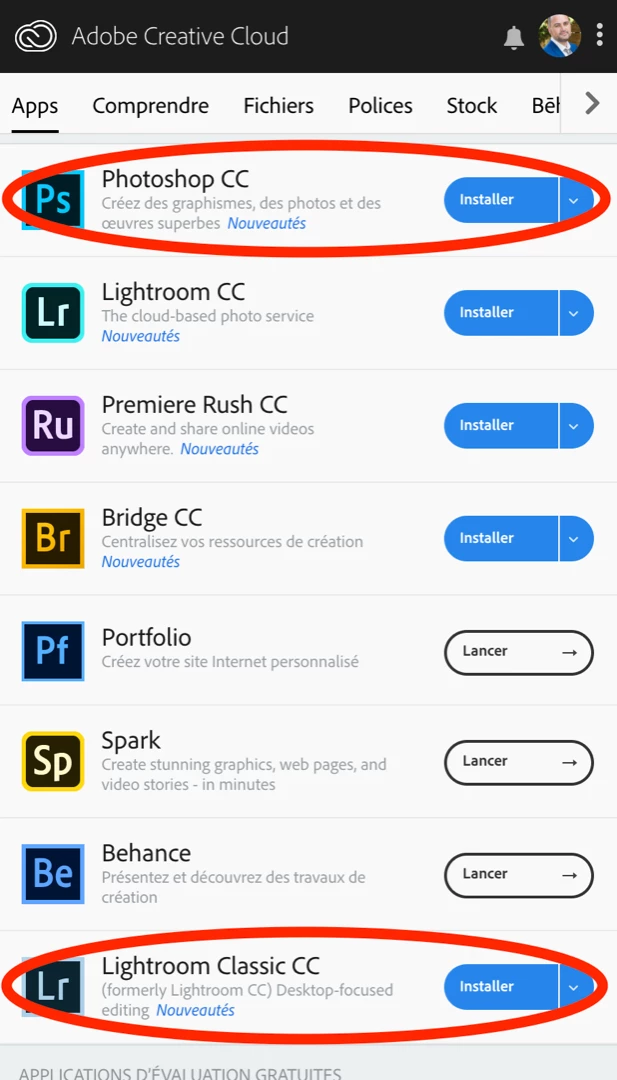
I just upgraded Lightroom Classic CC (version 8.2) and Photoshop CC (version 20.0.3). But today, Adobe Creative Cloud asks me to reinstall them all!! (see image).

I am logged in. I tried to logout/login, restarted my computer. Nothing works.

Also, something VERY ANNOYING. When clicking "Nouveautés" (What's new), it redirects you to a page of the 8.1 version of Lightroom Classic CC (New features summary for the December 2018 release of Lightroom Classic CC)

Since the subscription model, I find the Adobe CC upgrading process very buggy and frustrating.
This topic has been closed for replies.
Correct answer DenSavard

Ok, after more search, I found some answers here: https://www.fredmiranda.com/forum/topic/1582695

It seems Adobe released an upgrade by mistake. If you have the same problem, I would wait until the release comes out again. Maybe (hopefully) it will contain a fix for those who downloaded the "bad" upgrade.

4 replies

DenSavardAuthorCorrect answer
Inspiring
February 9, 2019

Ok, after more search, I found some answers here: https://www.fredmiranda.com/forum/topic/1582695

It seems Adobe released an upgrade by mistake. If you have the same problem, I would wait until the release comes out again. Maybe (hopefully) it will contain a fix for those who downloaded the "bad" upgrade.

Known Participant
February 9, 2019

You're right Den. I re-installed the apps and that actually rolled me back to 8.1 from 8.2 etc.

So Adobe did an accidental release and we had to re-install to roll back to the previous version. That's not cool ... I wish Adobe would be a little more careful.

Remember when we all had to create that magic folder to stop CC from destroying folders.

Adobe make some great software, but the deployment mechanism is too often faulty IMHO.

Participant
November 3, 2023

I had to do a hard reset on my laptop. Should I wait to download it again?


Known Participant
February 9, 2019

I re-installed all the applications that wanted to be Installed according to CC app. I have Photography plan so that was Lightroom, Lightroom Classic and Photoshop.

Lightroom Classic, which is my main app is fine, however Photoshop seems to have lost some of my preferences (my UI color preferences etc.). I thought those were synced in CC ? Anyway, no harm done. I still have all my personal curves presets in place etc.

Known Participant
February 9, 2019

I have the exact same problem as Den. The Creative Cloud App (v4.8.0.421) thinks all my applications need to be installed :

I see the same for Lightroom Classic & Lightroom CC, but not Bridge CC. All of the applications work perfectly.

Like Den I also tried various login/logout and reboot sequences. And tried clearing the OOBE folder.

macOS 10.13.6

kglad
Community Expert
Community Expert
February 9, 2019

install them.

Known Participant
February 9, 2019

Thanks kglad ... I just hit Install for Lightroom CC and everything seemed fine. Will try the other apps too, as I can always restore from Mac OS time machine if it breaks.

kglad
Community Expert
Community Expert
February 9, 2019

i saw the same thing, clicked install and everything works and looks correct.

i too do not understand what happened because i didn't pay any attention to what happened after i clicked update yesterday and i didn't check whether ps was already installed before clicking install today.