andreasherold
Participant
February 5, 2017
Answered

Adobe Creative Clouds requires Adobe Creative Cloud for installation

  • February 5, 2017
  • 2 replies
  • 258 views

Hey guys,

(I'm german by the way (thats why the second window is in german) and I'm using Windows 10.)

here's my problem:

I recently bought Adobe Premiere 14 but after installing the software and starting it, there was an small window telling me this:
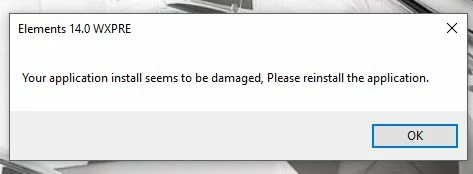
I googled the problem and found out that I probably need the Adobe Application Manager (aam) or Adobe Creative Cloud Desktop App (ACC) or both (I couldn't figure it out).

So I tried to install the aam, and everything it does was to update the aam but nothing more.

Then I tried to install the acc and this happend:
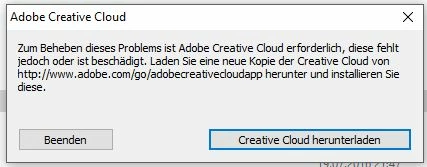
Before this window appears, there was the installation/downloading window for the acc. Everything worked as expected: downloaded complete, installation was (I think) also complete, but then this window (see above).

I also tried to delete everything with the cleaner tool and then reinstalling the ACC but the result was the same.

I'm really not interested in this cloud thing. I only want to use premiere elements 14 and that's it.

Thanks for your time.

This topic has been closed for replies.
Correct answer Atul_Saini

Hi Andreash25840390,

As you have encountered error " Error: "Adobe Creative Cloud is needed to resolve this problem" while installing Adobe Premiere Elements 14 on windows 10, I would request you to follow step 1 and 2 from this link: - Error: "Adobe Creative Cloud is needed to resolve this problem" and then, try to install Adobe Premiere Elements 14. Download link for Adobe Premiere Elements 14 is available here: - Download Adobe Premiere Elements 15, 14, 13, 12, 11, 10

You may refer the following link to get information on how to install and activate Adobe applications: - How to download, install, and activate Adobe applications.  

Please feel free to update this discussion with the results and in case you need further assistance with this.

Thanks. 

2 replies

Atul_Saini
Atul_SainiCorrect answer
Legend
February 16, 2017

Hi Andreash25840390,

As you have encountered error " Error: "Adobe Creative Cloud is needed to resolve this problem" while installing Adobe Premiere Elements 14 on windows 10, I would request you to follow step 1 and 2 from this link: - Error: "Adobe Creative Cloud is needed to resolve this problem" and then, try to install Adobe Premiere Elements 14. Download link for Adobe Premiere Elements 14 is available here: - Download Adobe Premiere Elements 15, 14, 13, 12, 11, 10

You may refer the following link to get information on how to install and activate Adobe applications: - How to download, install, and activate Adobe applications.  

Please feel free to update this discussion with the results and in case you need further assistance with this.

Thanks. 

jbm007
Community Expert
Community Expert
February 5, 2017

If you purchased a perpetual serial number license you should not need to install Adobe Creative Cloud.

make sure when you install your app you R-click the setup file and select  "run as administrator"