Participating Frequently
May 25, 2014
Answered

Adobe CS5.5 Web Premium: Einige Komponenten konnten nicht installiert werden...

  • May 25, 2014
  • 1 reply
  • 1063 views

Hallo liebe Community,

ich habe heute meine Adobe Web CS 5.5 Win Version auf meinem i7 PC von den DVDs aus installiert. Hardware-/Software-Info: i7, 16 GB RAM, Windows 7 Professional 64bit.

Nachdem die Installation durchgelaufen ist, meldete die Installationsroutine beim Abschluß, daß einige Komponenten nicht installiert werden konnten. Jedoch hatte mir die Installationsroutine nicht mitgeteilt, WELCHE Komponenten nicht installiert wurden bzw. Probleme machten. --> Beim erneuten Einlegen der ersten (von zwei) Installations-DVDs war nicht zu sehen, daß bei einer Programm-Komponente ein Häkchen fehlte....

1. Kann ich meine CS 5.5 - Installation (im Nachhinein) auf Fehler überprüfen? Wenn ja, wie?

2. Sollte ich meine Version noch einmal installieren? Wenn ja, wie am besten? Falls ich die Software vorher deninstallieren muss, wie tue ich das GRÜNDLICH (Stichwort Registry!!!)

3. Wie kann ich dann abschließend meine Adobe Web Premium CS 5.5 danach sauber installieren?

4. Gibt es generell Probleme der Installation von Adobe Web Premium CS 5.5 unter Windows 7? Wie siehts denn da aus mit Patches, Bugfixes usw.?

Danke an alle Antwortenden im Voraus!!!

Gruß,

André
    This topic has been closed for replies.
    Correct answer kglad

    Hi,

    thanks for your answer. Understood - Hände weg von Acrobat Pro X (hands away from Acrobat Pro X) - I also found out, how you already wrote - that "my" Acrobat Pro X was installed with my CD5.5 too.

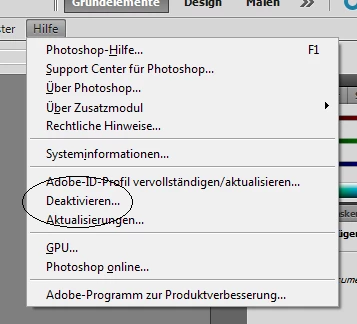
    I checked over the Start-Button the folder Adobe Web Premium CS5.5. All programs are installed and accessable too. But one last question - before we can close this case :-) - you wrote in your e-Mail "...by opening it (or any other adobe program) and clicking help: if all's well, 'activation' should be grayed-out and unclickable while 'deactivate' is clickable...." [see also the picture below...]

    I think, you meant my help-window should look like this, right?! "Deaktivieren" means in english deactivate...

    Thanks for all your support & help!!!!! Now its working :-)

    By the way, it is alos possible to install a another Version of a CS from Adobe - for instance a newer one - beside my existing CS5.5?

    Thanks in advance!!

    Best regards from Berlin,

    André


    ithought you would see an activation option grayed out and deactivate clickable. 

    your screenshot shows no activation option and deactivate is clickable which also means your product is activated.

    and yes, you can install other cs versions and they will all work without problem.  (adobe acrobat is the only adobe program that is problematic if more than 1 version is installed.)

    1 reply

    kglad
    Community Expert
    Community Expert
    May 25, 2014
    amflash11Author
    Participating Frequently
    May 26, 2014

    Hallo,

    erst mal vielen Dank für Deine Antwort.

    Der unter Punkt 1. genannte Hinweis hat mir leider nicht geholfen, da ich keine log-Datei gefunden habe. Zur Info - ich habe den Ordner von Adobes Installationsroutine übernommen, der mir vorgeschlagen wurde. Lediglich habe ich mich für das Laufwerk D: entschieden, nicht C:, da ich dort nicht mehr so viel Platz habe.

    Adobes Installer schlug vor:

    C:\Program Files\Adobe

    Von mir ausgewählt...(weil auf Laufwerk C: nicht mehr so viel Platz war....)

    D:\Program Files\Adobe

    Danach habe ich die Installationsroutine regurlär fortgesetzt.

    Aber ich habe weder unter D:\Program Files\Adobe - noch unter D:\Program Files (x86)\Adobe Ordner namens "Gemeinsame Dateien" finden können, auch nicht unter D:\Programme (x86)\ und auch nicht unter D:\Programme\ - und auf Laufwerk C: auch nicht. Auch ergab meine Suche nach Dateien mit den Endungen ".log.gz" auf dem gesamten D:-Laufwerk kein Ergebnis.

    Was empfiehlst Du? Neu-Installation? Wenn ja, wie am besten?

    Danke für die Antwort!!

    Gruß,

    André

    amflash11Author
    Participating Frequently
    May 26, 2014

    Hallo,

    ich habe noch mal meinen ganzen PC nach einer log-file durchsuchen lassen und wurde doch noch fündig.

    Ich habe nur den "Summary"-Teil hier mal herauskopiert - was von diesen Meldungen brauche ich nicht beachten - welche sollte ich beachten?

    Danke & Gruß,

    André

    -------------------------------------- Summary --------------------------------------

    - 0 fatal error(s), 7 error(s), 8 warning(s)

    ----------- Payload: {CFA46C39-C539-4BE9-9364-495003C714AD} Adobe SwitchBoard 2.0 2.0.0.0 -----------

    WARNING: DF029: ARKServiceControl::StartService: Service not started/stopped SwitchBoard. Current State: 0 Exit Code: 0 Service Specific Exit Code: 0(Seq 1)

    ----------- Payload: {2EE4F060-CEE6-4002-AA8B-91B791541767} Pixel Bender Toolkit 2.6.0.0 -----------

    WARNING: DF035: CreateAlias:Icon file does not exist at C:\Program Files (x86)\Adobe\Adobe Utilities - CS5.5\Pixel Bender Toolkit 2.6\windows\pb_app.icofile:\\\C:\PIXELB~1\source\winwood\Staging%20Area\windows\pb_app.ico42178f80493091e8e552c84a2897e9da68fce32_32_f80493091e8e552c84a2897e9da68fce for icon C:\ProgramData\Microsoft\Windows\Start Menu\Programs\Adobe Web Premium CS5.5\Adobe Pixel Bender Toolkit 2.6.lnk with target C:\Program Files (x86)\Adobe\Adobe Utilities - CS5.5\Pixel Bender Toolkit 2.6\Pixel Bender Toolkit.exe(Seq 89)

    ----------- Payload: {7202D4A7-F7E6-4e7a-B77D-7B1C4E8B5CA6} Adobe Flash Player 10 ActiveX 10.0.0.0 -----------

    ERROR: Error 1722.There is a problem with this Windows Installer package. A program run as part of the setup did not finish as expected. Contact your support personnel or package vendor. Action NewCustomAction1, location: C:\Users\BAM\AppData\Local\Temp\InstallAX.exe, command: -install activex -msi

    ERROR: Install MSI payload failed with error: 1603 - Schwerwiegender Fehler bei der Installation.

    MSI Error message: Error 1722.There is a problem with this Windows Installer package. A program run as part of the setup did not finish as expected. Contact your support personnel or package vendor. Action NewCustomAction1, location: C:\Users\BAM\AppData\Local\Temp\InstallAX.exe, command: -install activex -msi

    ----------- Payload: {43A1C48E-3E50-410e-951C-E17A66BBF824} Adobe Flash Player 10 Plugin 10.0.0.0 -----------

    ERROR: Error 1722.There is a problem with this Windows Installer package. A program run as part of the setup did not finish as expected. Contact your support personnel or package vendor. Action NewCustomAction1, location: C:\Users\BAM\AppData\Local\Temp\InstallPlugin.exe, command: -install plugin -msi

    ERROR: Install MSI payload failed with error: 1603 - Schwerwiegender Fehler bei der Installation.

    MSI Error message: Error 1722.There is a problem with this Windows Installer package. A program run as part of the setup did not finish as expected. Contact your support personnel or package vendor. Action NewCustomAction1, location: C:\Users\BAM\AppData\Local\Temp\InstallPlugin.exe, command: -install plugin -msi

    ----------- Payload: {47CE893F-A0FF-4094-AA16-5209AEA7C7E0} Firefox Plugin CS5.1 6.1.0.0 -----------

    WARNING: DF012: File/Folder does not exist at E:\Adobe CS5_5\payloads\AdobeContribute6.1-FFPlugin\OEM(Seq 32)

    ----------- Payload: {208DE3D5-541C-41B0-8595-7A608A6E4306} IE Plugin CS5.1 6.1.0.0 -----------

    WARNING: DF012: File/Folder does not exist at E:\Adobe CS5_5\payloads\AdobeContribute6.1-IEPlugin\OEM(Seq 26)

    ----------- Payload: {4A4F91EA-5951-4C5C-B911-027D802817EB} Office Plugin CS5.1 6.1.0.0 -----------

    WARNING: DF012: File/Folder does not exist at E:\Adobe CS5_5\payloads\AdobeContribute6.1-OfficePlugin\OEM(Seq 34)

    ----------- Payload: {DD309051-FACF-4A5E-87F1-C57154BB3DE8} Adobe Contribute CS5.1 6.1.0.0 -----------

    WARNING: DF012: File/Folder does not exist at E:\Adobe CS5_5\payloads\AdobeContribute6.1-mul\OEM(Seq 8283)

    ----------- Payload: {8DADF070-FE60-4899-8EF0-4242E7702F7D} Adobe Fireworks CS5.1 11.1.0.0 -----------

    WARNING: DF012: File/Folder does not exist at E:\Adobe CS5_5\payloads\AdobeFireworks11.1.0All\OEM(Seq 1215)

    ----------- Payload: {AFC62B78-6F7C-46D8-B735-24EBE21EE149} Adobe Fireworks CS5.1_AdobeFireworks11.1.0de_DELanguagePack 11.1.0.0 -----------

    WARNING: DF012: File/Folder does not exist at E:\Adobe CS5_5\payloads\AdobeFireworks11.1.0de_DELanguagePack\OEM(Seq 75)

    ERROR: DW050: The following payload errors were found during install:

    ERROR: DW050:  - Adobe Flash Player 10 Plugin: Install failed

    ERROR: DW050:  - Adobe Flash Player 10 ActiveX: Install failed

    Please search the above error/warning string(s) to find when the error occurred.

    These errors resulted in installer Exit Code mentioned below.

    -------------------------------------------------------------------------------------

    Exit Code: 6 - Silent workflow completed with errors.

    *=*=*=*=*=*=*=*=*=*=*=*=*=*=*=*=*=*=*=*=*=*=*=*=*=*=*=*=*=*=*=*=*=*=*=*=*=*=*=*=*=*=*

    END - Installer Session

    *=*=*=*=*=*=*=*=*=*=*=*=*=*=*=*=*=*=*=*=*=*=*=*=*=*=*=*=*=*=*=*=*=*=*=*=*=*=*=*=*=*=*