
maxc82584694
Participant
August 21, 2016
Answered

Adobe CS5.5 Web Premium won't install on MacOS Sierra

  • August 21, 2016
  • 4 replies
  • 8649 views

So I recently bought a new MacBook Pro. On my old Mac I purchased Adobe CS5.5 Web Premium. I would like that suite on my new Mac however it does not have an optical drive so I figured I would download it from here https://helpx.adobe.com/creative-suite/kb/cs5-5-product-downloads.html. After downloading the file I clicked on install.app and the following happens:
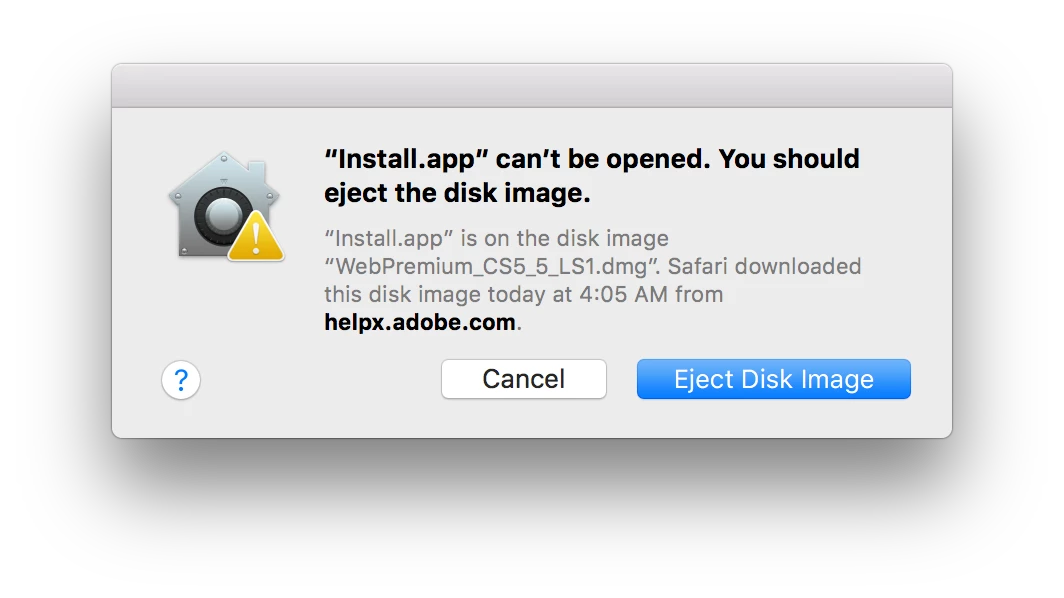
What am I doing wrong? Is there a different place I can go to download the dmg?

Thanks

This topic has been closed for replies.
Correct answer maxc82584694

I did this already and even disabled gatekeeper from the command line

sudo spctl --master-disable

No luck.


I figured it out, here is the solution:

Right click on the app and go to 'Show Package Contents'

Navigate to 'Contents/MacOS' and open that folder in Terminal

In terminal run: sudo ./Install

4 replies

Participant
January 30, 2017

OMG, thank you so much for finding this answer utilizing Terminal!  I've been having problems with my programs for WEEKS! Something went wrong and none of them would open. I followed a million different answers without being able to fix the problem, including trying to uninstall and reinstall, which kept bringing me to this same error message. I finally came across this answer and it WORKED!  THANK YOU!

Participant
January 8, 2017

See this for MacOS Sierra. Worked for me for CS5.5.

Installing Creative Suite on macOS 10.12 (Sierra)

Participant
January 9, 2017

This worked!  Thank you!

John Waller
Community Expert
Community Expert
August 21, 2016

MacOS Sierra has not yet been released in its final version.

I presume you mean your new MacBook Pro is running OS X 10.11 El Capitan?

maxc82584694
Participant
August 21, 2016

I am running MacOS Sierra Beta

John Waller
Community Expert
Community Expert
August 21, 2016

OK, so you're on an unsupported, yet-to-be-released OS.

Try changing your security settings:

- Click on the Apple icon in the top left corner of your screen and choose System Preferences.

- Next, click on Security & Privacy icon.

- To edit the security settings, click the padlock icon in the bottom left of the window.

- You will be asked to confirm your Mac credentials, enter them and hit Unlock.

- On the following screen, you'll see the options for "Allow applications downloaded from", you need to click on the "Anywhere" radio button, once you click that you will see a confirmation window, click on "Allow From Anywhere".

John T Smith
Community Expert
Community Expert
August 21, 2016

IF Mac El Capitan read below

CS6 and earlier programs have not been tested and will not be updated to run on Mac El Capitan

-which means that you try to use CS6 and earlier at YOUR risk of having problems

-you may get CS6 and earlier programs to install and run, or you may not (some do, some don't)

-Java https://helpx.adobe.com/dreamweaver/kb/dreamweaver-java-se-6-runtime.html may help

Install CS5 on Mac 10.11 https://forums.adobe.com/thread/2003455 may help (also for other than CS5)

-also a TEMPORARY security change https://forums.adobe.com/thread/2039319

-http://mac-how-to.wonderhowto.com/how-to/open-third-party-apps-from-unidentified-developers-mac-os-x-0158095/

-and more on gatekeeper https://support.apple.com/en-au/HT202491

maxc82584694
Participant
August 21, 2016

I tried all of the above but it still doesn't work. Clicking the question mark on the pop up gives the following: