Participating Frequently
March 8, 2018
Answered

Adobe Photoshop Elements 15 läßt sich nicht installieren

  • March 8, 2018
  • 1 reply
  • 661 views

Hallo,

ich habe folgendes Problem:

Ich habe einen neuen Windows-Rechner auf dem ich mein Photoshop-Elements 15 wieder installieren möchte. Leider erhalte ich immer folgenden Hinweis:
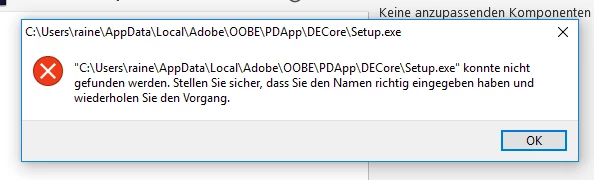
Aber der richtige Pfad läßt sich nicht eingeben und diesen Pfad finde ich nicht auf meinem Rechner.

Auch die Installation von Acrobat Reader DC free wird abgebrochen.

Habe schon mit Ccleaner alles bereinigt. Trotzdem erhalte ich vorher immer noch die Meldung, dass eine alte Version gefunden wurde.

Was kann ich tun, damit ich gekaufte Adobe-Produkte installieren kann?

Rainer

    This topic has been closed for replies.
    Correct answer kglad

    Hello kglad,

    i have tried your advices, but unfortunately it has not worked. I always get the same error-notification.

    I tried to install photoshop elements 2018 as trial but i got the same notification. I am not able to install any of the products of adobe...

    Ccleaner says that there is no problem at all. And I don't know how to delete that notification. I am disappointed with the result.

    I remember when I had been on my employment (now I am retired) I often had problems installing Adobe products. I think there is a big problem of the installing process. The software engineers have to think about a user friendly process. I want to work with the programm and i don't want to solve problems installing a programm.

    But to my existing problem: will be there a solution?


    you can't get help with v15 from adobe support, but you can with 2018.  if you contact adobe and carefully record what they do to install 2018, you should be able to duplicate the steps and install v15.

    using a browser that allows popups and cookies,  contact adobe support during pst business hours by clicking here and, when available, click 'chat', http://helpx.adobe.com/x-productkb/global/service-ccm.html

    or contact the Adobe Twitter team at @AdobeCare

    1 reply

    kglad
    Community Expert
    Community Expert
    March 8, 2018

    what installation files (names, extensions and sizes) are you using to install pse 15? (typically, for windows, there are two files - an exe and 7z)

    [moved from Installing, Updating, & Subscribing to Acrobat to Downloading, Installing, Setting Up]

    Participating Frequently
    March 8, 2018

    Hello,

    to install i used this file: PhotoshopElements_15_LS30_win64.exe

    and

    Acrobat Reader DC: AcroRdrDC1801120035_de_DE.exe

    kglad
    Community Expert
    Community Expert
    March 8, 2018

    those are for two different installations.

    put the pse file in a directory by itself.  ie, with no other files.  then right click the pse exe and click 'run as administrator'.  what do you see?