


Participant
August 20, 2021
Answered

Adobe Photoshop still says Update Required despite everything being up to date. Help?

  • August 20, 2021
  • 5 replies
  • 10718 views

Hi all,

The other day I tried to open one of my Photoshop files and it popped up with this:
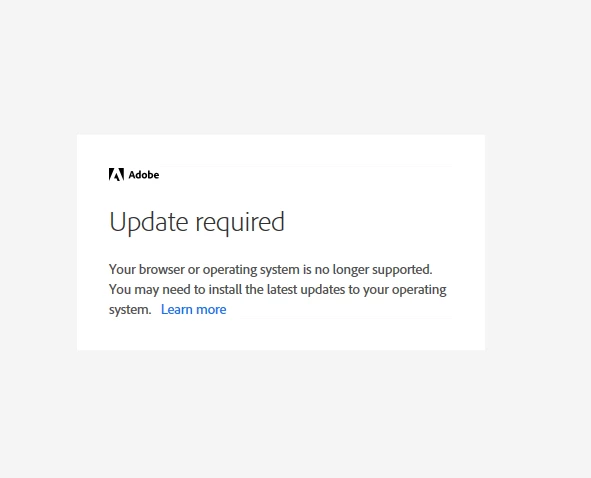
I opened the link and followed the steps to resolve the possible issues. As far as I can tell, both my Windows system and my Internet Explorer (the default browser for Windows) are completely up to date (Windows 10 & Internet Explorer 11, respectively).

Bear in mind that:

(a) I am a student on a school laptop, and as such, do not have administrative privileges which in turn means that

(b) I can't see what version of Internet Explorer I have, only that I have Windows 10.
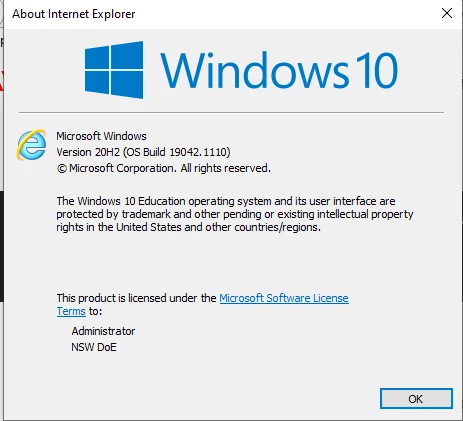
Google informs me that having Windows 10 automatically means I have Internet Explorer 11 so that's what I went with.


I have no idea how to fix this problem and I'd really love to have Photoshop up and running sometime soon (my assignments are counting on it!)


Thanks 😄

-Hannah

This topic has been closed for replies.
Correct answer BosjeR

My default browser is Chrome. I tried changing it to Edge, and then it also didn't work, and yes everything is tls 1.2 (windows and browsers are latest versions fwiw).


I installed Premiere Pro and used it fine by using the Creative Cloud Desktop. The issue is that I can no longer install my Premier Elements 2019 and my Photoshop Elements 2019. Again, I believe the installation window of both 2019 applications use a modified IE11 browser, which is no longer supported.


If you want to help, then please try to download https://esd.adobe.com/AdobeProducts/PRE/17/win64/PremiereElements_2019_LS31_win64.exe en try to install it.


Alright, so I gave in and spoke to support. I never have good experiences dealing with support as I find that they are typically unaware of specific problems like mine. I was wrong, they knew exactly how to solve it, gave me some tools to wipe all historic adobe software, then gave me two different executables for both creative cloud and 2019 premier elements, and then it worked without any issues.


Don't be like me, speak to support 🙂

5 replies

Participant
October 10, 2021

Hi.

Just disable your internet connection before running setup. For me it worked smoothly👍

Nancy OShea
Community Expert
Community Expert
August 20, 2021

TLS 1.0 and 1.1 are end of life now.  You need to enable TLS 1.2 connections throughout your system otherwise you cannot connect with Adobe's Servers.  See below for the announcement and links to relevant fixes which includes among other things using modern browsers with latest updates like MS Edge instead of IE.

https://helpx.adobe.com/x-productkb/multi/eol-tls-support.html


Hope that helps.


Nancy O'Shea— Product User & Community Expert
Known Participant
August 20, 2021

Unwanted software could be blocking you from seeing updates, so check your antivirus (I use Windows Defender)

to see if you have any threats.


Hope this helps. - An "Average" Adobe User

Participating Frequently
August 20, 2021

https://community.adobe.com/t5/photoshop-elements/unable-to-install-adobe-photoshop-elements-2019-on-win-10/m-p/12186914


I have the same issue like all these other people in the thread. 


No, the issue does not lie on my end with unwanted software, or is antivirus related.

kglad
Community Expert
Community Expert
August 21, 2021

if ie is your default browser, the problem is on your end because ie doesn't support current security. 


change your default browser to one that supports current security.

Participating Frequently
August 20, 2021

There is a problem currently with Adobe/Windows10/IE11 to log in to Adobe. The problem lies with Adobe but they have not officialy recognized it yet. Some users have reported it fixed by installing Creative Cloud and then trying to install/login. However this didn't work for me, maybe it works for you.

kglad
Community Expert
Community Expert
August 20, 2021

not even ms recommends using ie as your default browser.  is it?

Participating Frequently
August 20, 2021

That's the absurdity of this situation, yes. The actual discontinuation of IE11 won't be untill 2022, but already a few days ago certain services of IE11 were disabled (which I believe has triggered the issues to Adobe's login solution). 

kglad
Community Expert
Community Expert
August 20, 2021

contact your school it dept to resolve the problem.