
chrisa70812709
Participant
December 3, 2018
Answered

Adobe Premiere 18 installing with errors - Exit Code 1638

  • December 3, 2018
  • 1 reply
  • 609 views

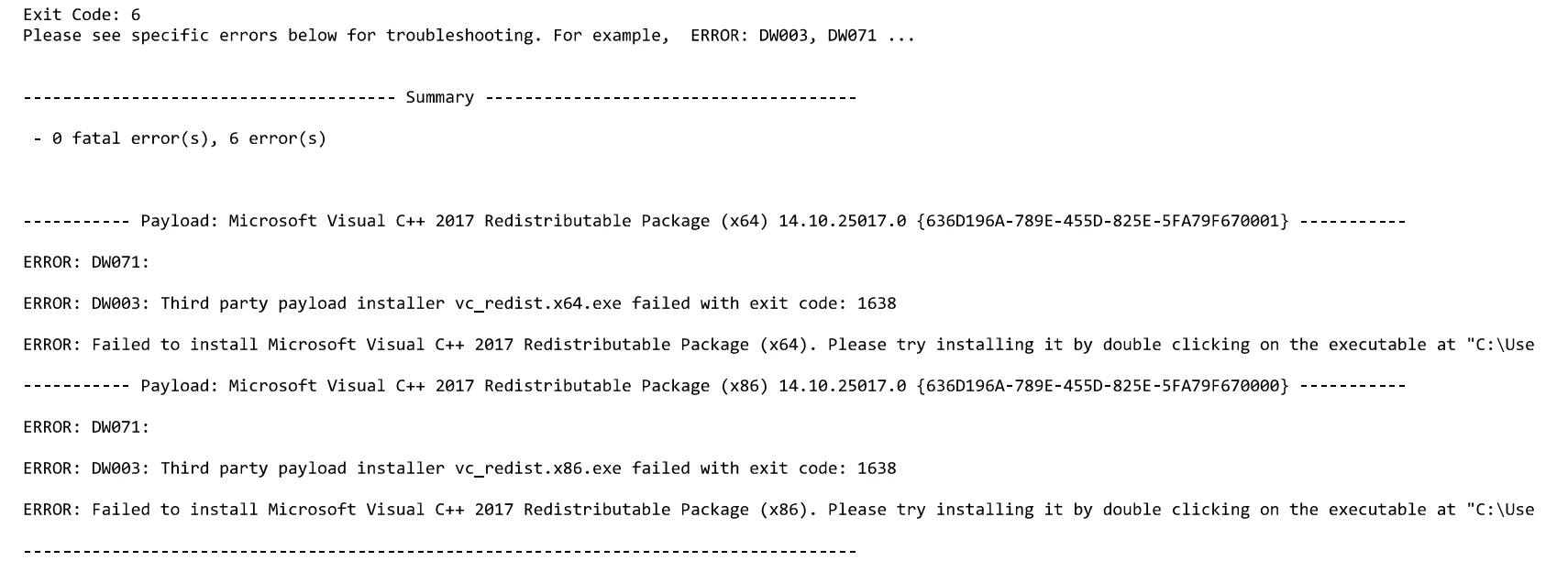
So I upgraded my computer to a newer, better computer (i7 Gen 8, 1070 GTX, 16GB RAM, etc.).  However, when I go to install Adobe Premiere and Photoshop, it says it finished with errors (see below).  I try to open Premiere and it gets hung up on PlayerMediaCore.pim.  I have reinstalled them multiple times, tried Adobe's cleaner program, and still nothing.  I have read multiple articles on the issue, but nothing is working.  I don't understand why a better computer is suffering from this.  Any ideas?
This topic has been closed for replies.
Correct answer Govardhan.V

If installed , manually uninstall Visual C++ Redistrubutable package 2017 ( X86) .

Download and install the same from below link :

https://support.microsoft.com/en-in/help/2977003/the-latest-supported-visual-c-downloads

Once installed restart the computer and try to install Premier pro app again.

1 reply

John T Smith
Community Expert
Community Expert
December 3, 2018
chrisa70812709
Participant
December 5, 2018

still not working...  I guess I will have to wipe the computer completely.  I dont get it.

Govardhan.V
Govardhan.VCorrect answer
Participating Frequently
December 5, 2018

If installed , manually uninstall Visual C++ Redistrubutable package 2017 ( X86) .

Download and install the same from below link :

https://support.microsoft.com/en-in/help/2977003/the-latest-supported-visual-c-downloads

Once installed restart the computer and try to install Premier pro app again.