
Participant
November 15, 2025
Answered

Adobe Premiere Elements 2026 not loading

  • November 15, 2025
  • 2 replies
  • 130 views

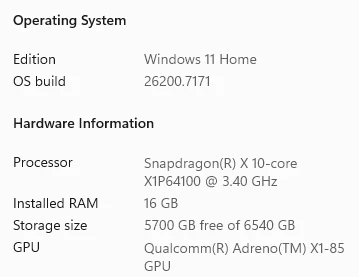
I own a microsoft surface Laptop 7th edition with a snapdragon processor with 
I have been trying to load Adobe Premiere Elements 2026 and get the following error message:
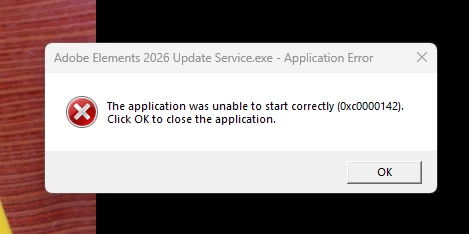
I have tried reinstalling, and updating my graphic adapter,.


Any Solutions

Correct answer Nancy OShea

Windows on ARM processor not supported. 

Qualcomm's Snapdragon are ARM-based. 

https://www.adobe.com/products/premiere-elements/tech-specs.html


Sorry.  😞


2 replies

Nancy OShea
Community Expert
Nancy OSheaCommunity ExpertCorrect answer
Community Expert
November 16, 2025

Windows on ARM processor not supported. 

Qualcomm's Snapdragon are ARM-based. 

https://www.adobe.com/products/premiere-elements/tech-specs.html


Sorry.  😞


Nancy O'Shea— Product User & Community Expert
Participant
November 16, 2025
Thank you for the information. I should have looked into it further before
purchasing the product. My expensive bad. Know see if I can get a refund
Gordon Frank
Nancy OShea
Community Expert
Community Expert
November 16, 2025

Log-in to your account below:

https://account.adobe.com/products


Reach out to Adobe Customer Care and explain that your equipment isn't compatible with Elements '26. Ask if you can upgrade to Premiere Pro Beta which is supported by ARM processors.

https://helpx.adobe.com/download-install/apps/system-requirements/apps-compatibility-copilot.html


See Premiere Pro System Requirements below:

https://helpx.adobe.com/premiere/desktop/get-started/technical-requirements/adobe-premiere-pro-technical-requirements.html


Good luck. 


Nancy O'Shea— Product User & Community Expert
kglad
Community Expert
Community Expert
November 15, 2025

can you rollback recent win 11 updates?