Inspiring
July 9, 2026
Answered

AdobeGCClient appears in C:\Windows\Temp

  • July 9, 2026
  • 34 replies
  • 167 views

我的筆記型電腦沒有被移動到任何地方。我不知道為什麼 Adob​​eGCClient 會隨機出現在 C:\Windows\Temp 目錄下,並且裡面還有本地的 win32 x64 dll 資料檔。

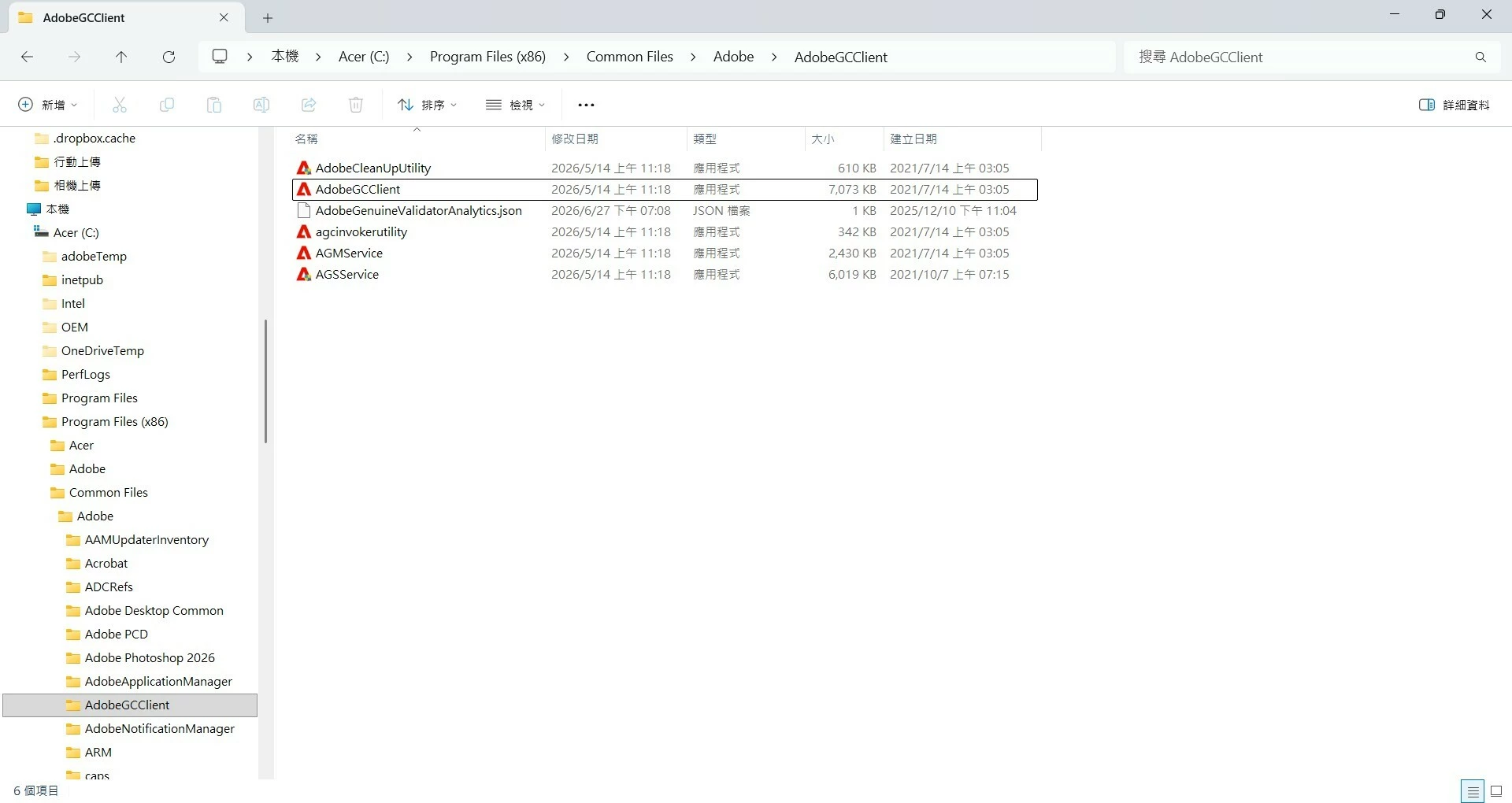
C:\Program Files (x86)\Common Files\Adobe\AdobeGCClient 目錄下只有應用程式文件,沒有 dll 資料檔。我用命令提示字元清空了臨時資料夾,但我擔心程式打不開。
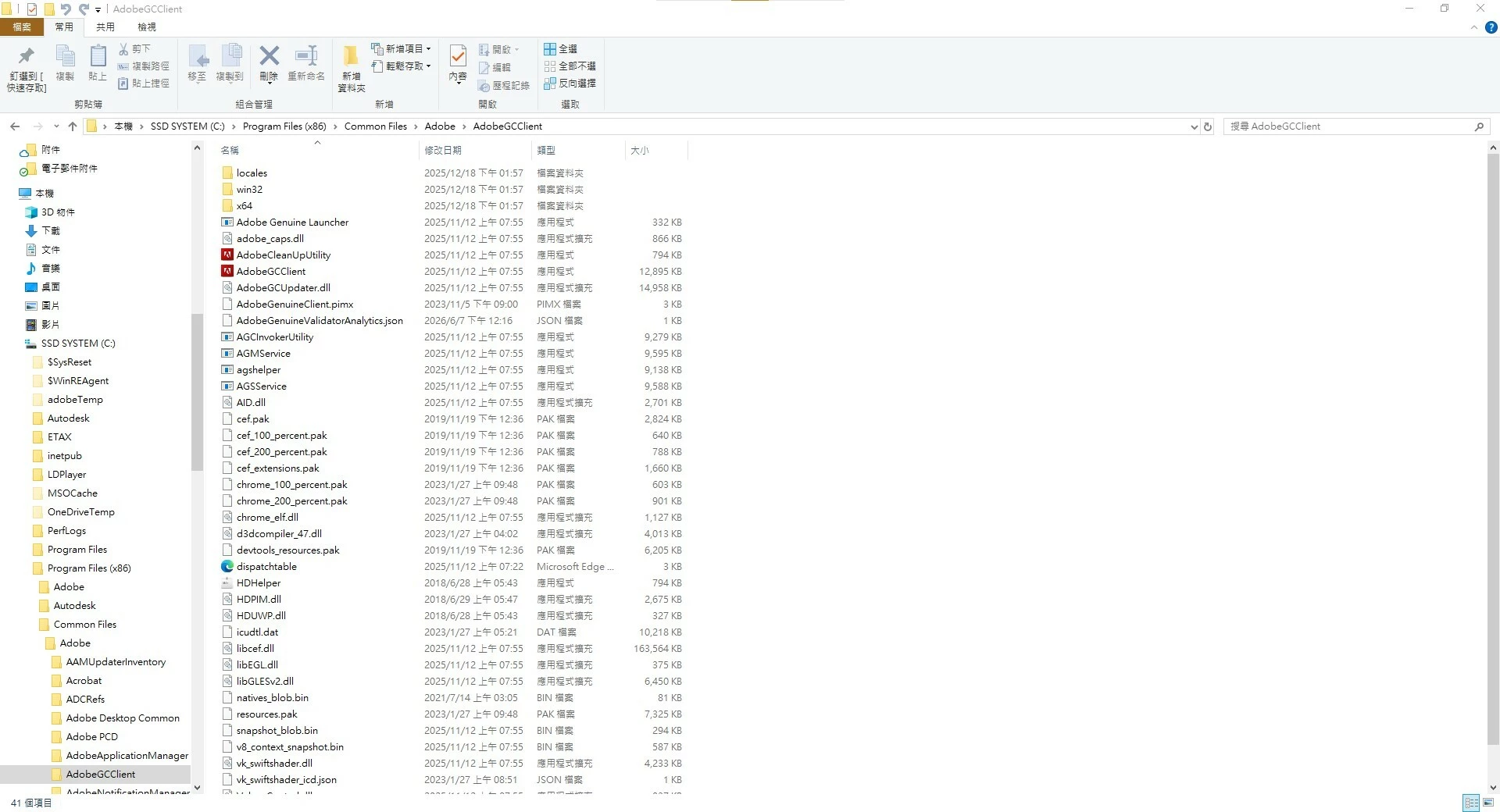
C:\Windows\Temp 中出現了 Adob​​eGCClog 資料夾。

原路徑為 C:\Program Files (x86)\Common Files\Adobe\AdobeGCClient

筆記型電腦上的 Adob​​e GCClient 莫名其妙地被清空了。

我的 AGSService 在六月進行了更新。更新過程中,在 C:\Windows\Temp 目錄下產生了 Adob​​eGCClient 暫存檔案。這個臨時文件今天出現了,Photoshop Illustrator 可以正常打開了。

This topic has been closed for replies.
Correct answer Jeff_A_Wright

Closing this discussion. Please see 

.

34 replies

Jeff_A_Wright
Community Manager
Jeff_A_WrightCommunity ManagerCorrect answer
Community Manager
July 17, 2026

Closing this discussion. Please see 

.

Nancy OShea
Community Expert
Community Expert
July 12, 2026

I don’t understand the problem. 


Nancy O'Shea— Product User & Community Expert
kglad
Community Expert
Community Expert
July 10, 2026

if you have no problem, what are you trying to accomplish?

Inspiring
July 10, 2026

@kglad A folder named NGL has appeared in C:\Windows\Temp. What is this?

kglad
Community Expert
Community Expert
July 10, 2026

it’s a cc folder for licensing and other tasks.

Inspiring
July 10, 2026

Why didn't you answer me?

Inspiring
July 10, 2026

Sorry, I've switched to the English version.

My laptop hasn't been moved anywhere. I don't know why AdobeGCClient is randomly appearing in the C:\Windows\Temp\AdobeGCClientDiscarded directory, and it also contains local win32 x64 DLL files.

The C:\Program Files (x86)\Common Files\Adobe\AdobeGCClient directory only contains application files, no DLL files. I tried searching for strange folder names in C:\Windows\Temp, but I ended up pasting different names. I cleared the temporary folder using the command prompt, but I'm worried the program won't open.

An AdobeGCClog folder has appeared in C:\Windows\Temp.

The original path was C:\Program Files (x86)\Common Files\Adobe\AdobeGCClient


The AdobeGCClient temporary file created in the C:\Windows\Temp\AdobeGCClientDiscarded directory has been deleted. When will the dll and dat files in the C:\Program Files (x86)\Common Files\Adobe\AdobeGCClient directory be restored?


Inspiring
July 10, 2026

@kglad 

What should be done?

Will the C:\Program Files (x86)\Common Files\Adobe\AdobeGCClient directory be restored?

Jeff_A_Wright
Community Manager
Community Manager
July 9, 2026

Thank you for posting to this public discussion forum, ​@Flawless_Odyssey6941.


I appreciate your question about the Adobe Genuine Service, and I can understand how an unexpected application could cause concern.


As suggested by ​@kglad this is part of the licensing process for Adobe applications. Additional information can be found at https://helpx.adobe.com/genuine/adobe-genuine-service.html.


I don’t see any active subscription associated with the account you used to post to this public discussion forum, @Flawless_Odyssey6941. What type of Creative Cloud subscription are you using to open Photoshop and Illustrator?

Inspiring
July 10, 2026

@Jeff_A_Wright The AdobeGCClient temporary file created in the C:\Windows\Temp directory has been deleted. When will the dll and dat files in the C:\Program Files (x86)\Common Files\Adobe\AdobeGCClient directory be restored?

Inspiring
July 10, 2026

@Jeff_A_Wright 

The AdobeGCClient temporary file created in the C:\Windows\Temp\AdobeGCClientDiscarded directory has been deleted. When will the dll and dat files in the C:\Program Files (x86)\Common Files\Adobe\AdobeGCClient directory be restored?


kglad
Community Expert
Community Expert
July 9, 2026

that’s an expected license check.

Inspiring
July 10, 2026

@kglad The AdobeGCClient temporary file created in the C:\Windows\Temp directory has been deleted. When will the dll and dat files in the C:\Program Files (x86)\Common Files\Adobe\AdobeGCClient directory be restored?

kglad
Community Expert
Community Expert
July 10, 2026

whenever you do something (at the right time) that triggers a license check.