


Participant
October 12, 2022
Answered

After Effects is not installing Cinema 4D

  • October 12, 2022
  • 2 replies
  • 638 views

I recently cleaned up my drives and the cinema 4D Plug-in for after effects got lost in the process.

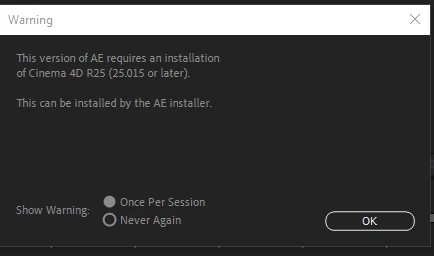
Now I constantly get this error message, which suggests that Cinema 4D will be reinstalled by reinstalling After Effects.

That is not the case.

Wether or not I keep my settings does not make a difference. Cinema 4D will not be installed under any circumstances.

How do I force an installation of the plug-in?
This topic has been closed for replies.
Correct answer Bloxus

Talked it over with support.

Solution:

1. Delete the After Effects Plug-in folder. Don't just clear it. Delete it. Make a Backup if there's something important there.

2. uninstall AE

3. Reinstall AE

4. Put your Backup back in.

2 replies

Mylenium
Legend
October 12, 2022

You may need to clean out the installer database and all that if you just arbitrarily deleted stuff.


Fix Adobe Creative Cloud download and install errors


Mylenium

BloxusAuthorCorrect answer
Participant
October 12, 2022

Talked it over with support.

Solution:

1. Delete the After Effects Plug-in folder. Don't just clear it. Delete it. Make a Backup if there's something important there.

2. uninstall AE

3. Reinstall AE

4. Put your Backup back in.

kglad
Community Expert
Community Expert
October 12, 2022

glad you got it resolved!