


Inspiring
December 6, 2022
Answered

Aplicativos contratados no plano não aparecem no Creative Cloud Desktop

  • December 6, 2022
  • 3 replies
  • 3111 views

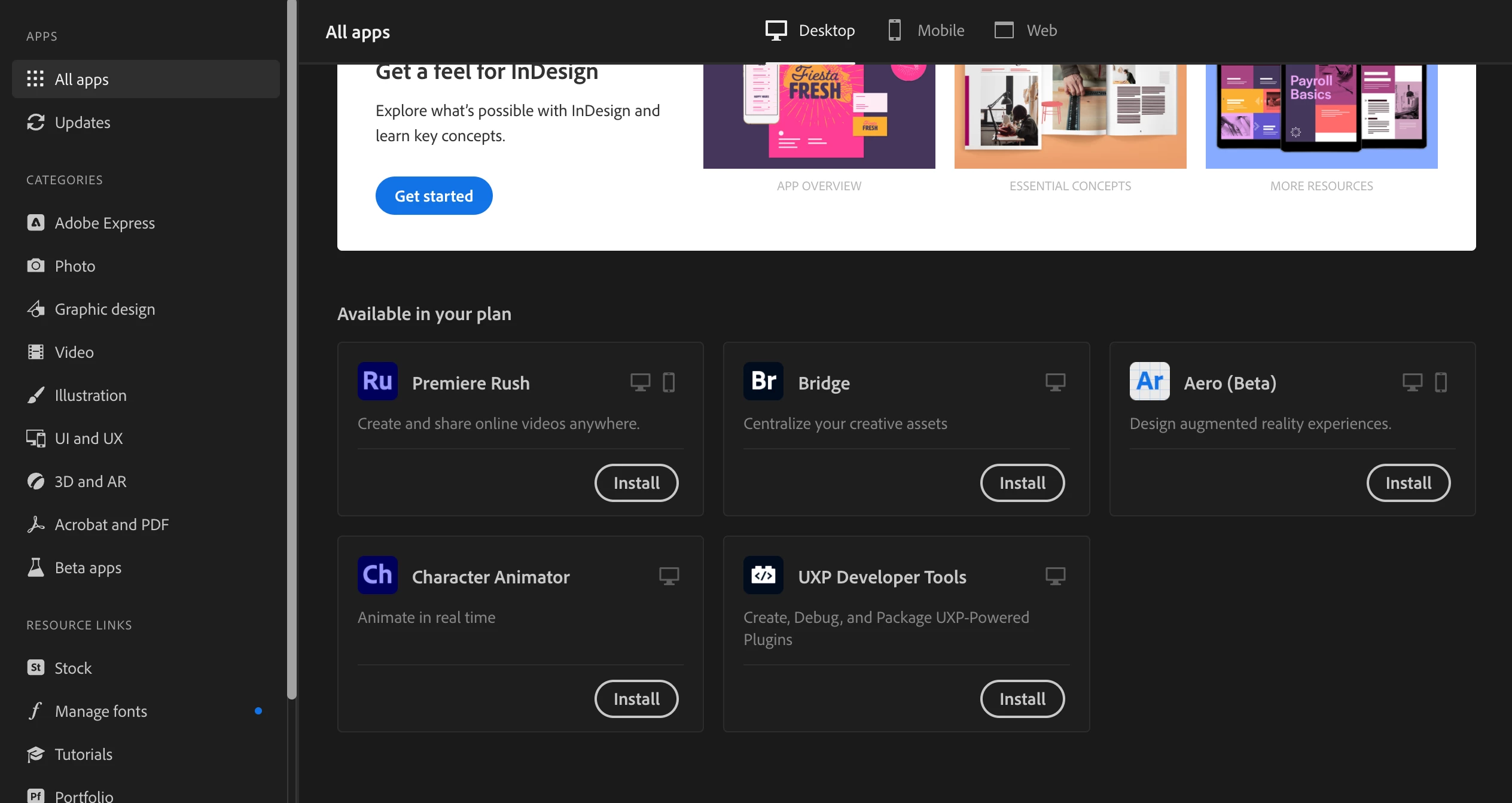
Contratei o plano Todos os Apps, mas ao baixar e instalar o Creative Cloud Desktop, estes apps não aparecem como disponíveis. Os apps aparecem no CC Web, mas ao clicar para instalar, abre o CC Desktop, porém, nada acontece. 


O problema aconteceu nos meus dois computadores, um com Windows 11 e outro Macbook Pro M1 rodando OSX Ventura 13.0.1.


Já tentei várias soluções encontradas online, como deslogar e relogar, reinstalar o CC, apagar registros e instalar do zero, etc. Nada funcionou.


Os canais de suporte são péssimos. O chat não responde nada e pelo telefone, ninguém atende. Já cancelei o pacote em uma conta e contratei em outra, porém, o problema persiste.
 

This topic has been closed for replies.
Correct answer sylker3d

After a while trying different solutions I stumbled with the cleaner tool here:
https://helpx.adobe.com/creative-cloud/kb/cc-cleaner-tool-installation-problems.html


After following the instructions, everything is back to normal. I can see all my apps and they run just fine now.


Thanks for the directions @kglad and @Jeffrey_A_Wright 

3 replies

sylker3dAuthorCorrect answer
Inspiring
December 7, 2022

After a while trying different solutions I stumbled with the cleaner tool here:
https://helpx.adobe.com/creative-cloud/kb/cc-cleaner-tool-installation-problems.html


After following the instructions, everything is back to normal. I can see all my apps and they run just fine now.


Thanks for the directions @kglad and @Jeffrey_A_Wright 

kglad
Community Expert
Community Expert
December 7, 2022

you're welcome.

Jeffrey_A_Wright
Community Manager
Community Manager
December 6, 2022

Sylker3d, sorry the computers cannot contact Adobe servers to allow you to evaluate a Creative Cloud All app membership. Since the problem is occurring on two separate computers, I would recommend you focus on the solutions offered in https://helpx.adobe.com/download-install/kb/common-network-connectivity-issues.html to unblock access on the local network.  


You may also want to confirm that the local network uses the recommended Domain Name Server and other settings from the hosting Internet Service Provider. A misconfiguration could lead to the exact behavior you have experienced on both macOS and Windows.

sylker3dAuthor
Inspiring
December 7, 2022

Thanks for the answer but I don't think this have anything to do with internet or connection, I have tried many different connections in different places. Also, I can access and dowload some apps, but not all those of my subscription plan. I cannot get Photoshop or Illustrator for instance. All the apps are available in my account page on the web, but not in Desktop so I cannot actually intall any of them.

kglad
Community Expert
Community Expert
December 6, 2022

check your account to verify your subscription is what you expect and to verify your adobe id, https://accounts.adobe.com


then, if that shows your account, sign out and back then back into the cc desktop app using the same adobe id that you used to confirm your subscription,  http://helpx.adobe.com/creative-cloud/kb/sign-in-out-creative-cloud-desktop-app.html

sylker3dAuthor
Inspiring
December 7, 2022

I"ve tried this before, no success. In my account page, it shows correctly my subscription plan and all apps available. CC Desktop does not reflect that, showing only the "free apps".

kglad
Community Expert
Community Expert
December 7, 2022

after checking your account, you signed out and back in to your cc desktop app using that same adobe id?


if yes, check @Jeffrey_A_Wright message about a connection problem