wxows22693217
Participant
July 3, 2018
Answered

App Icon 'Missing'

  • July 3, 2018
  • 1 reply
  • 5327 views

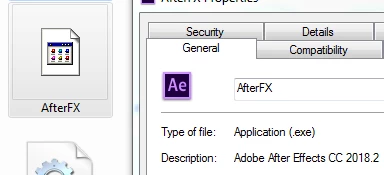
I recently installed Creative Cloud 2018 on a brand new hard drive, and the After Effects icon is showing up as missing, even though if I click into its properties, I can see it just fine:
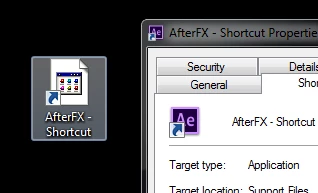
Any shortcuts I make to the desktop also show up as missing icon, and even after changing the icon for the shortcut, it still doesn't work.
This is only an issue with After Effects and all the other application icons work fine. Anyone else run into this issue?

This topic has been closed for replies.
Correct answer thatsmauri

Hi wxows22693217,

you could try clearing the thumbnails cache via the Disk Cleanup tool - here's how:
» https://neosmart.net/wiki/clear-thumbnails-cache/#How_to_clear_the_thumbnails_cache_in_Windows_7


If that doesn't work, you may need to rebuild the Icon Cache Database:

» Icons missing their specialized image - Microsoft Community


Best Regards,
Maurice

1 reply

thatsmauri
Community Expert
thatsmauriCommunity ExpertCorrect answer
Community Expert
July 3, 2018

Hi wxows22693217,

you could try clearing the thumbnails cache via the Disk Cleanup tool - here's how:
» https://neosmart.net/wiki/clear-thumbnails-cache/#How_to_clear_the_thumbnails_cache_in_Windows_7


If that doesn't work, you may need to rebuild the Icon Cache Database:

» Icons missing their specialized image - Microsoft Community


Best Regards,
Maurice

wxows22693217
Participant
July 5, 2018

This worked for me, thank you!

thatsmauri
Community Expert
Community Expert
July 5, 2018

Glad to hear it worked out for you
Happy Creating!