Participant
November 11, 2018
Answered

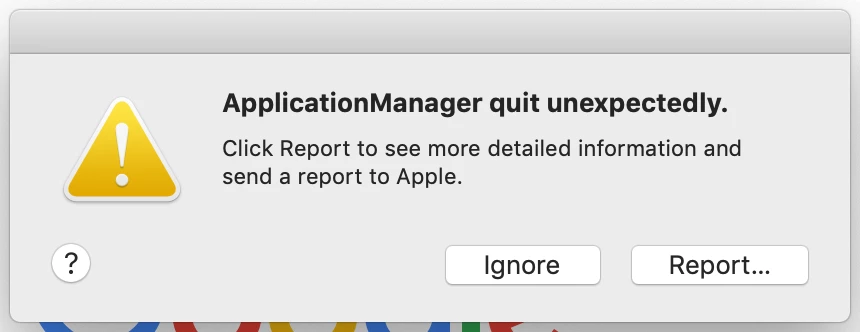
"ApplicationManager Quit Unexpectedly" - Mac

  • November 11, 2018
  • 1 reply
  • 1702 views

Hi All,

I'm having a continuous pop up message "ApplicationManager quit unexpectedly" every 5 minutes. I can either click "Ignore" or "Report". Ignore will get rid of the message and report does nothing. I'm desperately after help as i have tried booting in safe mode. I've tried Mac Diagnostics. I have restarted the mac a heap of times. I have reinstalled Creative Cloud, i have tried to use Adobe's repair option to fix issue and still no luck. I cannot uninstall Creative Cloud unless i uninstall Photoshop and i really don't want to do that. I have my Mac backed up with time machine but haven't tried a factory reset because i'm certain the issue will retain when i reinstall all of my apps and info.

I can be quit out of all my applications and it still comes up as an error. Please help anyone! I've searched high and low for answers.

Specs:
2013 Macbook Pro 15" Retina
Mac OS X Mojave 10.14.1
2.3ghz Intel i7
1tb Flash HDD

Thanks,
Cohen

This topic has been closed for replies.
Correct answer kglad

uninstall everything cc including preferences, https://helpx.adobe.com/creative-cloud/help/uninstall-remove-app.html

then uninstall the cc desktop app, https://helpx.adobe.com/creative-cloud/help/uninstall-creative-cloud-desktop-app.html

remove the oobe folder*

clean your computer of cc files per http://www.adobe.com/support/contact/cscleanertool.html

restart your computer (don't skip this)

reinstall the cc desktop app, https://creative.adobe.com/products/creative-cloud.

if you're unable to install the cc desktop app at this stage, use an administrator account (solution 4 here, https://helpx.adobe.com/creative-cloud/kb/creative-cloud-missing-damaged.html)

use the desktop app to install your cc programs/trials

*

    Mac OS: You can locate the OPM.db file in the \User\<user name>\Library\Application Support\Adobe\OOBE folder. To access the hidden user Library folder, see Access hidden user library files | Mac OS 10.7 Lion.

    Windows: You can locate the OPM.db file in the \Users\<user name>\AppData\Local\Adobe\OOBE folder.  To view the hidden AppData folder, see Show hidden files, folders, filename extensions | Windows XP, Vista, Windows 7.

1 reply

kglad
Community Expert
kgladCommunity ExpertCorrect answer
Community Expert
November 11, 2018

uninstall everything cc including preferences, https://helpx.adobe.com/creative-cloud/help/uninstall-remove-app.html

then uninstall the cc desktop app, https://helpx.adobe.com/creative-cloud/help/uninstall-creative-cloud-desktop-app.html

remove the oobe folder*

clean your computer of cc files per http://www.adobe.com/support/contact/cscleanertool.html

restart your computer (don't skip this)

reinstall the cc desktop app, https://creative.adobe.com/products/creative-cloud.

if you're unable to install the cc desktop app at this stage, use an administrator account (solution 4 here, https://helpx.adobe.com/creative-cloud/kb/creative-cloud-missing-damaged.html)

use the desktop app to install your cc programs/trials

*

    Mac OS: You can locate the OPM.db file in the \User\<user name>\Library\Application Support\Adobe\OOBE folder. To access the hidden user Library folder, see Access hidden user library files | Mac OS 10.7 Lion.

    Windows: You can locate the OPM.db file in the \Users\<user name>\AppData\Local\Adobe\OOBE folder.  To view the hidden AppData folder, see Show hidden files, folders, filename extensions | Windows XP, Vista, Windows 7.