
Participant
October 14, 2019
Question

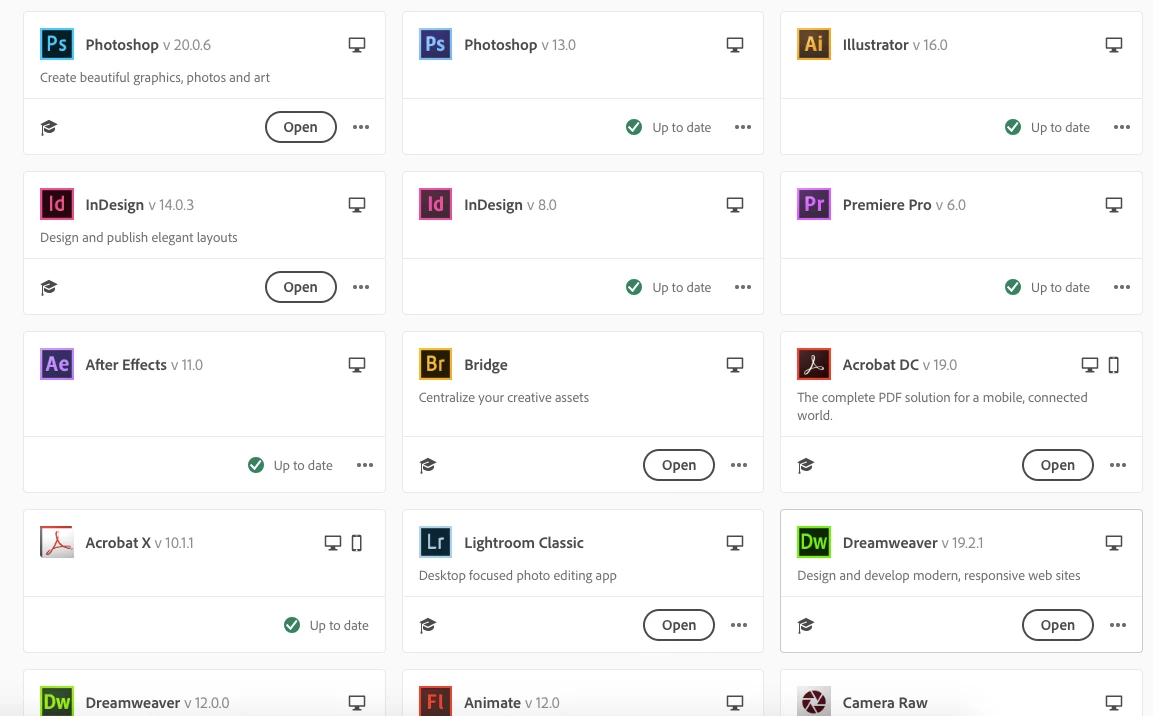
Applications are shown as double in Creative Cloud

  • October 14, 2019
  • 1 reply
  • 269 views

I just bought and installed Creative Cloud today, but instead of replacing my old CS applications, it just doubled them all (see below in the screenshot, there's doubles of Photoshop, InDesign and Dreamweaver visible. I manually removed those apps from my computer, but they still show here. Also, I have already tried rebooting my computer, restarting CC, and logging out/in of CC. They're still there, and there doesn't seem to be any way of removing them here.
This topic has been closed for replies.

1 reply

kglad
Community Expert
Community Expert
October 14, 2019

you should have properly uninstalled them:  https://helpx.adobe.com/creative-cloud/help/uninstall-remove-app.html


at this point you might be able to fix the problem by resetting the cc app: To reset the Creative Cloud desktop app, make sure it's in the foreground, then press: Win: Ctrl + Alt + R Mac: Cmd + Opt + R


if that fails, you'd probably need to do a complete clean (which won't allow you to install those old versions):


uninstall everything cc including preferences, https://helpx.adobe.com/creative-cloud/help/uninstall-remove-app.html
then uninstall the cc desktop app, https://helpx.adobe.com/creative-cloud/help/uninstall-creative-cloud-desktop-app.html
clean your computer of cc files per http://www.adobe.com/support/contact/cscleanertool.html
restart your computer (don't skip this)
reinstall the cc desktop app, https://creative.adobe.com/products/creative-cloud.
if you're unable to install the cc desktop app at this stage, use an administrator account (solution 4 here, https://helpx.adobe.com/creative-cloud/kb/creative-cloud-missing-damaged.html)
use the desktop app to install your cc programs/trials