

Jeffrey_A_Wright
Community Manager
Community Manager
May 20, 2014
Question

Applications missing from Creative Cloud Desktop application

  • May 20, 2014
  • 4 replies
  • 84861 views

If you are unable to locate a specific application then it is likely the computer you are using does not meet the current system requirements.  In the following example you can see that After Effects and Premiere Pro are missing from the list of available applications.
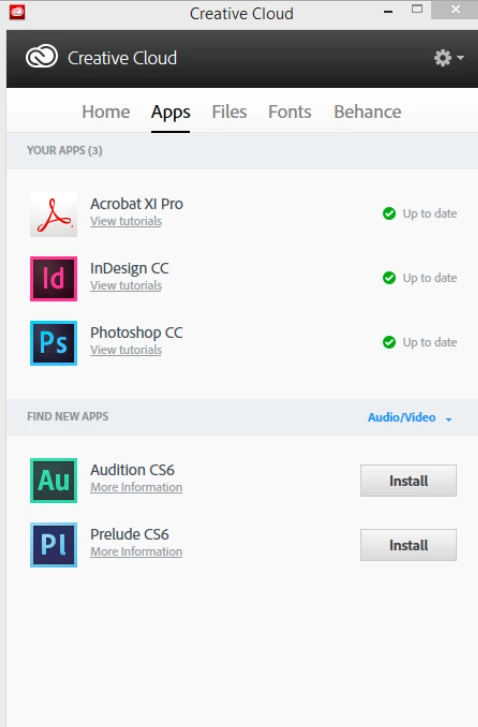
When I look at the System information for my Windows installation I am informed that I have a 32-bit version of Windows 8.
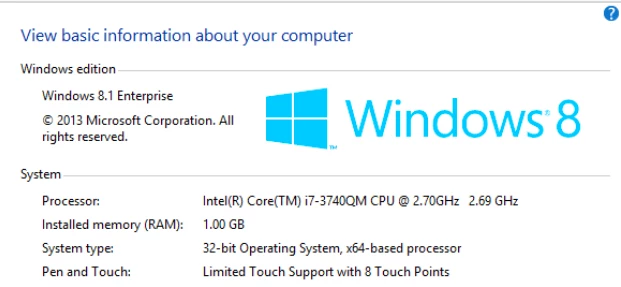
This means that I will be unable to install Premiere Pro or After Effects as my current computer does not meet the minimum system requirements.  You can find a list of Creative Cloud system requirements at Adobe Creative Cloud – Tech specs.

For additional information please see Not all apps displayed for download | Creative Cloud desktop app, Adobe Application Manager.

If you have confirmed that your computer meets and exceeds all of the listed System requirements then please see CC desktop lists applications as "Up to Date" when not installed.

Message was edited by: Jeff Wright Updated ink to http://helpx.adobe.com/creative-cloud/kb/all-apps-displayed-aam.html.

This topic has been closed for replies.

4 replies

eurekaa987
Participant
July 12, 2019

Thanks for the guide

orir92863031
Participating Frequently
February 5, 2017

Hello,

For some reason I can only download the Adobe Premiere CC 2014 version, although there are couple of newer ones.

How come?

Thanks,

Ori

Just Shoot Me
Legend
February 5, 2017

You have Video selected as what to display. Change it to All Apps.

orir92863031
Participating Frequently
February 5, 2017

It's still the same thing - only Premiere Pro CC 2014... Not a higher version..

ultimatet59636605
Participant
December 30, 2016

thanx

Participating Frequently
June 16, 2014

Dear Jeff.

This is very Common error with the Adobe Creative Cloud application.

If you have already have Download Adobe Creative Cloud application you can use Download Center : Adobe Creative Cloud for your Product Download.

You can also try this with your application if you are not a trail version user.

1. Launch the Adobe Application/ Creative Cloud application manager.

2. Click the gear icon in the upper-right corner and select Preferences.

3. In the Preferences menu, under General, click the Account tab.

4. Click Sign Out from Creative Cloud.

5. When prompted, sign in with your Adobe ID (usually your email address) and password.

Once You are done the application may ask you for update, Please let the application update Completely.

Note: Please Close all the other Adobe application before you Proceed.

All the Best.

Thank you

Maitreiyee.

Participant
July 2, 2014

Hi Maitreiyee,

I also faced the same problem as Jeff's. Tried your solution, but it did not work. I have still 26 days left of my trial. The App tab shows: Illustrator CC(2014) with green tick and Up to date. I have successfully worked on CC two days back, but I Quit it. Now when I signed out and signed it again after restart of comp, it doesn't work. Pl. help!

Jeffrey_A_Wright
Community Manager
Community Manager
July 2, 2014

Shalabh please see CC desktop lists applications as "Up to Date" when not installed - http://helpx.adobe.com/creative-cloud/kb/aam-lists-removed-apps-date.html for information on how to reinstall Illustrator CC 2014.