


Participating Frequently
October 3, 2026
Answered

Applications that are not compatible with my Mac Pro do not show older versions.

  • October 3, 2026
  • 10 replies
  • 54 views

In the Creative Cloud desktop app, I enabled Avatar > Preferences > Apps > Show older apps.

The problem is that my 2012 Mac Pro is incompatible with Photoshop and InDesign because my processor does not support AVX2 instructions.
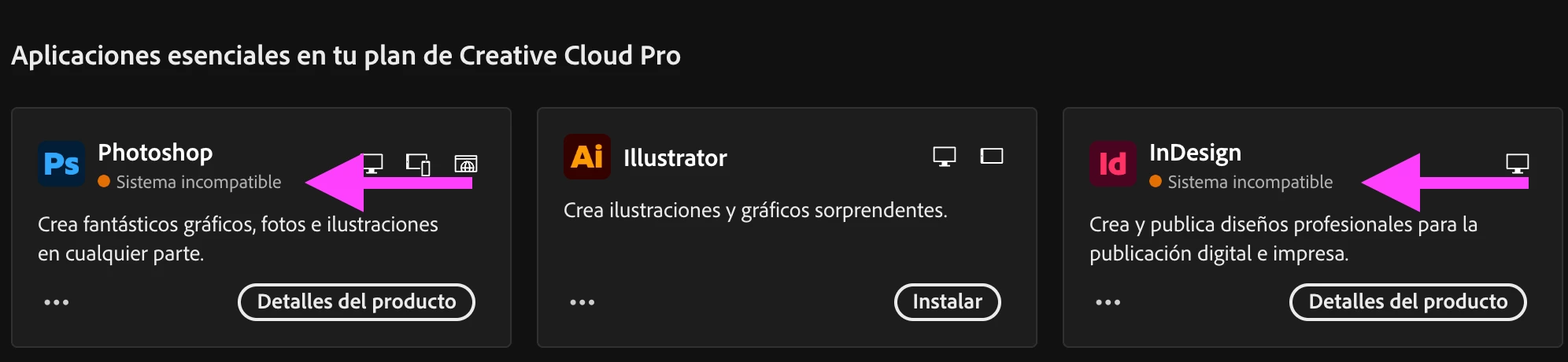
However, for the applications that can be installed, the "Other versions" option does appear—and in the case of Illustrator, as many as 32 older versions are listed. I don't understand why access to older versions is blocked precisely where it would be most useful: for applications that aren't compatible with my Mac Pro.
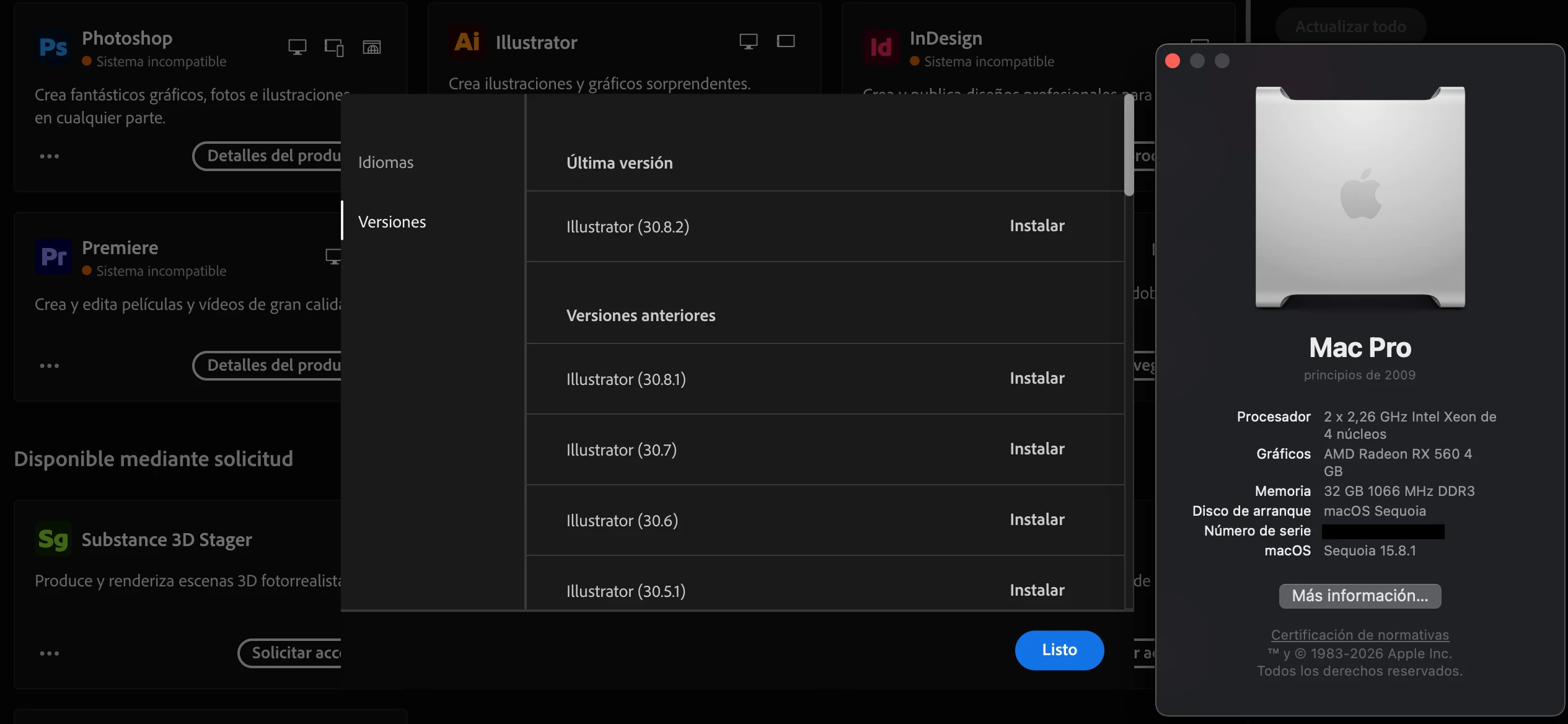
 

It doesn't make sense. Why would I want to install an old version of Illustrator if I can install the latest one? On the other hand, why can't I install Photoshop 2024 and InDesign 19.5, which *are* compatible with my Mac?

Adobe doesn't sell hardware. Why don't they give me access to older versions instead of forcing me to buy a new Mac? It would be so easy to keep customers who are still working on older Macs happy.

Why does Adobe act this way? Any solution?

Thanks in advance.

Correct answer Manan Joshi

This option shows only the latest two major versions. So that is the primary filter to show the versions

10 replies

ShivangiGupta
Community Manager
Community Manager
October 5, 2026

Hi ​@David R.,
We appreciate you reaching out.

In addition to the suggestion given by the experts, you can refer to this article: https://helpx.adobe.com/support/programs/cc-support-policy.html

I hope it clarifies the situation.

^Shivangi

^Shivangi
David R.Author
Participating Frequently
October 5, 2026

Thank you very much. That gives me some hope—at least regarding InDesign, which is the one I use most. I have an enterprise license, and I see there is a provision allowing the use of older versions at home for remote work in urgent situations. I’ll speak with my company's IT department.

kglad
Community Expert
Community Expert
October 5, 2026

​@David R. 


in the future, post in the enterprise & teams forum to get appropriate answers, https://community.adobe.com/questions-624

Nancy OShea
Community Expert
Community Expert
October 5, 2026

AVX2 has been the chip standard since 2015. I think it’s time for a new computer.


Creative Cloud products require Windows11+ or Mac Sequoia+  

Adobe expects users to have the latest operating systems, no more than 2 versions back.

If you’re not a fan of yearly OS upgrades, get a Win PC.  


Nancy O'Shea— Product User & Community Expert
David R.Author
Participating Frequently
October 5, 2026

It I understand I understand perfectly. Now try to understand me. My Mac Pro has dual Xeon processors, 32GB of RAM, and an RX560 4GB graphics card (Metal-compatible), and it runs Sequoia without issues. I have the full Adobe subscription; I don't need the absolute latest versions—I’d be happy running the most recent versions of Photoshop and InDesign compatible with my AVX processor (specifically these ones):

InDesign 19.5 (2024)

Photoshoo 24.x (2023)

This would be enough for my work and the latest version of Illustrator does work, though.

I know designers who use older machines because they still use Macromedia FreeHand.

All the best

David R.Author
Participating Frequently
October 3, 2026

Thank you very much for your answers. Best regards!

leo.r
Community Expert
Community Expert
October 3, 2026

In addition to what ​@Manan Joshi has already said:

As far as I understand, you even installed OCLP on your 2012 Mac Pro in hopes to run the latest Creative Cloud apps:


Otherwise, you wouldn’t be able to install Sequoia (unless I’m missing something).

In your case this, sadly, won’t help as this won’t upgrade your processor (as you know anyway).


Why does Adobe act this way? Any solution?


My guess is that they don’t want to be inundated with support requests for countless unsupported older versions being run on antique unsupported hardware (that’s just my speculation). But there’re no official ways to obtain installers for older versions beyond the ones offered via Creative Cloud.

Manan JoshiCommunity ExpertCorrect answer
Community Expert
October 3, 2026

This option shows only the latest two major versions. So that is the primary filter to show the versions

-Manan
David R.Author
Participating Frequently
October 3, 2026

And why does Illustrator allow me to install versions going back as far as 32 releases?

Community Expert
October 3, 2026

In your screenshot the major version shown is 30 which is the latest. So you should get options for 30 and 29 only. The different entries you show in your screenshot are minor versions of version 30 only.

-Manan