SMiThaYe
Participant
December 2, 2015
Answered

Apps launching when updating

  • December 2, 2015
  • 1 reply
  • 251 views

Recently updated Adobe Cloud to the latest version, also noted that all of the Adobe apps require an update.


yOb2Vx4.png

Apps > Updates:

  • Since I always check what each update entails I clicked on the 'What's New' and read the accompanying notes.
  • I then clicked on the blue 'Update' box and for the fifth time in a row the app keeps launching instead of updating. It warns of a conflict as shown in this popup (below).
    uGPG5TN.png
  • Closing the link to the update notes does not stop this from happening, this issue wasn't present in any of the previous Adobe Creative Cloud.


Then I noticed after pressing on the link that it appears the sensitivity for the app launching via Creative Cloud is too high, pressing on the 'What's New' also launches the app as does pressing anywhere else. Clearly this isn't working as intending and would appreciate a fix to avoid continued frustration.

Thanks.
This topic has been closed for replies.
Correct answer Sheena Kaul

Hi,

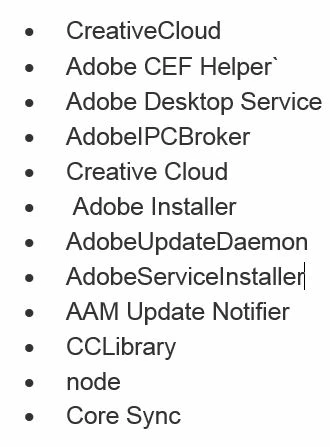
Please close the processes below from the task manager/activity monitor and then try:

Regards,

Sheena

1 reply

Sheena Kaul
Sheena KaulCorrect answer
Legend
December 2, 2015

Hi,

Please close the processes below from the task manager/activity monitor and then try:

Regards,

Sheena

SMiThaYe
SMiThaYeAuthor
Participant
December 2, 2015

Hello Sheena,

The following weren't in the Processes nor the Details tabs:

  • Adobe Desktop Service
  • Adobe Installer
  • Adobe Update Daemon
  • Adobe Service Installer
  • AAM Update Notifier
  • ( There was a CCLibraries (32-bit) not a CCLibrary, likely a slight typo but I stopped that anyway )

To highlight any potential issues, the following program was still running:

  • Adobe Acrobat Update Service (32 bit)


Started up Creative Cloud again and although I had no apps that required updating, clicking on the 'View Tutorials' link didn't launch the app.

I shall post again here again the IF the same problem occurs, I can't confirm it fixes my original problem as I would ideally have liked to try and repeat the same process but I am grateful for your assistance Sheena.

Thanks.

Sheena Kaul
Legend
December 2, 2015

You are welcome!

P.S. when using Adobe forums, please mark helpful/correct responses of Staff/helper, if there are any.