
Participant
August 28, 2018
Answered

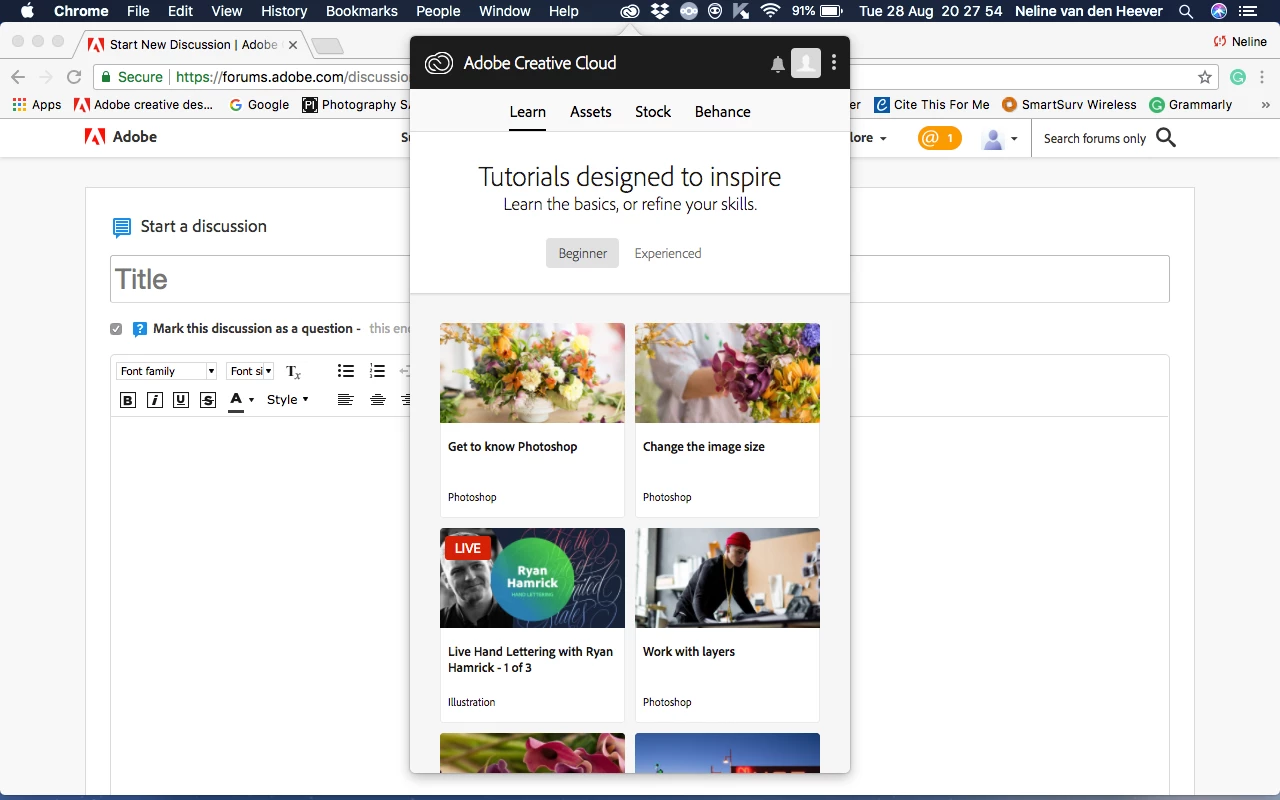
"Apps" panel not showing in Adobe Creative Cloud Desktop App

  • August 28, 2018
  • 1 reply
  • 1755 views

Good day

I have a MacBook Pro (13-inch, mid 2012) and installed the latest operating system (High Sierra).

I recently purchased The Adobe Creative Cloud,  I downloaded Adobe Creative Cloud desktop app and when I go to the Adobe Creative Cloud apps Catalogue and try to download an application, it takes me to the screen that says (Photoshop CC is now installing...", and it opens the Adobe Creative Cloud desktop app, but there is no panel for "Apps" and therefore no download is taking place. 

Can someone please help me fix this problem so I can download and install the applications?
This topic has been closed for replies.
Correct answer nelinevdh1995

I eventually went to the direct messaging on Adobe's website, one of their

technical support staff accessed my Mac and made the changes necessary.

1 reply

Jeffrey_A_Wright
Legend
August 28, 2018

Nelinevdh1995 for information on how to restore Apps tab in the Adobe Creative Cloud desktop application please see Apps tab missing from the Creative Cloud desktop app..   You will want to locate and edit the serviceconfig.xml file.  This file will be located in the root library and is not located in the System or User library.

Please update this discussion if you have any questions.  If you face any difficulties locating the serviceconfig.xml file then please post a screenshot of the location you are browsing to on macOS 10.13.6.  Information on how to post a screenshot can be found at FAQ: How do I capture and post a screen shot or video?

Participating Frequently
September 25, 2018

i have the same problem and i could locate (serviceconfig.xml) on my mac


nelinevdh1995AuthorCorrect answer
Participant
September 25, 2018

I eventually went to the direct messaging on Adobe's website, one of their

technical support staff accessed my Mac and made the changes necessary.