Participant
December 2, 2014
Answered

Apps tab missing from Creative Cloud Desktop

  • December 2, 2014
  • 15 replies
  • 101004 views

Hello and thanks in advance for any help you can provide.

I'm running Creative Cloud on Mac OS 10.9.5. A couple days ago I updated several of the apps through the Creative Cloud Desktop app in the menu bar. The apps updated and they all seem to run fine, but now the Apps tab is missing altogether from the CC Desktop Window, and it's even missing from the CC Desktop preferences. (Please see the screenshots.) Also, when I click on the "Install Adobe Apps" button in the CC Desktop window, nothing happens.
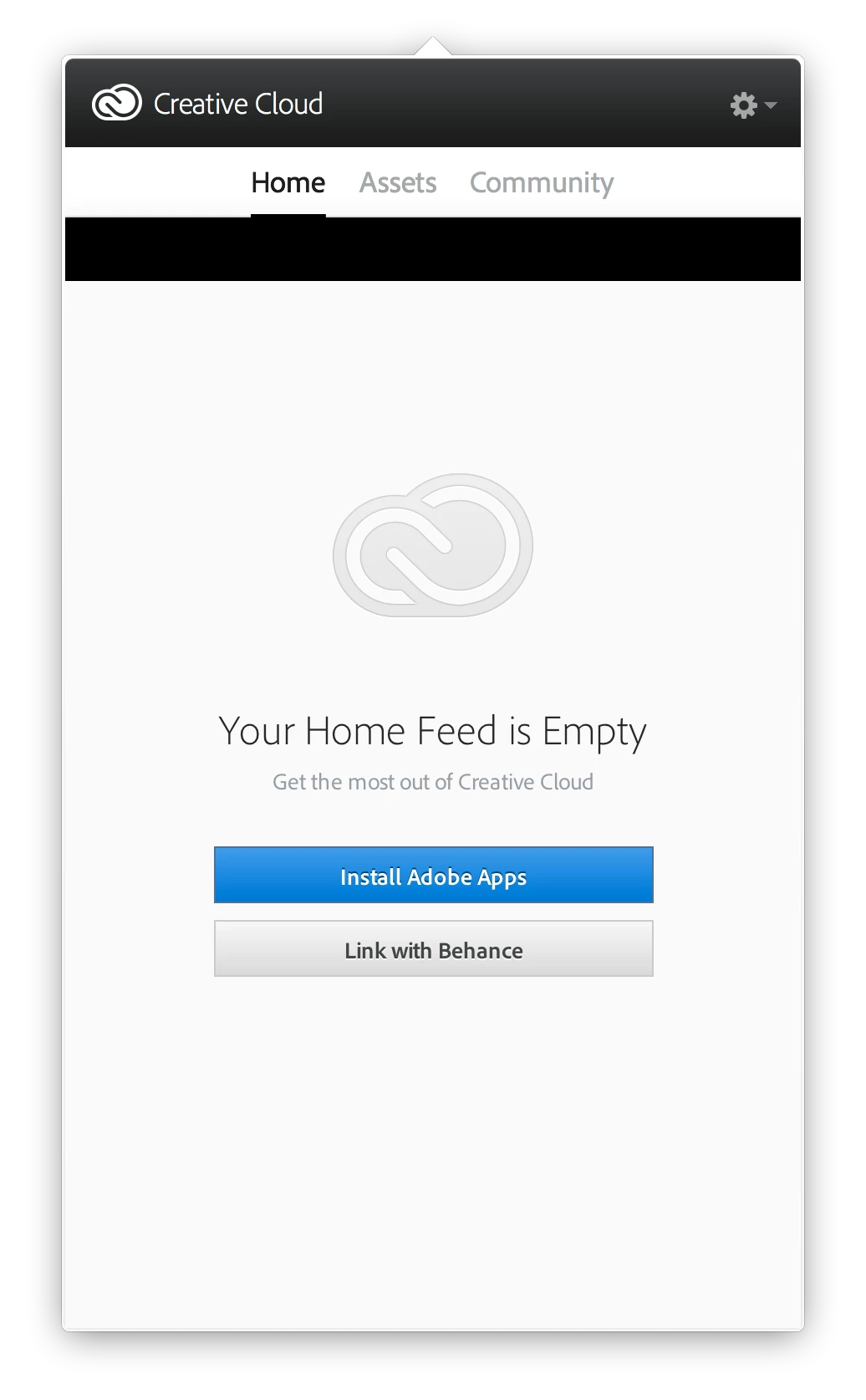
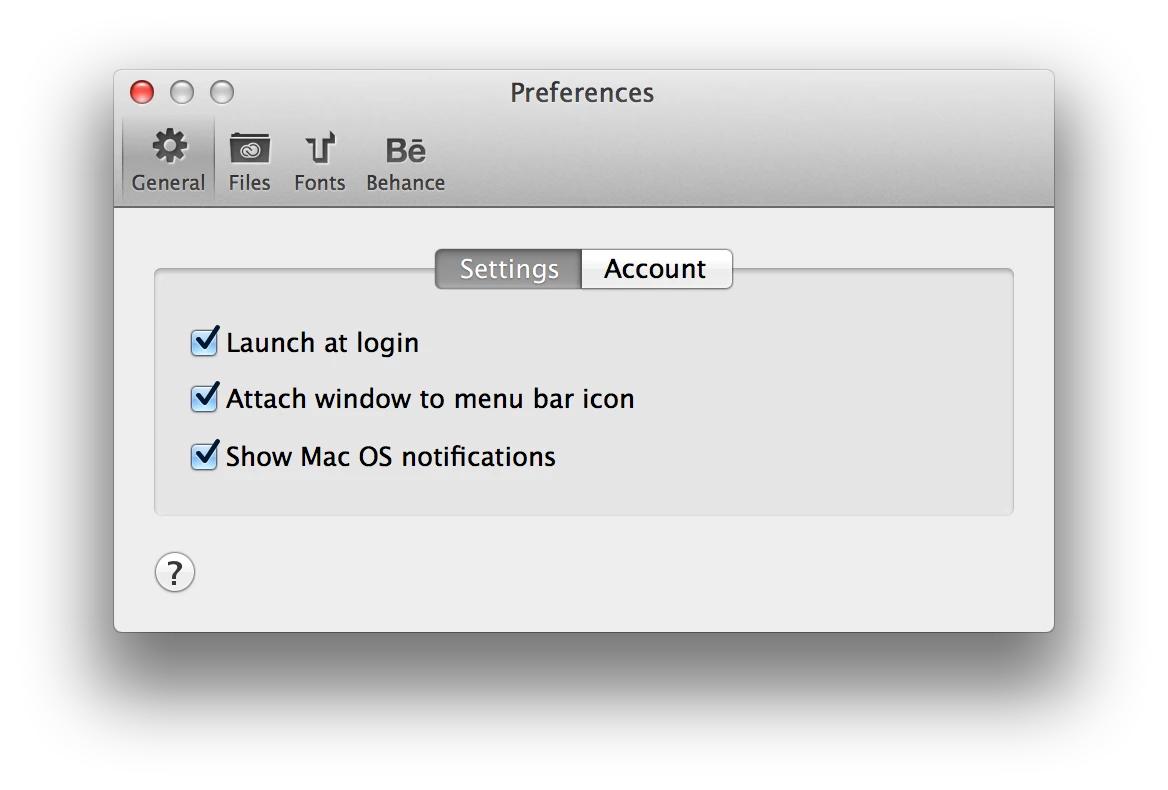
I've un-installed -> re-downloaded -> re-installed CC Desktop several times, along with trying some of the other troubleshooting suggestions I've found here on the Adobe site, such as:

  • restarting the computer
  • logging out of CC Desktop then back in again
  • deleting the opm.db file
  • deleting the CoreSync folder
  • deleting the AdobeAAMDetect plugin

Nothing seems to fix it. As I mentioned, the applications all seem to running fine, but I'd like to know that CC Desktop is functioning as intended and keeping me up to date. Any other suggestions?

Thanks again...
This topic has been closed for replies.
Correct answer MattR_USA

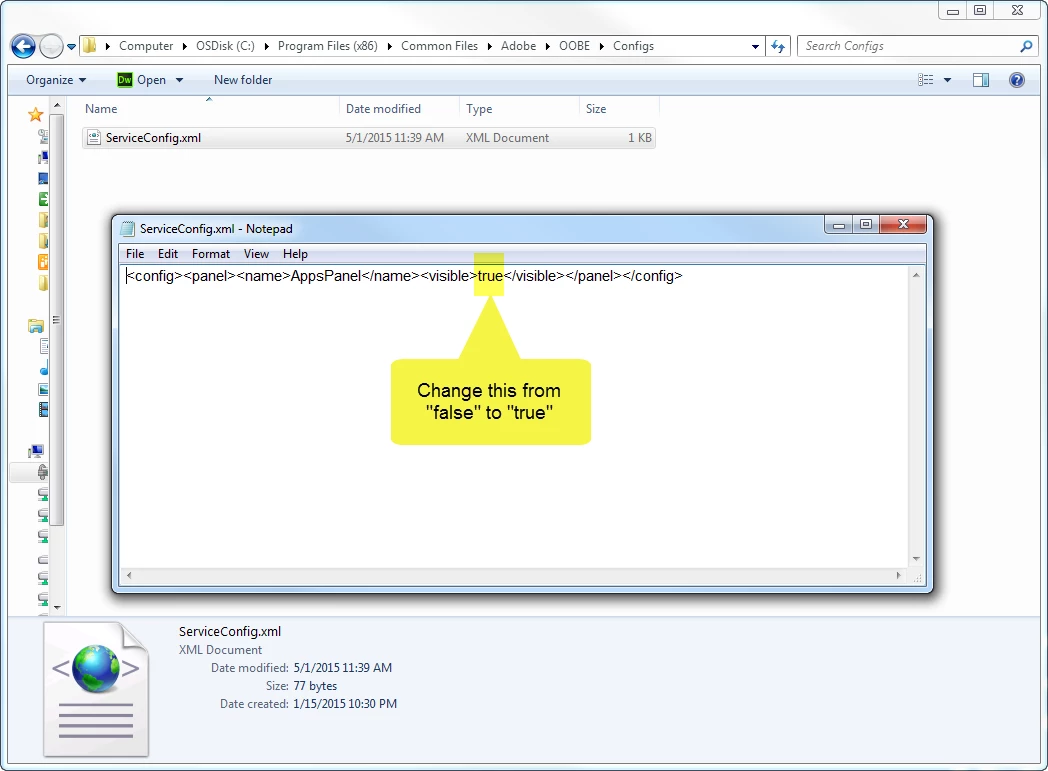
Downloading Lightroom 6 was exactly what I was going for when I realized my apps tab was missing.  I'm on a PC, but this screen shot is a look at what I had to modify.  If you can find this same file on your Mac to modify hopefully it'll resolve your issue.

15 replies

MattR_USA
Participant
May 1, 2015

I suddenly started having this same issue, and I tried going through the transcript technical support but the "cleaner tool" link has since been removed.  I tried updating the Creative Cloud app and multiple fixes I searched out online but haven't had any luck.  Does anybody have any updated recommendations on this?  Thank you!

Participant
May 1, 2015

It happened to me again, and I got it back by deleting the xml file found within configs folder here --> C:\Program Files (x86)\Common Files\Adobe\OOBE\Configs

MattR_USA
Participant
May 1, 2015

Holy smokes!  Carrodri for the win!  Thank you so much! 

At first I deleted the file and it was still missing, so I closed all my Adobe apps >> logged out of the Creative Cloud app and closed >> >> ended all Adobe tasks from my task manager on the Processes tab >> brought the xml file back >> opened with my text editor >> changed the "false" value to "true" >> and my issue was resolved. 

Thanks again, cheers!

Participant
January 15, 2015

I had this issue. And went through to chat with customer support. I have my apps panel once again. Transcript is below if you want to follow what I did.

Linci Mary: Hello. Welcome to Adobe Technical Support.
Linci Mary: Hi Thomas
Thomas Shambler: Hi there. My 'Apps' tab seems to have disapeared from Adobe CC desktop.
Linci Mary: As I understand you are unable to access the Apps tab of the Creative cloud as it keeps spinning, Is that right?
Thomas Shambler: On a windows machine. Have updated the app, re-installed, signed-out, signed in.
Thomas Shambler: Nope. there is no 'Apps' option even there...
Linci Mary: Thank you for confirming.
Linci Mary: I will be glad to check and help you with this issue.
Thomas Shambler: I put a screenshot up in one of the community forum.
Thomas Shambler: https://forums.adobe.com/thread/1648803?sr=inbox
Linci Mary: Okay
Linci Mary: Thank you for the information
Linci Mary: Lets try uninstalling and re-installing
Linci Mary: Please navigate to C:\Program Files (x86)\Common files\Adobe
Thomas Shambler: Done.
Linci Mary: Let me know if you can see AAM Updater , OOBE folder, Adobe application manager folder 
Thomas Shambler: Yup. See all of them.
Linci Mary: Delete them
Thomas Shambler: Says OOBE folder is in use. But CC is not open.
Linci Mary: Open task manager
Thomas Shambler: Open
Thomas Shambler: Adobe IPC Broker, Adobe Reader and Acrobat Manager, and Adobe Update Service are the only tasks related to CC.
Thomas Shambler: Ah. Ended those tasks. OOBE folder is now deleted.
Linci Mary: End all the Adobe related processes
Linci Mary: Okay
Linci Mary: Perfect!
Linci Mary: Now navigate to C:\Program Files (x86)\Adobe
Linci Mary: Let me know if you can see Adobe Creative Cloud folder.
Thomas Shambler: Nope. I do not see a CC folder.
Linci Mary: Okay
Linci Mary: Press windows key+ R to open run window
Linci Mary: Type %localappdata% and hit enter.
Thomas Shambler: It opened AppData > Local folder
Linci Mary: Open the Adobe folder
Linci Mary: Delete the AAM Updater , OOBE folder.
Thomas Shambler: Deleted.
Linci Mary: Okay
Linci Mary: Please click on the below link to run the cleaner tool :
Linci Mary: http://helpx.adobe.com/creative-suite/kb/cs5-cleaner-tool-installation-problems/_jcr_content/main-pars/accordion_container_1/accordion-par/accordion-item-0/accordion-item-par/procedure/proc_par/step_0/step_par/download/file.res/AdobeCreativeCloudCleanerTool.exe
Thomas Shambler: Right. At the "Choose from one of the following options to clean up:" window.
Thomas Shambler: 1. All, 2 Flash Player, etc.
Linci Mary: 1.  Please type  E for english and then hit enter.
Linci Mary: 2.  Please type  Y to confirm and then hit enter.
Linci Mary: 3.  Please type  3 and then hit enter. (Creative Cloud and CS6)
Linci Mary: 4.  Please type  1 and then hit enter. (Creative Cloud Desktop app /Adobe Application Manager)
Thomas Shambler: "Adobe Creative Cloud Cleaner Tool completed successfully"
Linci Mary: Okay
info: Your chat transcript will be sent to thomas.shambler@appgulf.com at the end of your chat.
Linci Mary: Please click on the below link and re-install the creative cloud desktop app:
Linci Mary:
Linci Mary: https://creative.adobe.com/products/creative-cloud
Thomas Shambler: "Initializing Installer"
Linci Mary: Okay
Linci Mary: Please let me know the status of installation for every two minutes.
Thomas Shambler: "Downloading Creative Cloud desktop"
Linci Mary: Okay
Thomas Shambler: 'We've encountered the following issues: Creative Cloud desktop failed to install. (Error code: 50)
Thomas Shambler: Did not work.
Linci Mary: This issue occurs due to conflicting process running in the background.
Linci Mary: Please open task manager and check once
Thomas Shambler: Only think that is open is "Adobe IPC Broker" and Adobe Update Service"
Linci Mary: Open Task manager, select Show processes from all users.
Linci Mary: Yes delete them
Thomas Shambler: Adobe IPC Broker just popped up, after ending the task
Thomas Shambler: ended task - it started up again
Linci Mary: Okay .
Linci Mary: Try installing CC desktop application.
Thomas Shambler: Downloading.
Thomas Shambler: Same error.
Thomas Shambler: Adobe IPC Broker task seems to originate from this folder: C:\Program Files (x86)\Common Files\Adobe\OOBE\PDApp\IPC
Linci Mary: Navigate to C:\Program Files (x86)\Adobe
Linci Mary: Let me know if you can see Adobe Creative Cloud folder.
Thomas Shambler: Yes. I do see it.
Linci Mary: Delete it
Thomas Shambler: It says the folder or a file in it is open in another program.
Thomas Shambler: Only thing I can think of, is that whenever I end the "Adobe IPC Broker" app, it re-starts.
Linci Mary: In this case I request you to restart the system and try
Thomas Shambler: Nothing else is open.
Thomas Shambler: Alright. Will restart.
Linci Mary: Okay
Linci Mary: Sure
Linci Mary: I'll will keep this case as open if you have any further issues please contact us back.
Linci Mary: Is there anything else I can help you with?
Thomas Shambler: Ok. Let's see what happens.
Thomas Shambler: Thanks for all your help. Hope this resolves the issue.
Linci Mary: Thank you
Linci Mary: I certainly appreciate your patience in this process.
Linci Mary: Thank you for contacting Adobe. Good Bye.

jimhere
Known Participant
January 15, 2015

If every update involves "the cleaner" why don't they just build that into the "installation" process?

Participant
January 6, 2015

Me too. Anyone have any bright ideas?

BPPNeedsHelp
Participant
December 2, 2014

I'm unable to locate and open my apps as well.

Participant
December 2, 2014

I am having the same issue after i updated it to the new version - Windows here