
Participant
September 19, 2019
Answered

Are the Costco computer bundles powerful enough for Creative Suite?

  • September 19, 2019
  • 1 reply
  • 927 views

I currently use mostly Photoshop/Camera Raw, Illustrator, and InDesign (would love to learn more apps) on a mid-2011 21.5" iMac with 2.7 GHz Intel Core i5 processor, 8 GB 1333 MHz DDR3 of RAM, and AMD Radeon HD 6770M 512 MB Graphics. My computer was already slow, and has started acting up (crashes, etc.) and it was noted at the repair shop that the age of my computer was to blame for the speed.

As a Costco member, I can see that they have a Microsoft Surface Book 2 bundle for a reasonable price, but it's smaller

and has less memory/different graphics card than a reviewed version I saw that was rated as excellent at handling Adobe. I think this one's memory is not upgradeable.
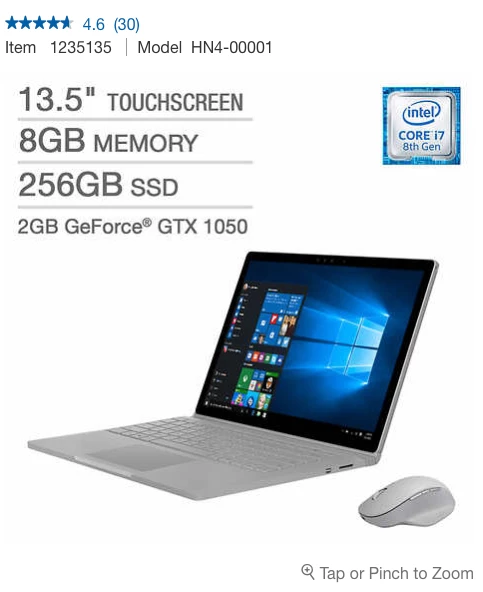
Would this work? I like the idea of having a decent tablet too. They have MacBookPros too I'm considering, but I work on PC at work and it performs just as well. Thoughts?

    This topic has been closed for replies.
    Correct answer Jeffrey_A_Wright

    SouthpawSweetie, the answer to your question depends on which applications, from a Creative Cloud membership, that you wish to use.  You can find the system requirements to run the Adobe Creative Cloud desktop application at https://helpx.adobe.com/creative-cloud/system-requirements.html.  There are also links in the documents to requirements for the different applications.


    If you are buying a new computer, then I would recommend purchasing a computer that meets, or exceeds, the recommended system requirements.  This will help make sure that the computer is still able to run newer updates, as they are released, over the time you use the computer.


    When purchasing a personal computer, I try to aim for a device that will meet my needs for the next three years.  This time period also often coincides with the time a computer can be covered under an extended warranty.

    1 reply

    Jeffrey_A_Wright
    Community Manager
    Jeffrey_A_WrightCommunity ManagerCorrect answer
    Community Manager
    September 19, 2019

    SouthpawSweetie, the answer to your question depends on which applications, from a Creative Cloud membership, that you wish to use.  You can find the system requirements to run the Adobe Creative Cloud desktop application at https://helpx.adobe.com/creative-cloud/system-requirements.html.  There are also links in the documents to requirements for the different applications.


    If you are buying a new computer, then I would recommend purchasing a computer that meets, or exceeds, the recommended system requirements.  This will help make sure that the computer is still able to run newer updates, as they are released, over the time you use the computer.


    When purchasing a personal computer, I try to aim for a device that will meet my needs for the next three years.  This time period also often coincides with the time a computer can be covered under an extended warranty.

    Participant
    September 27, 2019
    Thanks! It turns out, Microsoft has a page where you can configure the computer you're considering. Based on their survey questions, I'd likely need one with more memory.