
Participant
April 22, 2018
Resuelto

Being prompted to download Update for Universal Runtime, but unable to complete the process due to error: 0x8024001e

  • April 22, 2018
  • 2 respuestas
  • 478 visualizaciones

Hello Adobe family,

I'm trying to starting my artistic endeavor, but its being stunted due to my technological illiteracy. I have been prompted to install updates so that I can download the creative cloud to my computer, but I am getting a error message from the Windows Installer with the code 0x8024001e. From what I've read on the internert, that code has to do with malware on your computer, but I have Norton, so I think I should be okay in those regards. Anyway, does anyone hae any advice on what I should do, because I am at a loss and am getting a little frustrated.

Thank you,
    Este tema ha sido cerrado para respuestas.
    Mejor respuesta de Isaias923

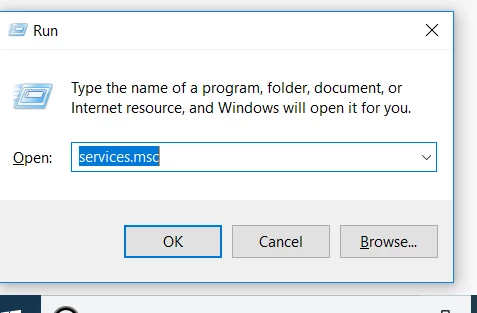
    Open Run command window and open Services console by running below mentioned command,.

    Once you had opened, look for Service named Windows Update.

    If the service is not started , start it.  or if the Service is already running. Stop and restart it. Also set start up type as " Automatic"

    Then reboot machine once,

    Open Service console again and make sure Windows update service is up and running.

    then try to install Visual C++ run time again.

    Still same ?? let us know.


    Hey! Thank you for the comment. That is very close to what I did. I set my Windows to "Never Check for updates", rebooted, and then downloaded a windows client that scans for anything wrong with the updater, and then updated. Everything is working fine now, thank you so much for your help.

    2 respuestas

    Govardhan.V
    Participating Frequently
    April 22, 2018

    Did you tried to download the Visual C++ runtime from the link mentioned in the below Help doc?

    Visual C++ Runtime 2015 Update

    Participant
    April 22, 2018

    I have yes, and that is when I get the error: 0x8024001e message

    Govardhan.V
    Participating Frequently
    April 23, 2018

    Open Run command window and open Services console by running below mentioned command,.

    Once you had opened, look for Service named Windows Update.

    If the service is not started , start it.  or if the Service is already running. Stop and restart it. Also set start up type as " Automatic"

    Then reboot machine once,

    Open Service console again and make sure Windows update service is up and running.

    then try to install Visual C++ run time again.

    Still same ?? let us know.

    John T Smith
    Community Expert
    Community Expert
    April 22, 2018

    Search http://www.microsoft.com/en-us/default.aspx to find and re-install the C runtime, or for ALL Windows help