
Participant
April 5, 2020
Answered

Blocked trying to reinstall PSE 2019

  • April 5, 2020
  • 3 replies
  • 274 views

I uninstalled PSE2019 in a desperate atempt  to fix a color problem.  I was told here that I could uninstall and reinstall. I uninstalled.  I then download PSE 2019 and entered the code which your sysesm recognized [serial number removed by moderator].

When I reinstalled it stopped me and said "you are using this progam on another computer. You have 28 days left"


How do I get this reinstalled?
This topic has been closed for replies.
Correct answer Peru Bob

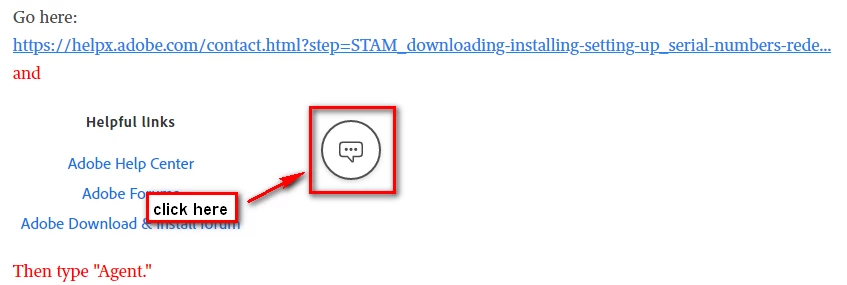
Go here and only ask to have your activations reset:

https://helpx.adobe.com/contact.html?step=STAM_downloading-installing-setting-up_serial-numbers-rede...

3 replies

Nancy OShea
Community Expert
Community Expert
April 5, 2020

Please refer to Activate & Deactivate Adobe Apps below.

https://helpx.adobe.com/download-install/kb/activate-deactivate-products.html


Nancy O'Shea— Product User & Community Expert
Peru Bob
Community Expert
Peru BobCommunity ExpertCorrect answer
Community Expert
April 5, 2020
Nancy OShea
Community Expert
Community Expert
April 5, 2020

Jim,

This Community is not Adobe support.  This is a public user-to-user forum. Never post sensitive user data in a public forum.  Your serial number is sensitive data.  I removed it from your post but now that it's out in the ether, there's no telling how many people will try to use it to activate their software.  Tsk, tsk, tsk...


===========
Beware of fake Adobe reps who may contact you privately offering to sell you software or take control of your computer. It's a scam, run away!


Nancy O'Shea— Product User & Community Expert