
Blue Spinner, CC does not start
I'm using Windows 7.
Bought Lightroom on Amazon, installed it, LR tells me I need the application manager or else I can't use my "trial" (although I tried logging in during installation aswell as installing with a serial offline), I install that, it updates to Creative Cloud and now the Creative Cloud just starts up like this:

Waited for three hours, no change. No login field, no list of apps, nothing.
The task manager looks like this;
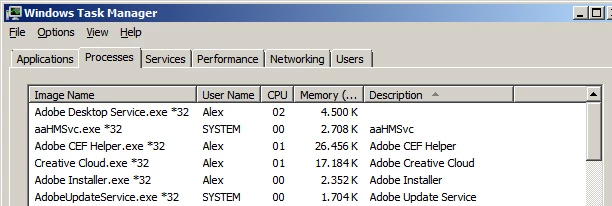
with the "Adobe Desktop Service" popping in every five seconds for half a second.
I did the "set permissions to adobe folders" fix I saw somewhere else on the forum, I renamed the OOBE folder several times, I ran the cleaner serval times, I reinstalled the CC several times and it's also important to note that this is not an connection issue, if I simply unplug my LAN cable the app gets stuck in the same state. Any hints or did I just blow 130 Euros in the wind?
All I really want is a stand alone Lightroom without CC if possible.
(If you can't tell, I'm extremely frustrated.)
 AdChoices