


christineb65240462
Participant
February 3, 2017
Answered

Can I uninstall unused Creative Suite Apps to save space on my hard-drive?

  • February 3, 2017
  • 1 reply
  • 361 views

Hi there!

I have Adobe's Creative Suit installed on my mac. I strictly use Photoshop and Illustrator. I'm out of space on my mac and I'm wondering if I can clear up some space by deleting the other applications I never use such as Dreamweaver, Indesign, Fireworks ect without that interfering with PS and AI?
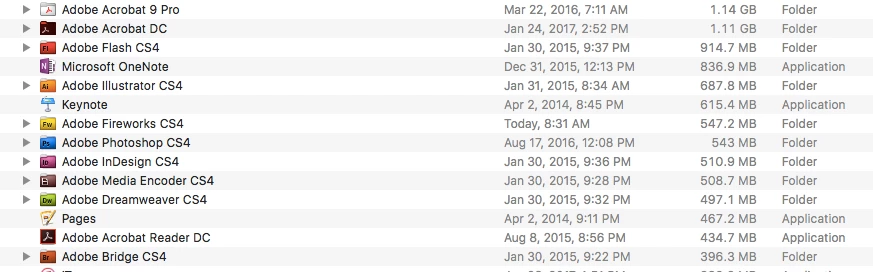
Thanks for your help,

Christine

This topic has been closed for replies.
Correct answer kglad

do not delete.

use the uninstallers in each of those folders.

1 reply

kglad
Community Expert
kgladCommunity ExpertCorrect answer
Community Expert
February 3, 2017

do not delete.

use the uninstallers in each of those folders.

Participating Frequently
July 31, 2024

Hi @kglad. What do the "uninstallers in each of these folders" look like? Ty in advance. [PS did get CS5 to install fully and activate after de-activating on 2 win7 machines!!!] Kristi

kglad
Community Expert
Community Expert
July 31, 2024

this is an old thread applicable to cs4.


p.s. i saw your other posts about how you solved the problem and thanked you for that info.  i incorporated into help for others:


your default browser* must support tls 1.2, https://helpx.adobe.com/x-productkb/multi/eol-tls-support.html

to test your default browser's tls you can use , https://clienttest.ssllabs.com:8443/ssltest/viewMyClient.html

your computer also needs to support openssl 1.0.1 or better. to check,

mac: https://phoenixnap.com/kb/how-to-check-openssl-version
win: https://www.techwalla.com/articles/how-to-find-the-openssl-version-number

* not only do you need to change your default browser, you must enable your os to support tls 1.2, Microsoft offers a Windows update to enable TLS 1.2 for Windows 7.