
Participant
April 4, 2013
Answered

Can not install Photoshop Elements 11 on windows 8

  • April 4, 2013
  • 2 replies
  • 2393 views

Hello,

i got the following error message at the end of the installation of Photoshop Elements 11 :
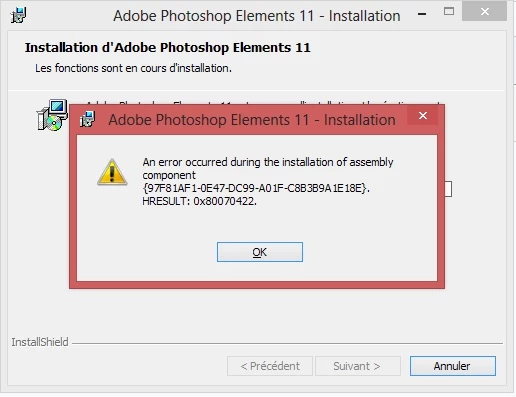
and the installation erases all the copied data and closed.

I tried everything I saw on the web...

I cleaned all the registry, desinstalled all other adobe products, cleaned again, etc etc.

Please can somebody help ?

    This topic has been closed for replies.
    Correct answer kglad

    that looks like you have a problem with the windows installer (msi=microsoft installer). 

    google: windows 8 msi windows installer repair

    and,  you could try adobe support:  (http://www.adobe.com/support/chat/ivrchat.html).

    2 replies

    Participant
    April 4, 2013

    Can not copy here the whole file (16.9 Mo) but found this inside "PSE11install.log" :

    MSI (s) (38:74) [14:39:36:127]: Executing op: ActionStart(Name=CA_ChangeFolderIcon,,)

    Action 14:39:36 : CA_ChangeFolderIcon.

    MSI (s) (38:74) [14:39:36:127]: Executing op: CustomActionSchedule(Action=CA_ChangeFolderIcon,ActionType=3137,Source=BinaryData,Target=ChangeFolderIcon,CustomActionData=C:\Program Files (x86)\Adobe\Photoshop Elements 11)

    MSI (s) (38:10) [14:39:36:130]: Invoking remote custom action. DLL: C:\WINDOWS\Installer\MSI6DDC.tmp, Entrypoint: ChangeFolderIcon

       Start ChangeFolderIcon:

       Installdir : C:\Program Files (x86)\Adobe\Photoshop Elements 11

       Plug-Ins folder : C:\Program Files (x86)\Adobe\Photoshop Elements 11\plug-ins

       End ChangeFolderIcon:

    MSI (s) (38:74) [14:39:36:182]: Executing op: ActionStart(Name=InstallFinalize,,)

    Action 14:39:36 : InstallFinalize.

    MSI (s) (38:74) [14:39:36:182]: Executing op: CleanupTempFiles(TempFiles=C:\WINDOWS\Installer\487e3.mst)

    MSI (s) (38:74) [14:39:36:182]: Scheduling file 'C:\WINDOWS\Installer\487e3.mst' for deletion during post-install cleanup (not post-reboot).

    MSI (s) (38:74) [14:39:36:185]: Executing op: End(Checksum=0,ProgressTotalHDWord=0,ProgressTotalLDWord=880932218)

    MSI (s) (38:74) [14:39:36:185]: Assembly Error:Le service ne peut pas être démarré parce qu’il est désactivé ou qu’aucun périphérique activé ne lui est associé.

    MSI (s) (38:74) [14:39:36:185]: Note: 1: 1935 2: {97F81AF1-0E47-DC99-A01F-C8B3B9A1E18E} 3: 0x80070422 4: IAssemblyCacheItem 5: Commit 6: Microsoft.VC80.ATL,type="win32",version="8.0.50727.762",publicKeyToken="1fc8b3b9a1e18e3b",processorArchitecture="x86"

    MSI (s) (38:74) [14:39:36:185]: Assembly Error (sxs): Please look into Component Based Servicing Log located at %windir%\logs\cbs\cbs.log to get more diagnostic information.

    MSI (s) (38:74) [14:39:36:187]: Transforming table Error.

    Erreur 1935. An error occurred during the installation of assembly component {97F81AF1-0E47-DC99-A01F-C8B3B9A1E18E}. HRESULT: 0x80070422. assembly interface: IAssemblyCacheItem, function: Commit, assembly name: Microsoft.VC80.ATL,type="win32",version="8.0.50727.762",publicKeyToken="1fc8b3b9a1e18e3b",processorArchitecture="x86"

    MSI (s) (38:74) [14:39:40:565]: Transforming table Error.

    MSI (s) (38:74) [14:39:40:565]: Produit : Adobe Photoshop Elements 11 -- Erreur 1935. An error occurred during the installation of assembly component {97F81AF1-0E47-DC99-A01F-C8B3B9A1E18E}. HRESULT: 0x80070422. assembly interface: IAssemblyCacheItem, function: Commit, assembly name: Microsoft.VC80.ATL,type="win32",version="8.0.50727.762",publicKeyToken="1fc8b3b9a1e18e3b",processorArchitecture="x86"

    Fin de l'action 14:39:40 : InstallFinalize. Valeur renvoyée : 3.

    I have to mention that my Windows 8 is 64-bit. Maybe an incompatibility with 'Microsoft VC80 ATL' type= Win 32 ?

    Thanks for your help

    kglad
    Community Expert
    kgladCommunity ExpertCorrect answer
    Community Expert
    April 4, 2013

    that looks like you have a problem with the windows installer (msi=microsoft installer). 

    google: windows 8 msi windows installer repair

    and,  you could try adobe support:  (http://www.adobe.com/support/chat/ivrchat.html).

    Participant
    April 4, 2013

    Congratulations and many thanks !!!!

    After searching "windows 8 msi windows installer repair" on google, I found a site "www.tweaking.com". With their free software 'windows repair all-in-one", I made a complete repair of my windows, and of msi installer.

    I finally succeeded to install photoshop elements 11 and avoid this error 1935 !

    kglad
    Community Expert
    Community Expert
    April 4, 2013

    you'll need to analyze your installation log files:  http://helpx.adobe.com/creative-suite/kb/troubleshoot-install-logs-cs5-cs5.html