
StockyMob Boss
Participant
January 2, 2019
Question

Can't change install location

  • January 2, 2019
  • 1 reply
  • 3023 views

Hi all,

Having a bit of difficulty with changing the installation location of my apps.

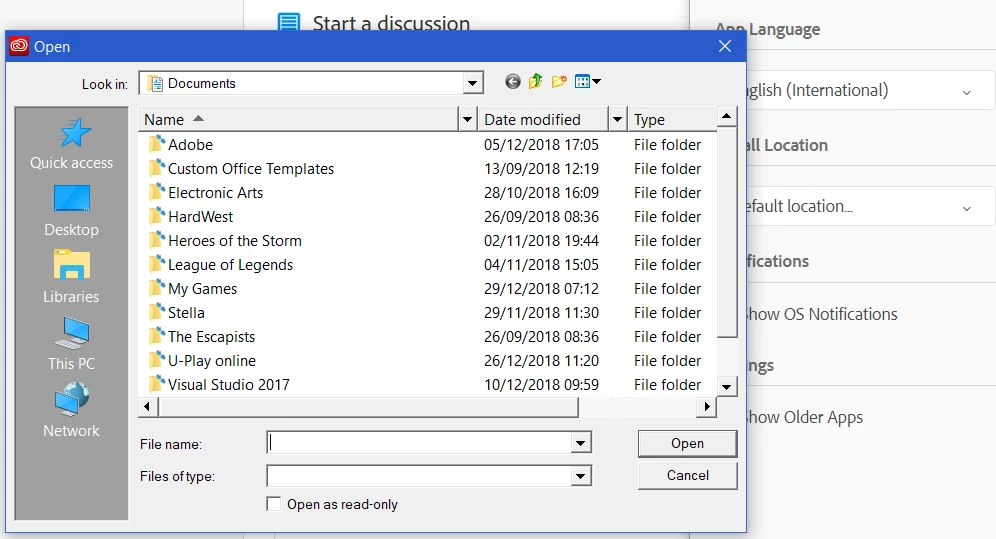
When I click on the section in preferences, it opens another window, but instead of allowing me to select a folder, it only allows me to select files. Whenever I try and change it or select a file/app, CC freezes and closes.

Could someone help me please? Otherwise I'm paying monthly for everything when I can only use two apps due to storage space...

Thanks in advance.
This topic has been closed for replies.

1 reply

AxelMatt
Community Expert
Community Expert
January 2, 2019
My System: Intel i7-8700K - 64GB RAM - NVidia Geforce RTX 3060 - Windows 11 Pro 25H2 -- LR-Classic 15 - Photoshop 27 - Nik Collection 8 - PureRAW 5 - Topaz Photo
StockyMob Boss
Participant
January 3, 2019

I checked here before but doesn't seem like the issue I'm facing. The software is asking me for a specific file name, not a folder like before. When I select something (such as a .exe file for Creative Cloud), the app freezes and crashes.

I'll try the method suggested on that thread soon and update once I'm finished.

Thank you!