Participant
May 5, 2017
Answered

Can't finish install on photoshop

  • May 5, 2017
  • 1 reply
  • 573 views

When I activate the set-up for Photoshop, it brings up a pop-up screen entitled Install Photoshop. I checked the help files and the screen is not complete. The last line of text and the start installing button do not show.. There is no scroll bar. I've tried deleting the file and re-downloading it to no avail. Suggestions???
    This topic has been closed for replies.
    Correct answer Nancy OShea

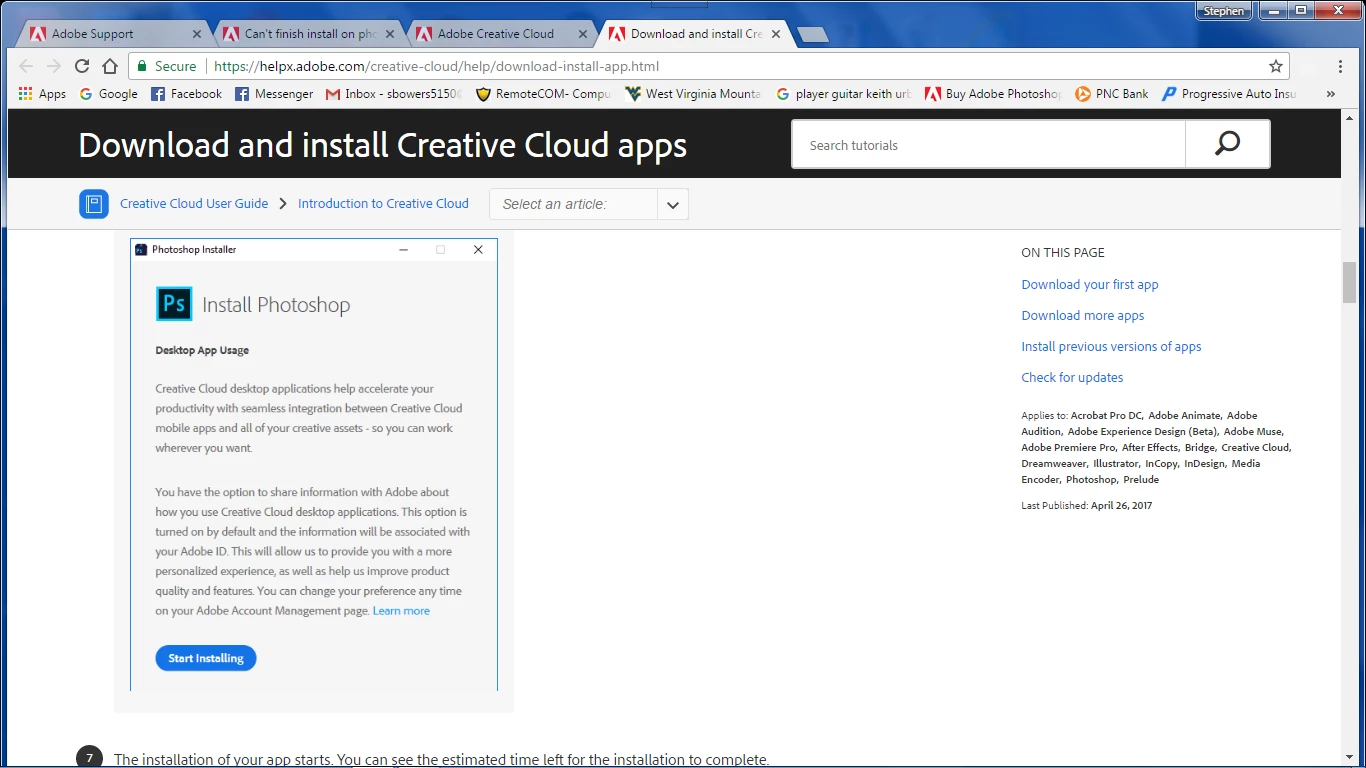
    There should be one more line of text and a button...This shot from their website instructions.


    Does your laptop meet the system requirements?

    Photoshop system requirements

    1024 x 768 display (1280x800 recommended) with 16-bit color and 512 MB or more of dedicated VRAM; 2 GB is recommended*

    Is your laptop's display set at 100% (Recommended) scale?  If you go above 100%, many screens may appear truncated or cut off from view.   For best results, use 100% or normal scale settings.

    Nancy

    1 reply

    Jeffrey_A_Wright
    Legend
    May 5, 2017

    Sbowers5150 what version of Photoshop are you attempting to install?   Which operating system are you installing Photoshop on?  Finally, can you please post a screen shot of the screen causing confusion?  You can find details on how to post a screen shot at FAQ: How do I capture and post a screen shot or video?​.

    Participant
    May 5, 2017

    Dell Inspiron Laptop...Windows 7...CS6

    Here's the screen from Adobe that I downloaded from..

    Participant
    May 5, 2017

    There should be one more line of text and a button...This shot from their website instructions.