Can't Install Creative Cloud Desktop on Mac OS X 10.7.5
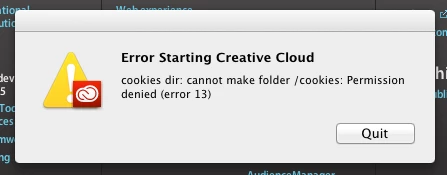
If I try to install it on my default user, I get an error 13. Specifically:
"cookies dir: cannot make folder / cookies: permission denied (error 13)"
If I try to install it on my Administrator user, I get an error A12E6 that says there's a problem with the installation.
I tried the solutions for both errors. For the error 13, I ran terminal and did the following solution as posted in another thread by a staff member:
chmod -N ~/library
chmod +a "everyone deny delete" ~/library
Did nothing.
Then I tried popping over to my administrator account, and I did the following solution as posted in another thread:
"
For MAC
Step 1: Go to /Application/Utilities (Rename Adobe Application Manager to Adobe Application Manager_old)
Step 2: Click on Go (Finder Menu)-> Go to folder-> ~/Library (Which is user Library)
In User Library go to -> Application Support -> Adobe and Rename OOBE to OOBE_old
After rename the above mentioned folders download the updated version of AAM from : http://www.adobe.com/support/downloads/detail.jsp?ftpID=4774
After installing AAM try to sign in it should work now.
"
This also did nothing. What can I do to get this thing working?
I'm running a Power Mac on OS X 10.7.5.
 AdChoices